

TensorFlow实战:深入解析过拟合与正则化策略

本文通过TensorFlow实战演示如何识别并解决过拟合问题。实验对比了不同网络层数、Dropout层数量及L2正则化系数对模型决策边界的影响。通过月牙数据集可视化,直观展示增加网络容量易导致过拟合,而合理引入Dropout和L2正则化能有效平滑决策边界,提升模型泛化能力。
过拟合问题实战概述
过拟合问题实战
1.构建数据集
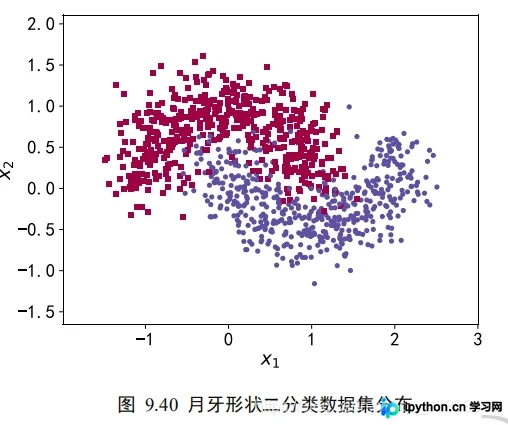
构建月牙数据集
本实验使用的数据集特征向量维度为2,标签取值为0或1,对应两个不同的分类类别。利用scikit-learn库中的make_moons函数,可以生成任意规模的数据集用于训练。
import matplotlib.pyplot as plt
# 导入数据集生成工具
import numpy as np
import seaborn as sns
from sklearn.datasets import make_moons
from sklearn.model_selection import train_test_split
from tensorflow.keras import layers, Sequential, regularizers
from mpl_toolkits.mplot3d import Axes3D
为了直观展示过拟合现象,我们仅采样了1000个数据点,并引入了标准差为0.25的高斯噪声。
def load_dataset():
 # 采样点数
 N_SAMPLES = 1000
 # 测试数量比率
 TEST_SIZE = None

 # 从 moon 分布中随机采样 1000 个点,并切分为训练集-测试集
 X, y = make_moons(n_samples=N_SAMPLES, noise=0.25, random_state=100)
 X_train, X_test, y_train, y_test = train_test_split(X, y, test_size=TEST_SIZE, random_state=42)
 return X, y, X_train, X_test, y_train, y_test
make_plot函数可根据样本坐标X和标签y绘制数据分布图,便于后续分析。
def make_plot(X, y, plot_name, file_name, XX=None, YY=None, preds=None, dark=False, output_dir=OUTPUT_DIR):
 # 绘制数据集的分布, X 为 2D 坐标, y 为数据点的标签
 if dark:
  plt.style.use('dark_background')
 else:
  sns.set_style("whitegrid")
 axes = plt.gca()
 axes.set_xlim([-2, 3])
 axes.set_ylim([-1.5, 2])
 axes.set(xlabel="$x_1$", ylabel="$x_2$")
 plt.title(plot_name, fontsize=20, fontproperties='SimHei')
 plt.subplots_adjust(left=0.20)
 plt.subplots_adjust(right=0.80)
 if XX is not None and YY is not None and preds is not None:
  plt.contourf(XX, YY, preds.reshape(XX.shape), 25, alpha=0.08, cmap=plt.cm.Spectral)
  plt.contour(XX, YY, preds.reshape(XX.shape), levels=[.5], cmap="Greys", vmin=0, vmax=.6)
 # 绘制散点图,根据标签区分颜色m=markers
 markers = ['o' if i == 1 else 's' for i in y.ravel()]
 mscatter(X[:, 0], X[:, 1], c=y.ravel(), s=20, cmap=plt.cm.Spectral, edgecolors='none', m=markers, ax=axes)
 # 保存矢量图
 plt.savefig(output_dir + '/' + file_name)
 plt.close()
def mscatter(x, y, ax=None, m=None, **kw):
 import matplotlib.markers as mmarkers
 if not ax: ax = plt.gca()
 sc = ax.scatter(x, y, **kw)
 if (m is not None) and (len(m) == len(x)):
  paths = []
  for marker in m:
   if isinstance(marker, mmarkers.MarkerStyle):
    marker_obj = marker
   else:
    marker_obj = mmarkers.MarkerStyle(marker)
   path = marker_obj.get_path().transformed(
    marker_obj.get_transform())
   paths.append(path)
  sc.set_paths(paths)
 return sc
X, y, X_train, X_test, y_train, y_test = load_dataset()
make_plot(X,y,"haha",'月牙形状二分类数据集分布.svg')
网络层数对过拟合的影响
2.网络层数的影响
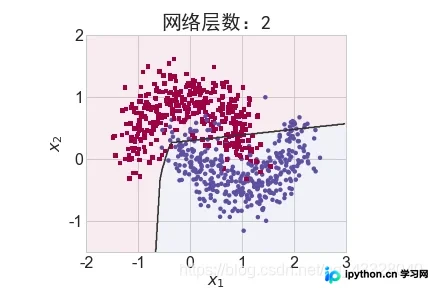
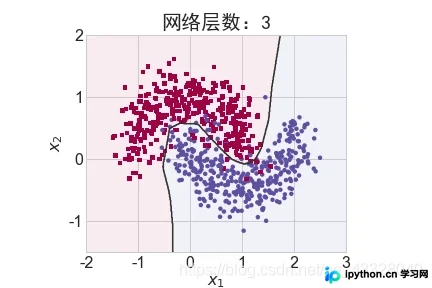
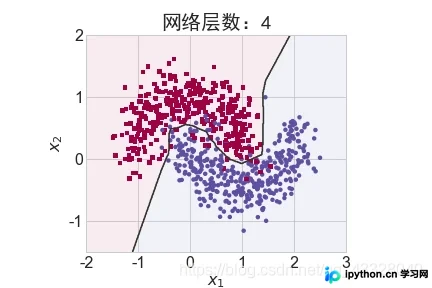
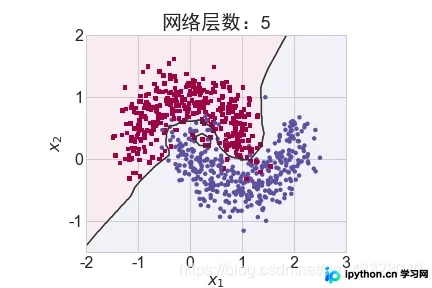
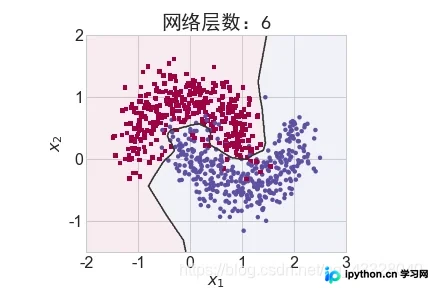
为探究不同网络深度对过拟合程度的影响,我们进行了5组训练实验。当𝑛取值范围在[0,4]时,构建层数为n + 2的全连接网络,并使用Adam优化器进行500个Epoch的训练。
def network_layers_influence(X_train, y_train):
 # 构建 5 种不同层数的网络
 for n in range(5):
  # 创建容器
  model = Sequential()
  # 创建第一层
  model.add(layers.Dense(8, input_dim=2, activation='relu'))
  # 添加 n 层,共 n+2 层
  for _ in range(n):
   model.add(layers.Dense(32, activation='relu'))
  # 创建最末层
  model.add(layers.Dense(1, activation='sigmoid'))
  # 模型装配与训练
  model.compile(loss='binary_crossentropy', optimizer='adam', metrics=['accuracy'])
  model.fit(X_train, y_train, epochs=N_EPOCHS, verbose=1)
  # 绘制不同层数的网络决策边界曲线
  # 可视化的 x 坐标范围为[-2, 3]
  xx = np.arange(-2, 3, 0.01)
  # 可视化的 y 坐标范围为[-1.5, 2]
  yy = np.arange(-1.5, 2, 0.01)
  # 生成 x-y 平面采样网格点,方便可视化
  XX, YY = np.meshgrid(xx, yy)
  preds = model.predict_classes(np.c_[XX.ravel(), YY.ravel()])
  print(preds)
  title = "网络层数:{0}".format(2 + n)
  file = "网络容量_%i.png" % (2 + n)
  make_plot(X_train, y_train, title, file, XX, YY, preds, output_dir=OUTPUT_DIR + '/network_layers')
Dropout层的作用分析
3.Dropout的影响
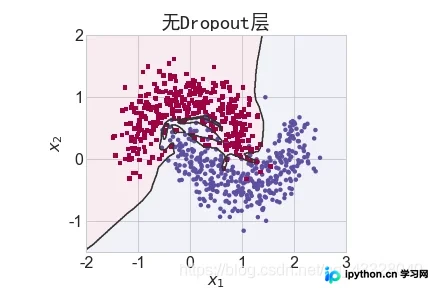
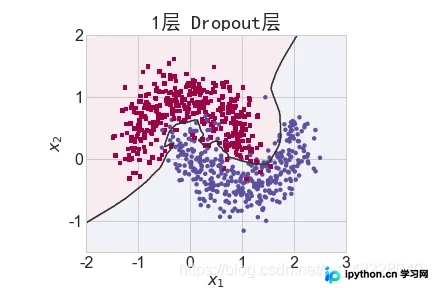
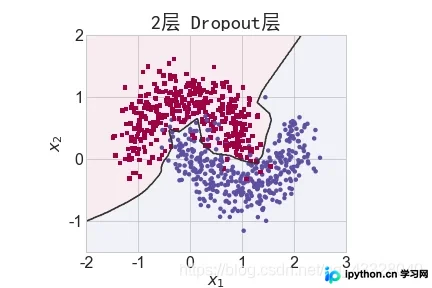
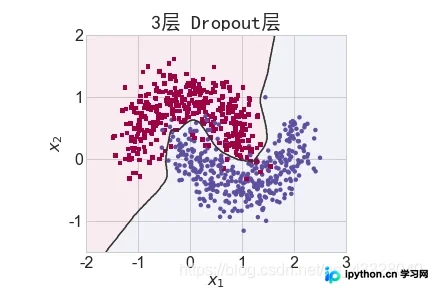
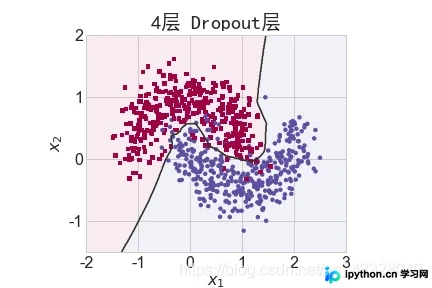
为评估Dropout层对训练效果的作用,我们进行了5组实验。每组实验均使用7层全连接网络,但在中间层间隔插入0至4个Dropout层,同样使用Adam优化器训练500个Epoch。
def dropout_influence(X_train, y_train):
 # 构建 5 种不同数量 Dropout 层的网络
 for n in range(5):
  # 创建容器
  model = Sequential()
  # 创建第一层
  model.add(layers.Dense(8, input_dim=2, activation='relu'))
  counter = 0
  # 网络层数固定为 5
  for _ in range(5):
   model.add(layers.Dense(64, activation='relu'))
  # 添加 n 个 Dropout 层
   if counter < n:
    counter += 1
    model.add(layers.Dropout(rate=0.5))

  # 输出层
  model.add(layers.Dense(1, activation='sigmoid'))
  # 模型装配
  model.compile(loss='binary_crossentropy', optimizer='adam', metrics=['accuracy'])
  # 训练
  model.fit(X_train, y_train, epochs=N_EPOCHS, verbose=1)
  # 绘制不同 Dropout 层数的决策边界曲线
  # 可视化的 x 坐标范围为[-2, 3]
  xx = np.arange(-2, 3, 0.01)
  # 可视化的 y 坐标范围为[-1.5, 2]
  yy = np.arange(-1.5, 2, 0.01)
  # 生成 x-y 平面采样网格点,方便可视化
  XX, YY = np.meshgrid(xx, yy)
  preds = model.predict_classes(np.c_[XX.ravel(), YY.ravel()])
  title = "无Dropout层" if n == 0 else "{0}层 Dropout层".format(n)
  file = "Dropout_%i.png" % n
  make_plot(X_train, y_train, title, file, XX, YY, preds, output_dir=OUTPUT_DIR + '/dropout')
L2正则化系数的影响
4.正则化的影响
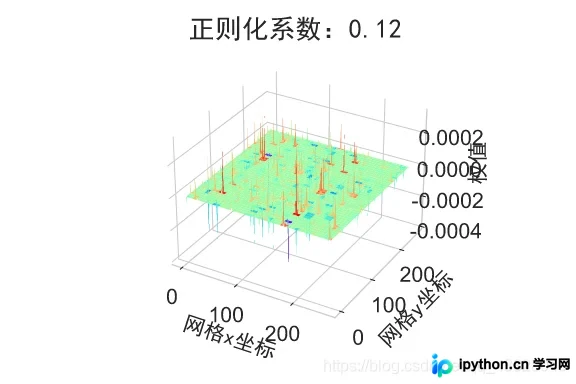
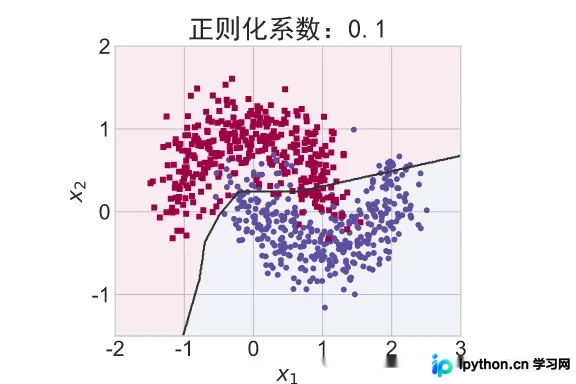
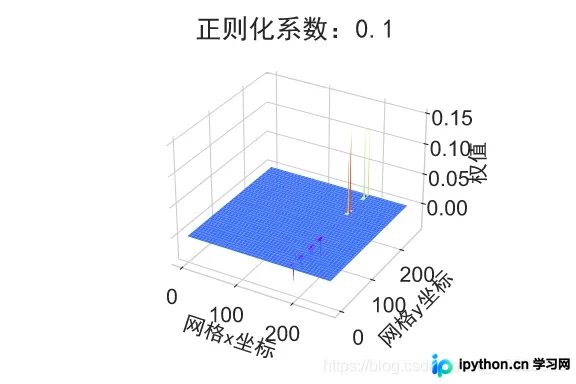
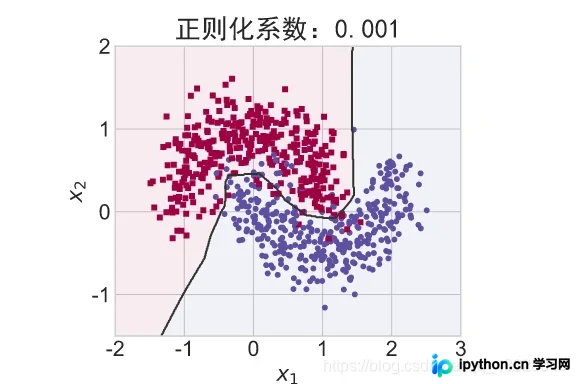
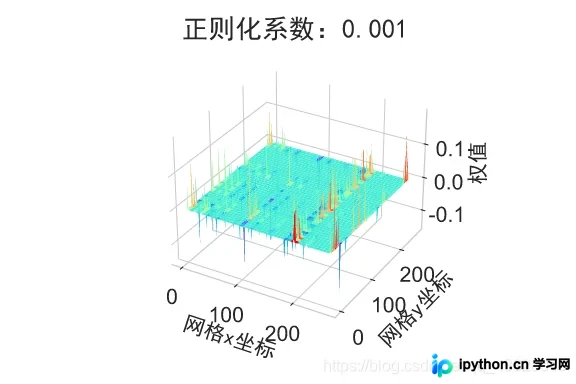
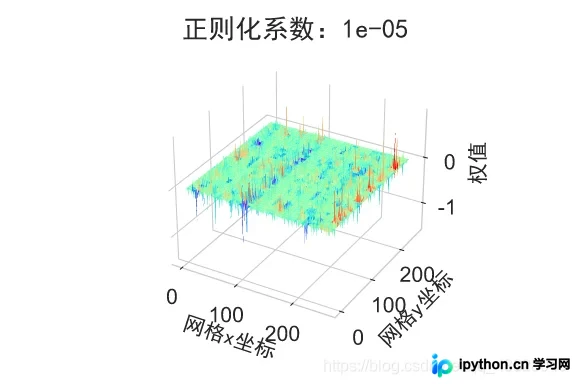
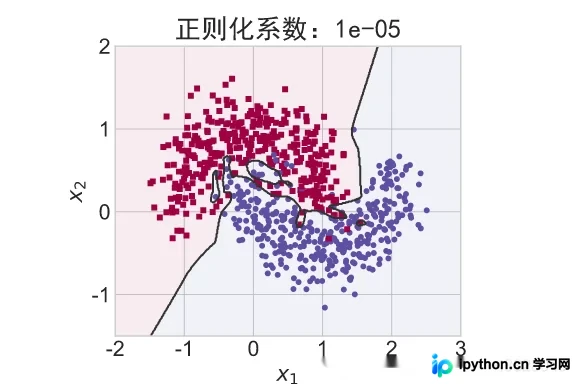
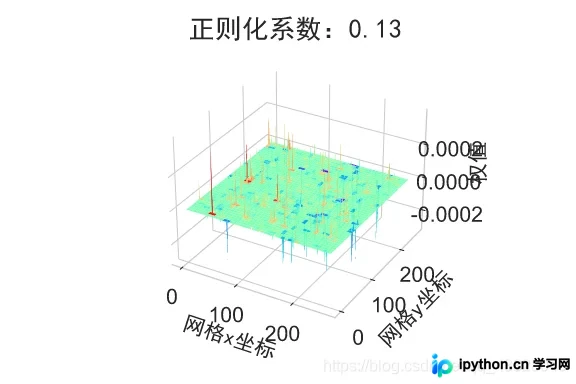
为探究正则化系数𝜆对模型训练的影响,我们采用L2正则化方式构建5层神经网络。其中,第2、3、4层的权值张量W均添加了L2正则化约束项。
def build_model_with_regularization(_lambda):
 # 创建带正则化项的神经网络
 model = Sequential()
 model.add(layers.Dense(8, input_dim=2, activation='relu')) # 不带正则化项
 # 2-4层均是带 L2 正则化项
 model.add(layers.Dense(256, activation='relu', kernel_regularizer=regularizers.l2(_lambda)))
 model.add(layers.Dense(256, activation='relu', kernel_regularizer=regularizers.l2(_lambda)))
 model.add(layers.Dense(256, activation='relu', kernel_regularizer=regularizers.l2(_lambda)))
 # 输出层
 model.add(layers.Dense(1, activation='sigmoid'))
 model.compile(loss='binary_crossentropy', optimizer='adam', metrics=['accuracy']) # 模型装配
 return model
首先实现一个用于可视化权重的函数。
def plot_weights_matrix(model, layer_index, plot_name, file_name, output_dir=OUTPUT_DIR):
 # 绘制权值范围函数
 # 提取指定层的权值矩阵
 weights = model.layers[layer_index].get_weights()[0]
 shape = weights.shape
 # 生成和权值矩阵等大小的网格坐标
 X = np.array(range(shape[1]))
 Y = np.array(range(shape[0]))
 X, Y = np.meshgrid(X, Y)
 # 绘制3D图
 fig = plt.figure()
 ax = fig.gca(projection='3d')
 ax.xaxis.set_pane_color((1.0, 1.0, 1.0, 0.0))
 ax.yaxis.set_pane_color((1.0, 1.0, 1.0, 0.0))
 ax.zaxis.set_pane_color((1.0, 1.0, 1.0, 0.0))
 plt.title(plot_name, fontsize=20, fontproperties='SimHei')
 # 绘制权值矩阵范围
 ax.plot_surface(X, Y, weights, cmap=plt.get_cmap('rainbow'), linewidth=0)
 # 设置坐标轴名
 ax.set_xlabel('网格x坐标', fontsize=16, rotation=0, fontproperties='SimHei')
 ax.set_ylabel('网格y坐标', fontsize=16, rotation=0, fontproperties='SimHei')
 ax.set_zlabel('权值', fontsize=16, rotation=90, fontproperties='SimHei')
 # 保存矩阵范围图
 plt.savefig(output_dir + "/" + file_name + ".svg")
 plt.close(fig)
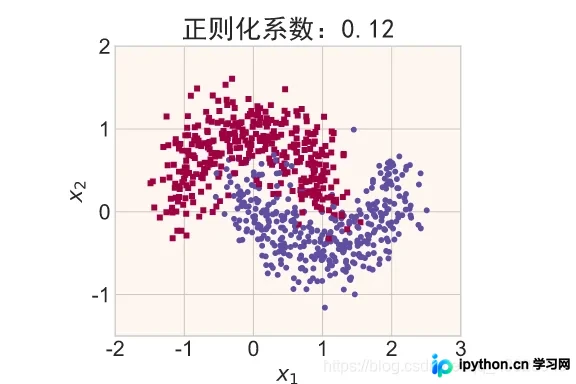
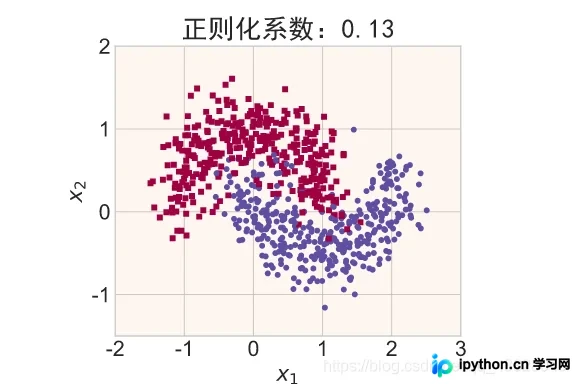
在保持网络结构不变的前提下,通过调节正则化系数 𝜆 = 0.00001,0.001,0.1,0.12,0.13 来测试网络训练效果,并绘制模型在训练集上的决策边界曲线。
def regularizers_influence(X_train, y_train):
 for _lambda in [1e-5, 1e-3, 1e-1, 0.12, 0.13]: # 设置不同的正则化系数
  # 创建带正则化项的模型
  model = build_model_with_regularization(_lambda)
  # 模型训练
  model.fit(X_train, y_train, epochs=N_EPOCHS, verbose=1)
  # 绘制权值范围
  layer_index = 2
  plot_title = "正则化系数:{}".format(_lambda)
  file_name = "正则化网络权值_" + str(_lambda)
  # 绘制网络权值范围图
  plot_weights_matrix(model, layer_index, plot_title, file_name, output_dir=OUTPUT_DIR + '/regularizers')
  # 绘制不同正则化系数的决策边界线
  # 可视化的 x 坐标范围为[-2, 3]
  xx = np.arange(-2, 3, 0.01)
  # 可视化的 y 坐标范围为[-1.5, 2]
  yy = np.arange(-1.5, 2, 0.01)
  # 生成 x-y 平面采样网格点,方便可视化
  XX, YY = np.meshgrid(xx, yy)
  preds = model.predict_classes(np.c_[XX.ravel(), YY.ravel()])
  title = "正则化系数:{}".format(_lambda)
  file = "正则化_%g.svg" % _lambda
  make_plot(X_train, y_train, title, file, XX, YY, preds, output_dir=OUTPUT_DIR + '/regularizers')
regularizers_influence(X_train, y_train)
至此,关于TensorFlow过拟合问题实战的介绍已完成。如需了解更多TensorFlow过拟合相关内容,可搜索本站历史文章或继续阅读后续文章。感谢大家的支持!
免责声明:本文内容仅供参考,不代表本站观点。转载或引用请注明出处。









