

Python文件处理实战:利用chardet解决编码与mimetypes识别类型

本文介绍Python中处理文件编码与类型识别的两个核心模块。针对ConfigParser读取非UTF-8配置文件时的UnicodeDecodeError,演示如何使用chardet模块自动检测文件编码并正确读取。同时讲解mimetypes模块通过文件名或URL获取MIME类型及对应文件扩展名的方法,涵盖guess_type与guess_all_extensions函数的具体用法与参数说明。
Python文件处理模块概述
在进行Python文件处理时,mimetypes和chardet是两个非常实用的模块,分别用于解决文件类型识别和编码检测问题。
使用chardet解决文件编码问题
### chardet模块: 该模块主要用于解决文件编码识别的问题。
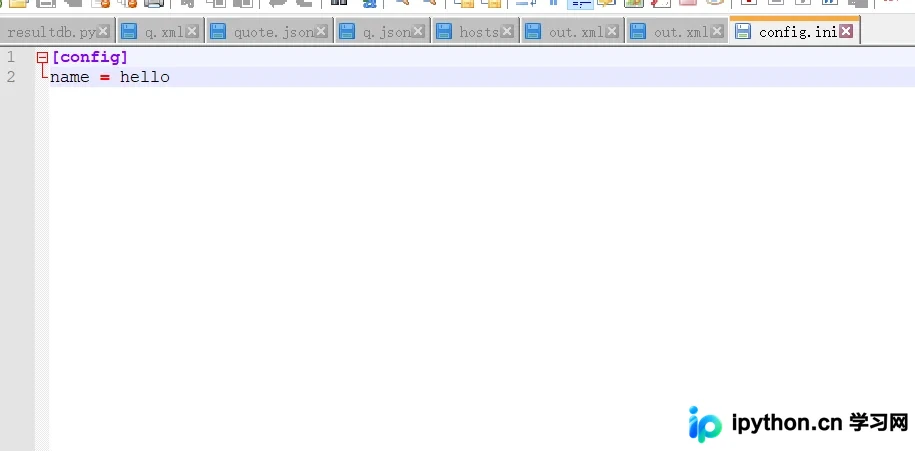
假设存在一个配置文件,其编码格式既非ASCII也非UTF-8,直接读取可能会遇到问题。
__coding__ = 'UTF-8'
__author__ = 'bingo'

import chardet
import configparser
parse = configparser.ConfigParser()
parse.read("config.ini")
print(parse.sections())
运行结果如下:
G:\Anaconda\python.exe "C:/Users/bingo/Desktop/The crawler/学习/demo.py" Traceback (most recent call last): File "C:/Users/bingo/Desktop/The crawler/学习/demo.py", line 29, in <module> parse.read("config.ini") File "G:\Anaconda\lib\configparser.py", line 696, in read self._read(fp, filename) File "G:\Anaconda\lib\configparser.py", line 1014, in _read for lineno, line in enumerate(fp, start=1): UnicodeDecodeError: 'gbk' codec can't decode byte 0xff in position 0: illegal >multibyte sequence
chardet解决ConfigParser编码报错
若采用以下方法,先利用chardet获取文件的实际编码格式,即可完美解决上述报错:
chardet检测编码并读取配置示例
import chardet
import configparser

data = open("config.ini", "rb").read()
a = chardet.detect(data)
print(a)

parse = configparser.ConfigParser()
parse.read("config.ini", encoding=a["encoding"])
print(parse.sections())

>>>>>>>>>>>>>>>再运行:
G:\Anaconda\python.exe "C:/Users/bingo/Desktop/The crawler/学习/demo.py"
{'encoding': 'UTF-16', 'confidence': 1.0, 'language': ''}
['config']

Process finished with exit code 0
### mimetypes模块: 该模块主要用于处理文件类型的识别。 该模块提供了在文件名或URL与文件扩展名关联的MIME类型之间进行转换的功能,主要包含以下两个函数: mimetypes.guess_type(url, strict=True): 返回一个包含(type, encoding)的元组。其中strict为默认参数,用于指定已知MIME类型的列表是否仅限于在IANA注册的官方类型;type表示MIME类型,encoding可能为None。 mimetypes.guess_all_extensions(type, strict=True): 返回一个列表,根据传入的type(MIME类型),返回所有可能的文件扩展名字符串列表,包括前导点('.')。strict为默认参数,用于指定已知MIME类型的列表是否仅限于在IANA注册的官方类型。
使用mimetypes识别文件类型
import mimetypes

# 获取文件MIME类型
type, encoding = mimetypes.guess_type("demo.py")
print(type)
# 根据MIME类型获取所有可能的文件后缀名
c = mimetypes.guess_all_extensions(type)
print(c)

>>>运行结果如下:
G:\Anaconda\python.exe "C:/Users/bingo/Desktop/The crawler/学习/demo.py"
text/plain
['.bat', '.c', '.h', '.ksh', '.pl', '.txt', '.asm', '.cc', '.cod', '.cpp', '.cs', '.csh', '.cshader', >'.csproj', '.cxx', '.def', '.dsh', '.dshader', '.dsp', '.dsw', '.efu', '.filters', '.fx', '.gitattributes', >'.gitignore', '.gitmodules', '.gsh', '.gshader', '.hh', '.hlsl', '.hlsli', '.hpp', '.hsh', '.hshader', >'.hxx', '.i', '.idl', '.inc', '.inl', '.ipp', '.js', '.jsproj', '.jsx', '.jsxbin', '.jsxinc', '.lst', '.mak', >'.map', '.mdp', '.mk', '.odh', '.odl', '.pkgdef', '.pkgundef', '.psh', '.pshader', '.py', '.pyw', >'.rc', '.rc2', '.rct', '.res', '.rgs', '.s', '.sln', '.sol', '.sor', '.srf', '.tlh', '.tli', '.ts', '.tsx', '.tt', >'.user', '.vb', '.vbproj', '.vcp', '.vcw', '.vsh', '.vshader']
.bat

Process finished with exit code 0
到此这篇关于Python—处理文件(mimetypes和chardet)的文章就介绍到这了,更多相关Python—处理文件内容请搜索本站以前的文章或继续浏览下面的相关文章希望大家以后多多支持本站!
免责声明:本文内容仅供参考,不代表本站观点。转载或引用请注明出处。









