

Python使用OpenCV实现图片转素描效果

发布时间:2026-10-14| 6人浏览过
本文介绍如何利用Python和OpenCV库将普通照片转换为素描风格图像。通过读取图片、灰度化处理、高斯模糊及颜色减淡混合等步骤,结合tkinter实现文件选择交互,完整代码展示了从加载图片到保存素描结果的全过程,适用于Python初学者及图像处理爱好者参考。
Python图片转素描实现代码
具体实现代码如下所示:
# -*- coding:utf-8 -*-


import cv2
import numpy as np
from tkinter import filedialog, Tk
from os import getcwd
from re import findall


def open_path():
  # 图片路径
  root = Tk()
  root.withdraw()
  file_path = (filedialog.askopenfilename(title='选择图片文件', filetypes=[('All Files', '*')]))
  return file_path


def dodgeNaive(image, mask):
  # determine the shape of the input image
  width, height = image.shape[:2]

  # prepare output argument with same size as image
  blend = np.zeros((width, height), np.uint8)

  for col in range(width):
    for row in range(height):
      # do for every pixel
      if mask[col, row] == 255:
        # avoid division by zero
        blend[col, row] = 255
      else:
        # shift image pixel value by 8 bits
        # divide by the inverse of the mask
        tmp = (image[col, row] << 8) / (255 - mask)
        # print('tmp={}'.format(tmp.shape))
        # make sure resulting value stays within bounds
        if tmp.any() > 255:
          tmp = 255
          blend[col, row] = tmp

  return blend


def dodgeV2(image, mask):
  return cv2.divide(image, 255 - mask, scale=256)


def burnV2(image, mask):
  return 255 - cv2.divide(255 - image, 255 - mask, scale=256)


def rgb_to_sketch(src_image_name):
  print('转换中......')
  img_rgb = cv2.imread(src_image_name)
  img_gray = cv2.cvtColor(img_rgb, cv2.COLOR_BGR2GRAY)
  # 读取图片时直接转换操作
  # img_gray = cv2.imread('example.jpg', cv2.IMREAD_GRAYSCALE)

  img_gray_inv = 255 - img_gray
  img_blur = cv2.GaussianBlur(img_gray_inv, ksize=(21, 21),
                sigmaX=0, sigmaY=0)
  img_blend = dodgeV2(img_gray, img_blur)

  # cv2.imshow('original', img_rgb)
  # cv2.imshow('gray', img_gray)
  # cv2.imshow('gray_inv', img_gray_inv)
  # cv2.imshow('gray_blur', img_blur)
  cv2.imwrite(dst_image_name, img_blend)
  save_path = getcwd() + "\\" + dst_image_name # 保存路径
  print('转换完成!!!\n')
  print('保存路径:' + save_path)
  cv2.imshow(save_path, img_blend)
  cv2.waitKey(0)
  cv2.destroyAllWindows()


if __name__ == '__main__':
  print('请选择图片(路径不要含中文):')
  src_image_name = open_path() # 文件路径
  print(src_image_name + '\n')
  image_name = ''.join(findall(r'[^\\/:*?"<>|\r\n]+$', src_image_name)) # 获取文件名
  dst_image_name = 'Sketch_' + image_name
  rgb_to_sketch(src_image_name)
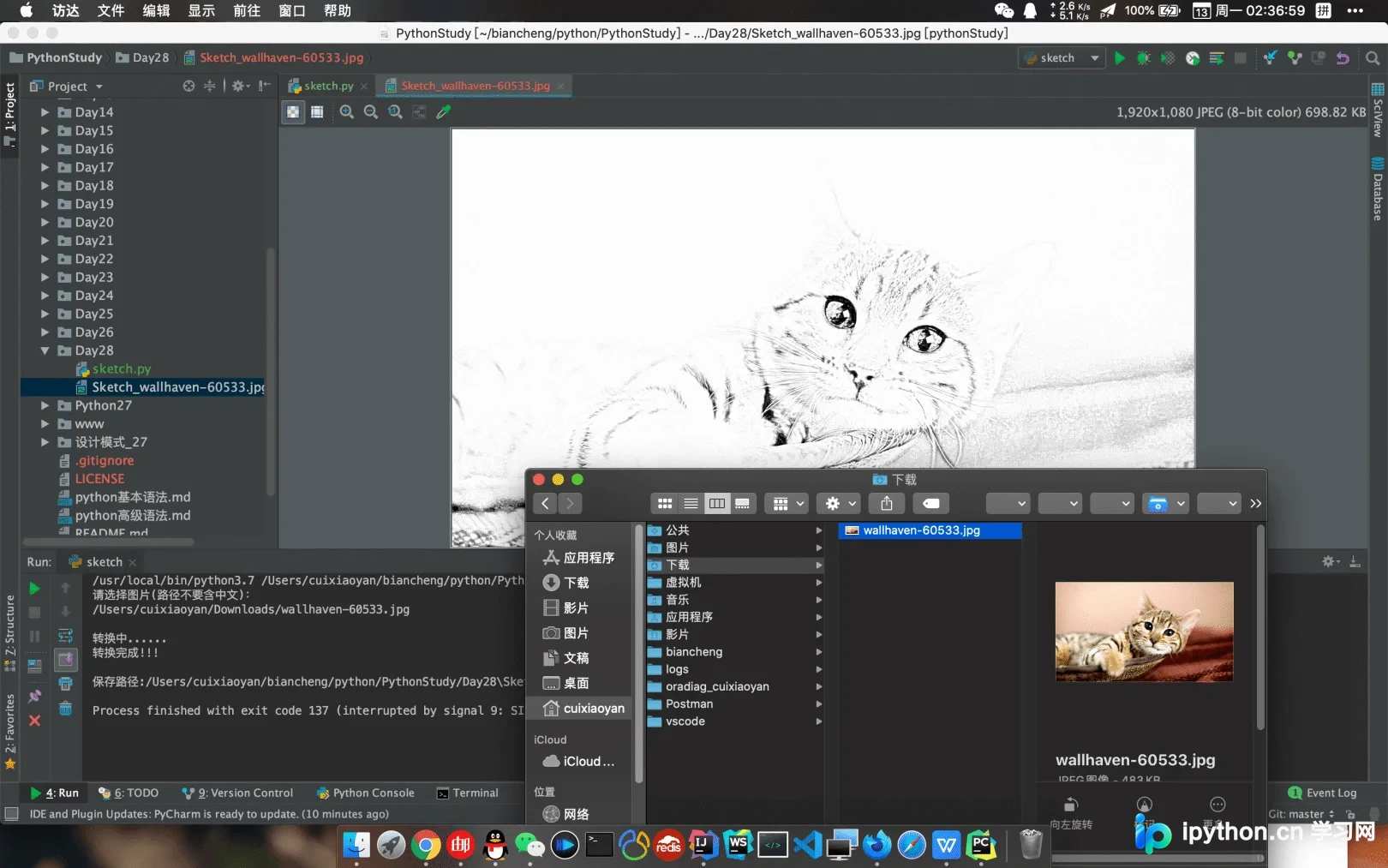
转换后的效果如下所示:
以上便是利用Python将图片转换为素描画的完整教程,如需了解更多关于Python图片处理的相关内容,欢迎持续关注本站其他技术文章。
免责声明:本文内容仅供参考,不代表本站观点。转载或引用请注明出处。









