

Python configparser模块封装及构造配置文件

发布时间:2026-10-14| 5人浏览过
本文介绍Python标准库configparser模块,该模块用于解析类似ini格式的配置文件。文章展示了配置文件的典型结构,包含多个section及配置项,并通过封装Config类演示如何读取和写入配置信息。
configparser模块简介
1.configparser模块简介
在实际开发中,使用配置文件来灵活配置参数是非常普遍的做法。Python对这类任务提供了良好的支持,其官方发布的库中便包含了专门用于处理此类需求的模块,即configParser。
configParser所解析的配置文件格式与常见的ini文件格式相似。这种格式的特点在于,文件中包含多个section(节),而每个section下又包含多个具体的配置项。
配置文件格式示例
2.看一下configparser生成的配置文件的格式
ini配置文件的具体格式如下所示:
这里是注释
[log]
log_path = base_dir/OutPut/log/

[image]
img_path = base_dir/OutPut/image/

[report]
report_path = base_dir/OutPut/report/

[test_case]
test_case_path = base_dir/TestData/case.xlsx
读取文件内容
3.读取文件内容
import configparser
import os
import sys

BASE_DIR = os.path.dirname(os.path.dirname(os.path.dirname(__file__)))

if sys.platform == "win32":
  ENV_CONF_DIR = os.path.join(BASE_DIR, 'Common/conf/env_config.ini').replace('/', '\\')
else:
  ENV_CONF_DIR = os.path.join(BASE_DIR, 'Common/conf/env_config.ini')

class Config(object):

  def __init__(self, path):
    self.path = path #配置文件名
    self.cf = configparser.ConfigParser() #创建一个配置文件对象
    self.cf.read(self.path, encoding='utf-8') # 调用配置文件对象的读取方法,并传入一个配置文件名

  def get(self, field, key): # 获取字符串类型的选项值
    result = ""
    try:
      result = self.cf.get(field, key)
    except:
      result = ""
    return result

  def set(self, field, key, value):
    try:
      self.cf.set(field, key, value)
      self.cf.write(open(self.path, 'w'))#创建一个配置文件并将获取到的配置信息使用配置文件对象的写入方法进行写入
    except:
      return False
    return True

def r_config(config_file_path, field, key):
  rf = configparser.ConfigParser()
  try:
    rf.read(config_file_path, encoding='utf-8')
    if sys.platform == "win32":
      result = rf.get(field, key).replace('base_dir', str(BASE_DIR)).replace('/', '\\')
    else:
      result = rf.get(field, key).replace('base_dir', str(BASE_DIR))
  except:
    sys.exit(1)
  return result
def w_config(config_file_path, field, key, value):
  wf = configparser.ConfigParser()
  try:
    wf.read(config_file_path)
    wf.set(field, key, value)
    wf.write(open(config_file_path, 'w'))
  except:
    sys.exit(1)
  return True
if __name__ == '__main__':
  print(r_config(ENV_CONF_DIR, 'log', 'log_path'))
  print(r_config(ENV_CONF_DIR, 'DB', 'database'))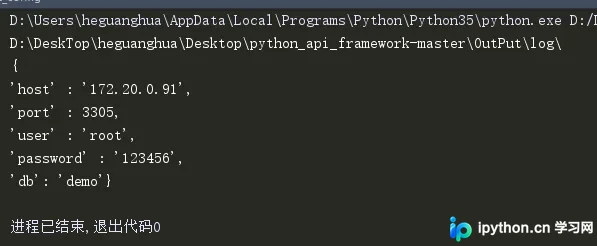
以上就是本文的全部内容,希望对大家的学习有所帮助,也希望大家多多支持本站。
免责声明:本文内容仅供参考,不代表本站观点。转载或引用请注明出处。









