

解决Python Matplotlib绘图数据点位置错乱及时间序列空区间处理

本文解决Matplotlib绘图中因数据格式为字符串导致的数据点错乱和X轴刻度异常问题,通过将CSV导入的x、y数据转换为float类型即可修复。同时介绍如何在绘制时间序列时跳过无数据的区间,通过代理x数据和自定义格式化器实现紧凑图表展示。
Matplotlib绘图数据点错乱与X轴异常修复
在绘制正负样本在各个特征维度上的累积分布函数(CDF)图时,遇到了以下异常情况:
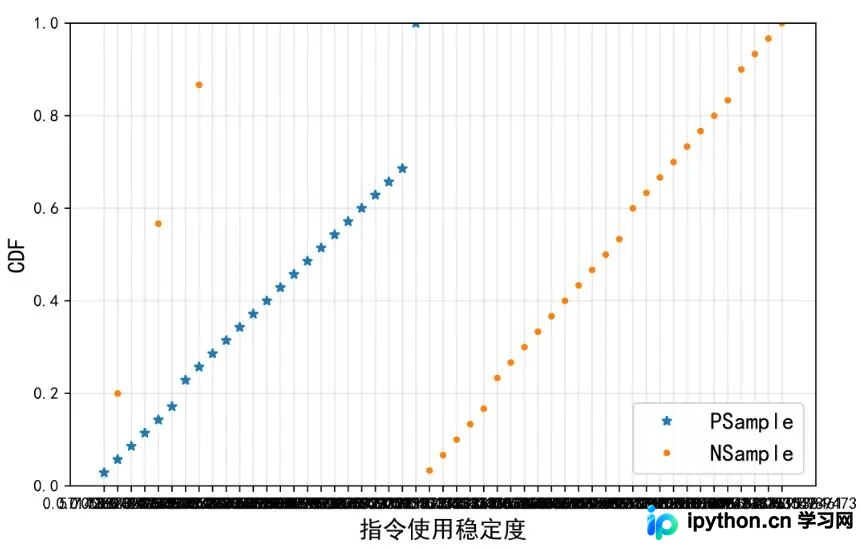
具体表现如下:
1. 部分负样本的数据点位置出现颠倒或错位。
2. X轴的刻度显示混乱,呈现为无序的杂乱状态。
最终解决方案
造成上述问题的根本原因在于,从CSV文件直接导入matplotlib.plot()函数的x_data和y_data数据格式为字符串(string)。这导致所有数据点的x坐标被直接作为字符串刻在X轴上,且由于坐标数据格式错误,部分点表现为“乱点”。解决方法是在导入x、y数据后,先将其转换为float类型,再输入plot()函数,问题即可解决。
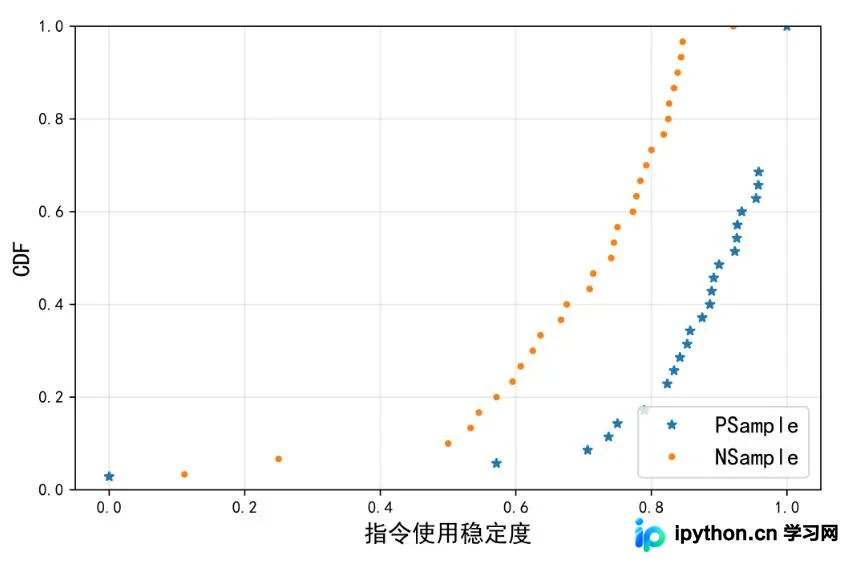
时间序列跳过无数据区间的处理方法
补充知识:Matplotlib如何在绘制时间序列时跳过无数据的区间
其实官方文档里就提供了方法,这里简单的翻译并记录一下.
11.1.9 Skip dates where there is no data When plotting time series, e.g., financial time series, one often wants to leave out days on which there is no data, e.g., weekends. By passing in dates on the x-xaxis, you get large horizontal gaps on periods when there is not data.
The solution is to pass in some proxy x-data, e.g., evenly sampled indices, and then use a custom formatter to format these as dates. The example below shows how to use an ‘index formatter' to achieve the desired plot:
解决方案是通过传递x轴数据的代理,比如下标,
然后通过自定义的'formatter'去取到相对应的时间信息
manual内示例代码:
import numpy as np
import matplotlib.pyplot as plt
import matplotlib.mlab as mlab
import matplotlib.ticker as ticker

#读数据
r = mlab.csv2rec('../data/aapl.csv')
r.sort()
r = r[-30:] # get the last 30 days
N = len(r)
ind = np.arange(N) # the evenly spaced plot indices
def format_date(x, pos=None):
 #保证下标不越界,很重要,越界会导致最终plot坐标轴label无显示
 thisind = np.clip(int(x+0.5), 0, N-1)
 return r.date[thisind].strftime('%Y-%m-%d')

fig = plt.figure()
ax = fig.add_subplot(1,1,1)
ax.plot(ind, r.adj_close, 'o-')
ax.xaxis.set_major_formatter(ticker.FuncFormatter(format_date))
fig.autofmt_xdate()
plt.show()
示例:
同样一段数据上为原始,下为去掉无数据间隔区间
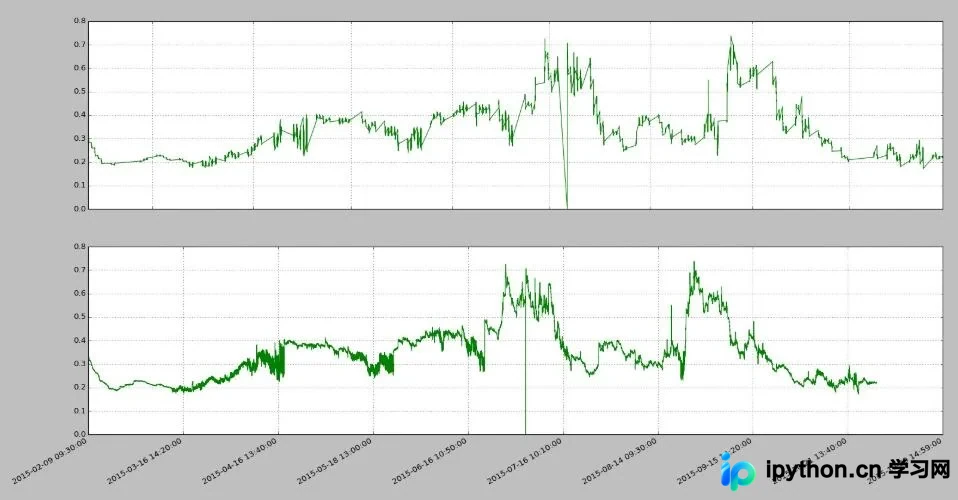
import pandas as PD
import numpy as NP
import matplotlib.pyplot as PLT
import matplotlib.ticker as MTK

file = r'vix_series.csv'
df = PD.read_csv(file, parse_dates=[0, 2])
#用下标代理原始时间戳数据
idx_pxy = NP.arange(df.shape[0])
#下标-时间转换func
def x_fmt_func(x, pos=None):
 idx = NP.clip(int(x+0.5), 0, df.shape[0]-1)
 return df['datetime'].iat[idx]
#绘图流程
def decorateAx(ax, xs, ys, x_func):
 ax.plot(xs, ys, color="green", linewidth=1, linestyle="-")
 ax.plot(ax.get_xlim(), [0,0], color="blue",
   linewidth=0.5, linestyle="--")
 if x_func:
  #set数据代理func
  ax.xaxis.set_major_formatter(MTK.FuncFormatter(x_func))
 ax.grid(True)
 return

fig = PLT.figure()
ax1 = fig.add_subplot(2,1,1)
ax2 = fig.add_subplot(2,1,2)
decorateAx(ax1, df['datetime'], df['vix_all'], None)
decorateAx(ax2, idx_pxy, df['vix_all'], x_fmt_func)
#优化label显示,非必须
fig.autofmt_xdate()
PLT.show()
很多时候乱翻google还不如好好通读官方manual…
以上这篇解决Python Matplotlib绘图数据点位置错乱问题就是小编分享给大家的全部内容了,希望能给大家一个参考,也希望大家多多支持本站。
免责声明:本文内容仅供参考,不代表本站观点。转载或引用请注明出处。









