

Python接口测试中MySQL数据库操作的封装与实现

发布时间:2026-10-13| 3人浏览过
本文详细解析在Python接口测试中如何封装MySQL数据库操作。通过设计OperateMysql类,实现数据库连接、查询、更新及删除功能的统一管理。文章提供了完整的代码示例,涵盖连接初始化、游标创建及常用SQL执行方法,帮助测试人员高效处理数据校验与初始化场景。
引言
引言
接口测试中的数据库操作必要性
在进行接口测试时,数据库操作是不可或缺的环节。这主要基于几个核心需求:数据结果的校验、测试数据的初始化准备,以及部分参数化测试场景的执行需要。
数据库操作框架设计
数据库操作框架设计
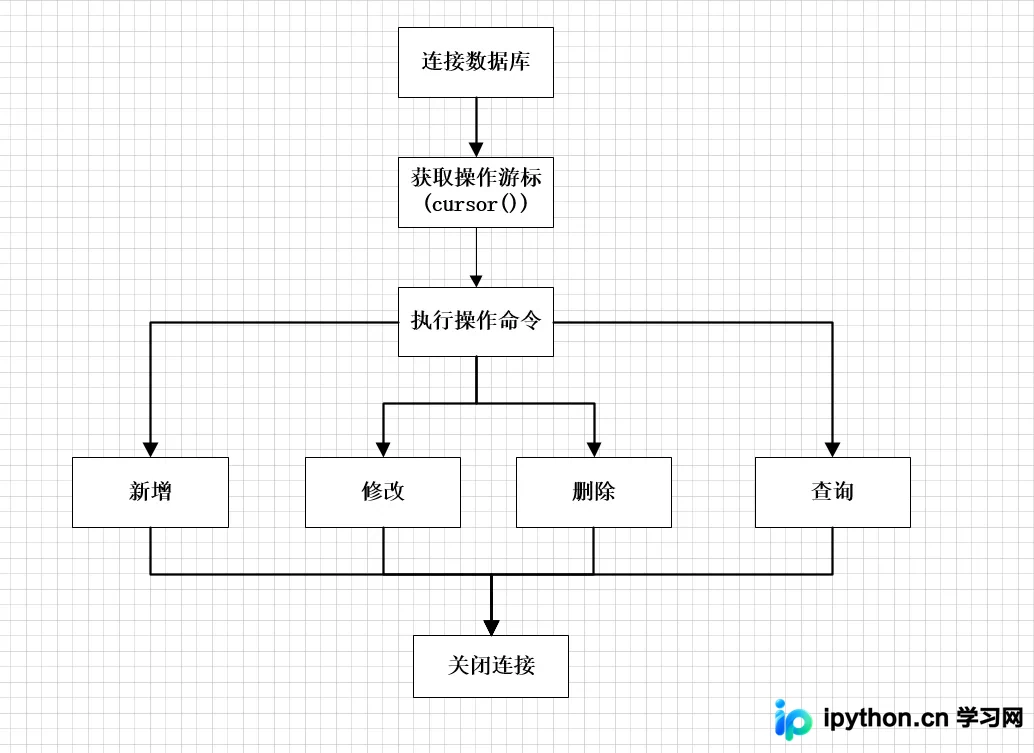
本文主要聚焦于MySQL数据库的操作,其整体设计思路如下:
数据库操作类的封装实现
封装实现
具体代码实现如下:
核心代码实现与解析
import pymysql
import json


class OperateMysql(object):
  def __init__(self):
    # 数据库初始化连接
    self.connect_interface_testing = pymysql.connect(
      "localhost",
      "root",
      "123456",
      "test",
      charset='utf8mb4',
      cursorclass=pymysql.cursors.DictCursor
    )

    # 创建游标操作数据库
    self.cursor_interface_testing = self.connect_interface_testing.cursor()

  def select_first_data(self, sql):
    """
    查询第一条数据
    """
    try:
      # 执行 sql 语句
      self.cursor_interface_testing.execute(sql)
    except Exception as e:
      print("执行sql异常:%s"%e)
    else:
      # 获取查询到的第一条数据
      first_data = self.cursor_interface_testing.fetchone()
      # print(first_data)
      # 将返回结果转换成 str 数据格式,禁用acsii编码
      first_data = json.dumps(first_data,ensure_ascii=False)
      # self.connect_interface_testing.close()
      return first_data

  def select_all_data(self,sql):
    """
    查询结果集
    """
    try:
      self.cursor_interface_testing.execute(sql)
    except Exception as e:
      print("执行sql异常:%s"%e)
    else:
      first_data = self.cursor_interface_testing.fetchall()
      first_data = json.dumps(first_data,ensure_ascii=False)
      # self.connect_interface_testing.close()
      return first_data

  def del_data(self,sql):
    """
    删除数据
    """
    res = {}
    try:
      # 执行SQL语句
      result = self.cursor_interface_testing.execute(sql)
      # print(result)
      if result != 0:
        # 提交修改
        self.connect_interface_testing.commit()
        res = {'删除成功'}
      else:
        res = {'没有要删除的数据'}
    except:
      # 发生错误时回滚
      self.connect_interface_testing.rollback()
      res = {'删除失败'}
    return res

  def update_data(self,sql):
    """
    修改数据
    """
    try:
      self.cursor_interface_testing.execute(sql)
      self.connect_interface_testing.commit()
      res = {'更新成功'}
    except Exception as e:
      self.connect_interface_testing.rollback()
      res = {'更新删除'}
    return res

  def insert_data(self,sql,data):
    """
    新增数据
    """

    try:
      self.cursor_interface_testing.execute(sql,data)
      self.connect_interface_testing.commit()
      res = {data,'新增成功'}
    except Exception as e:
      res = {'新增失败',e}
    return res
  def conn_close(self):
    # 关闭数据库
    self.cursor_interface_testing.close()


if __name__ == "__main__":
  # ()类的实例化
  om = OperateMysql()

  # 新增
  data = [{'id': 1, 'name': '测试', 'age': 15}, {'id': 2, 'name': '老王', 'age': 10}, {'id': 3, 'name': '李四', 'age': 20}]
  for i in data:
    i_data = (i['id'],i['name'],i['age'])
    insert_res = om.insert_data(
      """
       INSERT INTO test_student (id,name,age) VALUES (%s,%s,%s)
      """,i_data
    )
    print(insert_res)

  # 查询
  one_data = om.select_first_data(
    """
      SELECT * FROM test_student;
    """
  )
  all_data = om.select_all_data(
    """
    SELECT * FROM test_student;
    """
  )
  print(one_data)
  # all_data字符串类型的list转list
  print("查询总数据:%s",len(json.loads(all_data)),"分别是:%s",all_data)

  # 修改
  update_data = om.update_data(
    """
    UPDATE test_student SET name = '王五' WHERE id = 1;
    """
  )
  print(update_data)

  # 删除
  del_data = om.del_data(
    """
    DELETE FROM test_student WHERE id in (1,2,3);
    """
  )
  print(del_data)

  # 关闭游标
  om.conn_close()
运行结果与演示说明
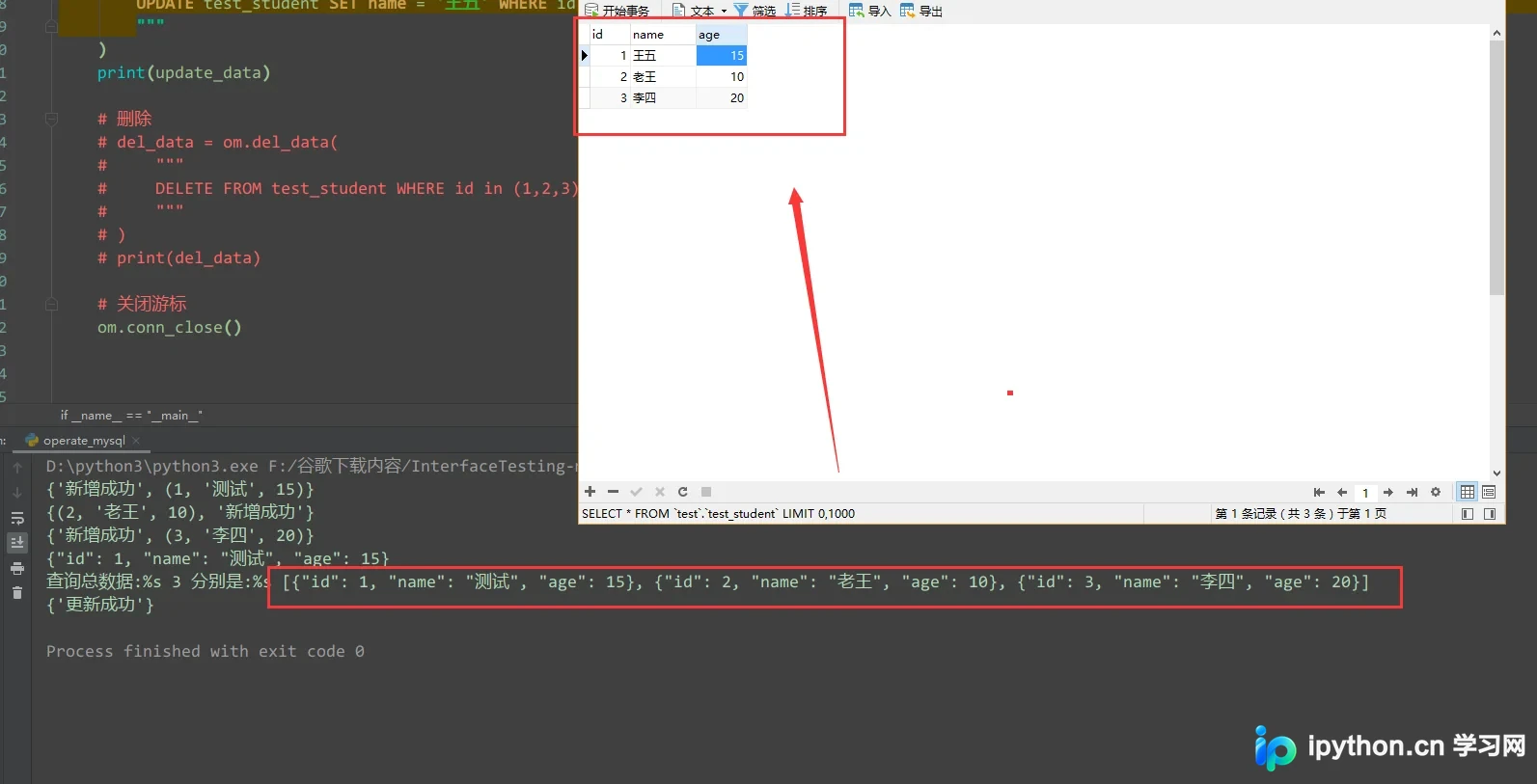
运行结果展示:

为了便于演示流程,此处先注释掉删除数据的SQL语句,随后执行程序:
总结
以上就是本文的全部内容,希望对大家的学习有所帮助,也希望大家多多支持本站。
免责声明:本文内容仅供参考,不代表本站观点。转载或引用请注明出处。









