

Jupyter Notebook 中美观显示矩阵与解决大数组截断问题

发布时间:2026-10-13| 5人浏览过
本文介绍在 Jupyter Notebook 中通过自定义 Python 函数将矩阵转换为 Latex 格式以实现美观显示的方法,同时提供使用 np.set_printoptions 解决 numpy 大数组显示不全的两种配置方案,帮助开发者优化数据可视化效果。
Jupyter Notebook 中美观显示矩阵
为了直观展示效果,这里直接提供相关代码实现。
from IPython.display import display,Latex,Math
%matplotlib inline

from IPython.core.interactiveshell import InteractiveShell
sh = InteractiveShell.instance()

def number_to_str(n,cut=5):
  ns=str(n)
  format_='{0:.'+str(cut)+'f}'
  if 'e' in ns or ('.' in ns and len(ns)>cut+1):
    return format_.format(n)
  else:
    return str(n)

def matrix_to_latex(mat,style='bmatrix'):
  if type(mat)==np.matrixlib.defmatrix.matrix:
    mat=mat.A
  head=r'\begin{'+style+'}'
  tail=r'\end{'+style+'}'
  if len(mat.shape)==1:
    body=r'\\'.join([str(el) for el in mat])
    return head+body+tail
  elif len(mat.shape)==2:
    lines=[]
    for row in mat:
      lines.append('&'.join([number_to_str(el) for el in row])+r'\\')
    s=head+' '.join(lines)+tail
    return s
  return None

sh.display_formatter.formatters['text/latex'].type_printers[np.ndarray]=matrix_to_latex
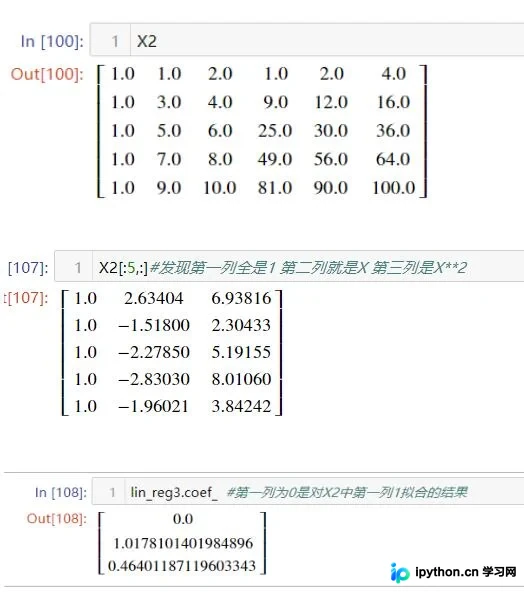
将代码输入到 Notebook 单元格并运行即可生效。
执行后,矩阵的打印输出将呈现更加美观的排版格式。
解决 numpy 大数组显示不全问题
补充知识:解决 python numpy 大数组显示不全的问题
import numpy as np np.set_printoptions(threshold=np.inf)
或者
np.set_printoptions(threshold='nan')
其中 threshold 表示:
Total number of array elements to be print(输出数组的元素数目)
以上这篇 jupyter notebook 中美观显示矩阵实例就是小编分享给大家的全部内容了,希望能给大家一个参考,也希望大家多多支持本站。
免责声明:本文内容仅供参考,不代表本站观点。转载或引用请注明出处。









