

OpenCV 表盘指针自动读数:径向灰度与霍夫变换双方案解析

本文介绍两种基于 OpenCV 的表盘指针自动读数方法。第一种通过径向灰度求和结合极坐标转换定位指针尖端;第二种利用霍夫直线检测提取指针边缘并计算中线角度。文章详细展示了图像预处理、中心定位及代码实现,并对比了两种方法的精度与局限性,适用于工业仪表识别场景。
项目背景与数据集概述
此前参与了一场关于表盘指针读数的技术竞赛,现对所用技术方案进行总结分享。
本次测试使用的数据集包含一千张样本图片。
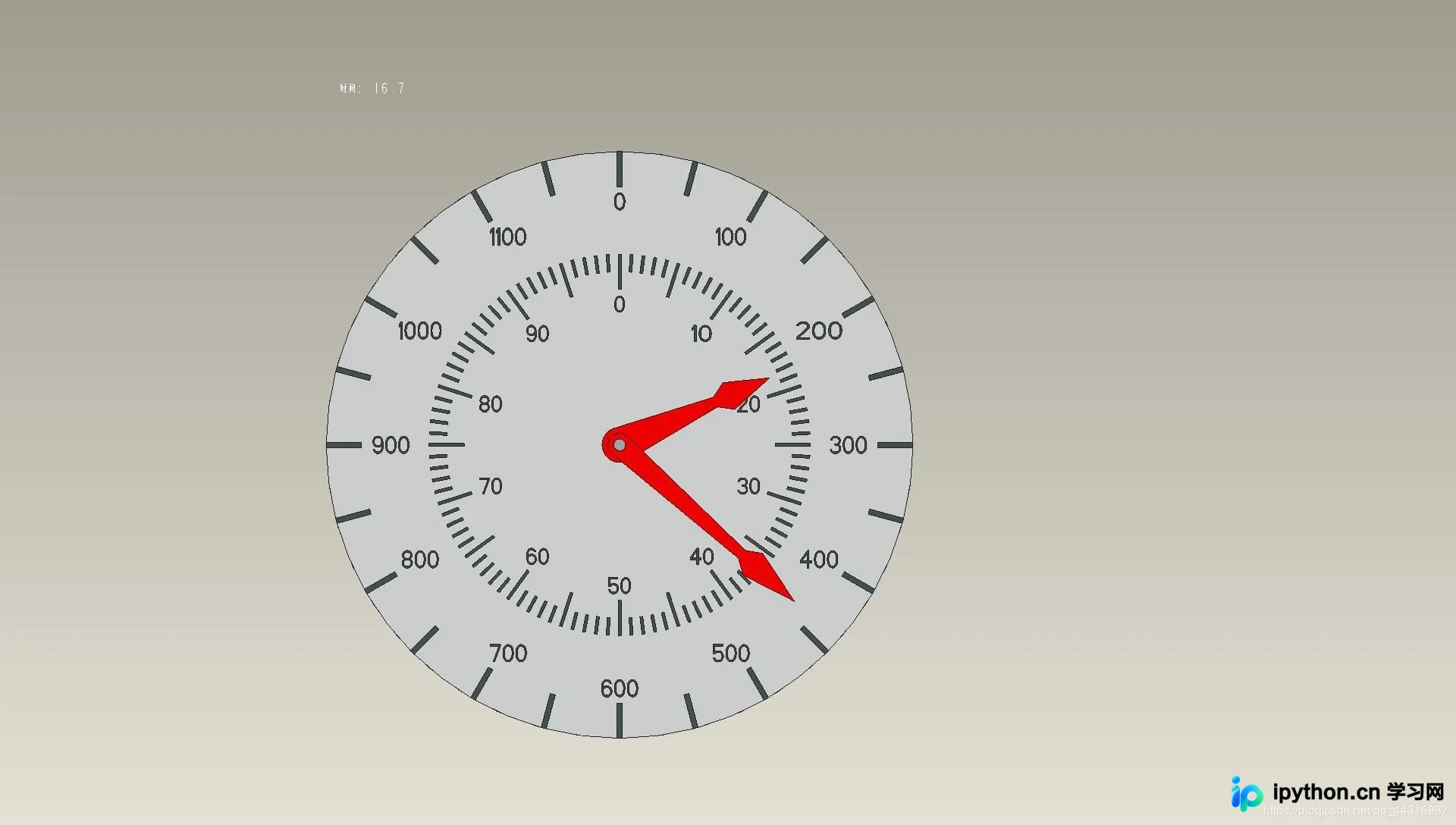
方案一:径向灰度求和法
方案一采用径向灰度求和算法。
核心原理如下:
首先将图像以表盘圆心为原点转换为极坐标系,随后对矩阵进行逐行求和运算,在二值化图像中定位最大值点,该点即对应指针的尖端位置。
引入必要的依赖库。
import cv2 as cv
import numpy as np
import math
from matplotlib import pyplot as plt
import os
执行图像预处理步骤。
背景去除:通过提取红色区域来分离指针。
def extract_red(image):
  """
  通过红色过滤提取出指针
  """
  red_lower1 = np.array([0, 43, 46])
  red_upper1 = np.array([10, 255, 255])
  red_lower2 = np.array([156, 43, 46])
  red_upper2 = np.array([180, 255, 255])
  dst = cv.cvtColor(image, cv.COLOR_BGR2HSV)
  mask1 = cv.inRange(dst, lowerb=red_lower1, upperb=red_upper1)
  mask2 = cv.inRange(dst, lowerb=red_lower2, upperb=red_upper2)
  mask = cv.add(mask1, mask2)
  return mask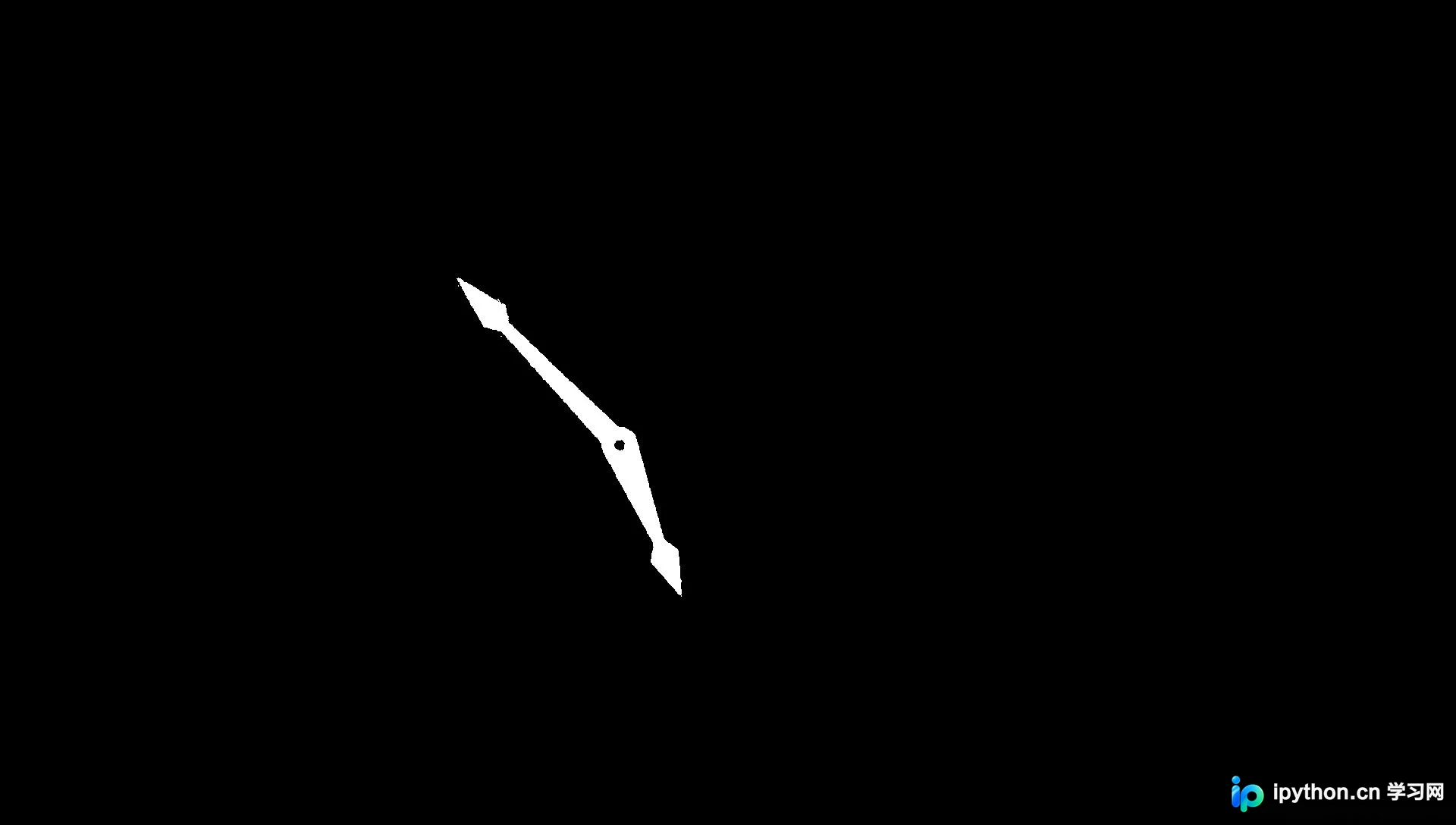
确定钟表中心:利用轮廓查找算法,提取轮廓的外接矩形,并根据矩形面积筛选出圆心坐标。
def get_center(image):
  """
  获取钟表中心
  """
  edg_output = cv.Canny(image, 100, 150, 2) # canny算子提取边缘
  cv.imshow('dsd', edg_output)
  # 获取图片轮廓
  contours, hireachy = cv.findContours(edg_output, cv.RETR_TREE, cv.CHAIN_APPROX_SIMPLE)
  center = []
  cut=[0, 0]
  for i, contour in enumerate(contours):
    x, y, w, h = cv.boundingRect(contour) # 外接矩形
    area = w * h # 面积
    if area < 100 or area > 4000:
      continue
    cv.rectangle(image, (x, y), (x + w, y + h), (255, 0, 0), 1)
    cx = w / 2
    cy = h / 2
    cv.circle(image, (np.int(x + cx), np.int(y + cy)), 1, (255, 0, 0)) ## 在图上标出圆心
    center = [np.int(x + cx), np.int(y + cy)]
    break
  return center[::-1]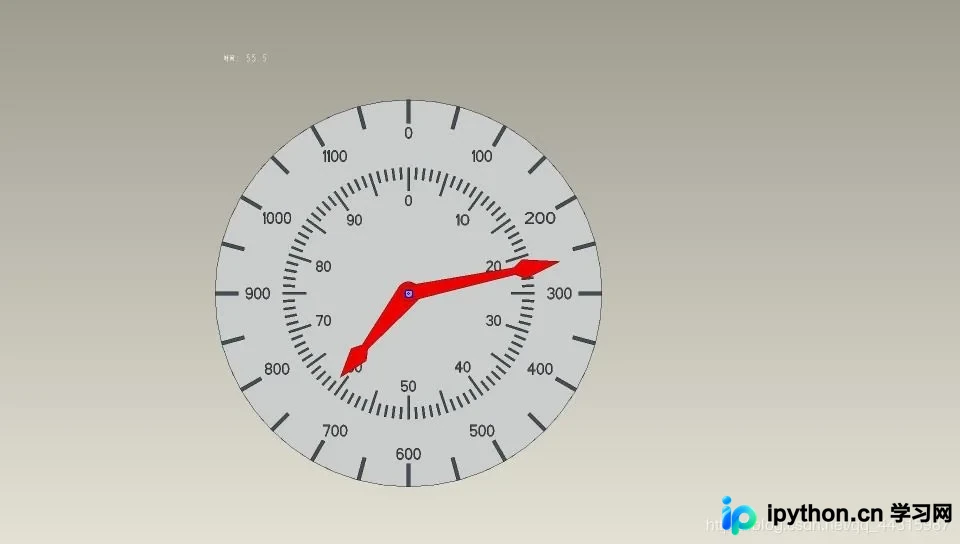
从上述处理结果可见,圆心定位具有较高的准确性。
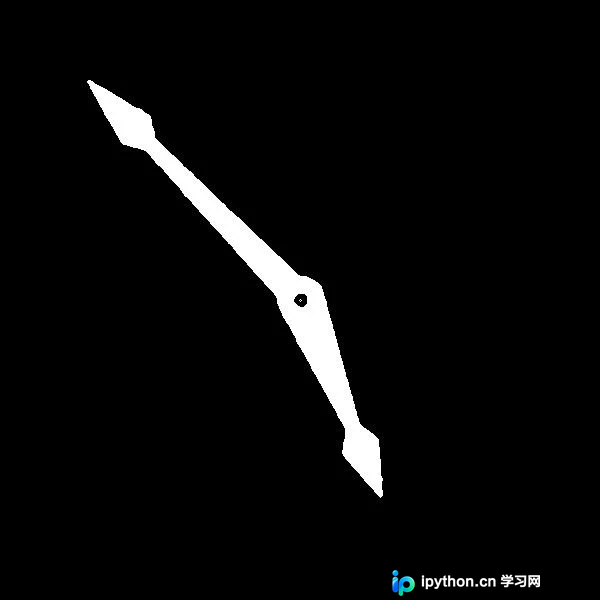
执行图像裁剪操作。
def ChangeImage(image):
  """
  图像裁剪
  """
  # 指针提取
  mask = extract_red(image)
  mask = cv.medianBlur(mask,ksize=5)#去噪
  # 获取中心
  center = get_center(mask)
  # 去除多余黑色边框
  [y, x] = center
  cut = mask[y-300:y+300, x-300:x+300]
  # 因为mask处理后已经是二值图像,故不用转化为灰度图像
  return cut
裁剪后的图像效果如下图所示。
进行极坐标转换处理。
注意:输入图片必须裁剪为正方形,以确保转换正确。
def polar(image):
  """
  转换成极坐标
  """
  x, y = 300, 300
  maxRadius = 300*math.sqrt(2)
  linear_polar = cv.linearPolar(image, (y, x), maxRadius, cv.WARP_FILL_OUTLIERS + cv.INTER_LINEAR)
  mypolar = linear_polar.copy()
  #将图片调整为从0度开始
  mypolar[:150, :] = linear_polar[450:, :]
  mypolar[150:, :] = linear_polar[:450, :]
  cv.imshow("linear_polar", linear_polar)
  cv.imshow("mypolar", mypolar)
  return mypolar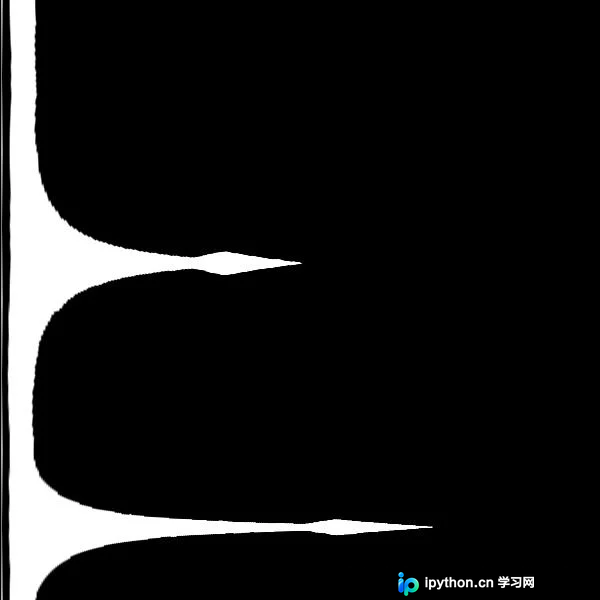
经转换后的图像可直观显示指针顶点。
接下来计算指针角度。
def Get_Reading(sumdata):
  """
  读数并输出
  """
  peak = []
  # s记录遍历时波是否在上升
  s = sumdata[0] < sumdata[1]
  for i in range(599):
    # 上升阶段
    if s==True and sumdata[i] > sumdata[i+1] and sumdata[i] > 70000:
      peak.append(sumdata[i])
      s=False
    # 下降阶段
    if s==False and sumdata[i] < sumdata[i+1]:
      s=True
  peak.sort()
  a = sumdata[0]
  b = sumdata[-1]
  if not peak or max(a,b) > peak[-1]:
    peak.append(max(a,b))
  longindex = (sumdata.index(peak[-1]))%599
  longnum = (longindex + 1)//25*50
  # 先初始化和长的同一刻度
  #shortindex = longindex
  shortnum = round(longindex / 6)
  try:
    shortindex = sumdata.index(peak[-2])
    shortnum = round(shortindex / 6)
  except IndexError:
    i=0
    while i<300:
      i += 1
      l = sumdata[(longindex-i)%600]
      r = sumdata[(longindex+i)%600]
      possibleshort = max(l,r)
      # 在短指针可能范围内寻找插值符合条件的值
      if possibleshort > 80000:
        continue
      elif possibleshort < 60000:
        break
      else:
        if abs(l-r) > 17800:
          shortindex = sumdata.index(possibleshort) - 1
          shortnum = round(shortindex / 6)
          break
  return [longnum,shortnum%100]
def test():
  """
  RGS法测试
  """
  image = cv.imread("./BONC/1_{0:0>4d}".format(400) + ".jpg")
  newimg = ChangeImage(image)
  polarimg = polar(newimg)
  psum = polarimg.sum(axis=1, dtype = 'int32')
  result = Get_Reading(list(psum))
  print(result)
if __name__ == "__main__":
  test()
  k = cv.waitKey(0)
  if k == 27:
    cv.destroyAllWindows()
  elif k == ord('s'):
    cv.imwrite('new.jpg', src)
    cv.destroyAllWindows()
输出示例坐标为 [1050, 44]。
方案二:霍夫直线检测法
方案二采用霍夫直线检测算法。
原理说明:利用霍夫变换检测出指针的两条边缘线,进而计算这两条边所夹中线的角度,该角度即代表指针刻度。
数据预处理流程与前一种方法基本一致。
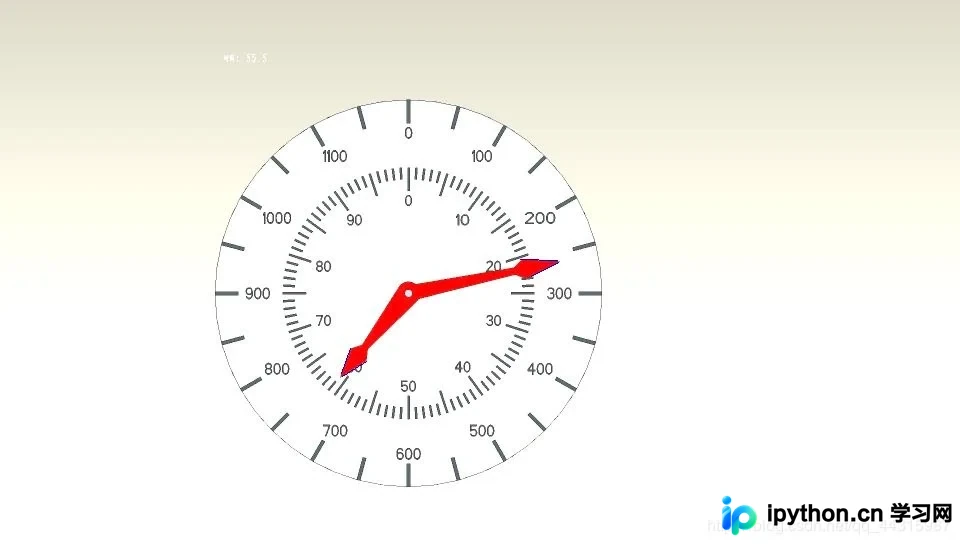
检测结果分别识别出两个指针的左右两条边,随后通过这四个角度计算出两个指针中线的具体角度。具体的计算逻辑较为复杂,代码实现细节较多。
class Apparatus:
  def __init__(self, name):
    self.name = name
    self.angle = []
    self.src = cv.imread(name)


  def line_detect_possible_demo(self, image, center, tg):
    '''
    :param image: 二值图
    :param center: 圆心
    :param tg: 直线检测maxLineGap
    '''
    res = {} # 存放线段的斜率和信息
    edges = cv.Canny(image, 50, 150, apertureSize=7)
    cv.imshow("abcdefg", edges)
    lines = cv.HoughLinesP(edges, 1, np.pi/360, 13, minLineLength=20, maxLineGap=tg)
    for line in lines:
      x_1, y_1, x_2, y_2 = line[0]
      # 将坐标原点移动到圆心
      x1 = x_1 - center[0]
      y1 = center[1] - y_1
      x2 = x_2 - center[0]
      y2 = center[1] - y_2

      # 计算斜率
      if x2 - x1 == 0:
        k = float('inf')
      else:
        k = (y2-y1)/(x2-x1)
      d1 = np.sqrt(max(abs(x2), abs(x1)) ** 2 + (max(abs(y2), abs(y1))) ** 2) # 线段长度
      d2 = np.sqrt(min(abs(x2), abs(x1)) ** 2 + (min(abs(y2), abs(y1))) ** 2)
      # 将长指针与短指针做标记
      if d1 < 155 and d1 > 148 and d2 > 115:
        res[k] = [1]
      elif d1 < 110 and d1 > 100 and d2 > 75:
        res[k] = [2]
      else:
        continue
      res[k].append(1) if (x2 + x1) /2 > 0 else res[k].append(0) # 将14象限与23象限分离
      cv.line(self.src, (x1 + center[0], center[1] - y1), (x2 + center[0], center[1] - y2), (255, 0, 0), 1)
      cv.imshow("line_detect-posssible_demo", self.src)


      # 计算线段中点的梯度来判断是指针的左侧线段还是右侧线段
      middle_x = int((x_1 + x_2) / 2)
      middle_y = int((y_1 + y_2) / 2)
      grad_mat = image[middle_y-5:middle_y+6, middle_x-5:middle_x+6]
      cv.imshow("grad_mat", grad_mat)
      grad_x = cv.Sobel(grad_mat, cv.CV_32F, 1, 0)
      grad_y = cv.Sobel(grad_mat, cv.CV_32F, 0, 1)
      gradx = np.max(grad_x) if np.max(grad_x) != 0 else np.min(grad_x)
      grady = np.max(grad_y) if np.max(grad_y) != 0 else np.min(grad_y)
      if ((gradx >=0 and grady >= 0) or (gradx <= 0 and grady >= 0)) and res[k][1] == 1:
        res[k].append(1) # 右测
      elif ((gradx <= 0 and grady <= 0) or (gradx >= 0 and grady <= 0)) and res[k][1] == 0:
        res[k].append(1)
      else:
        res[k].append(0) # 左侧
    # 计算角度
    angle1 = [i for i in res if res[i][0] == 1]
    angle2 = [i for i in res if res[i][0] == 2]
    # 长指针
    a = np.arctan(angle1[0])
    b = np.arctan(angle1[1])
    if a * b < 0 and max(abs(a), abs(b)) > np.pi / 4:
      if a + b < 0:
        self.angle.append(math.degrees(-(a + b) / 2)) if res[angle1[1]][1] == 1 else self.angle.append(
          math.degrees(-(a + b) / 2) + 180)
      else:
        self.angle.append(math.degrees(np.pi - (a + b) / 2)) if res[angle1[1]][1] == 1 else self.angle.append(
          math.degrees(np.pi - (a + b) / 2) + 180)
    else:
      self.angle.append(math.degrees(np.pi / 2 - (a + b) / 2)) if res[angle1[1]][1] == 1 else self.angle.append(math.degrees(np.pi / 2 - (a + b) / 2) + 180)
    print('长指针读数:%f' % self.angle[0])


    # 短指针
    a = np.arctan(angle2[0])
    b = np.arctan(angle2[1])
    if a * b < 0 and max(abs(a), abs(b)) > np.pi / 4:
      if a + b < 0:
        self.angle.append(math.degrees(-(a + b) / 2)) if res[angle2[1]][1] == 1 else self.angle.append(
          math.degrees(-(a + b) / 2) + 180)
      else:
        self.angle.append(math.degrees(np.pi - (a + b) / 2)) if res[angle2[1]][1] == 1 else self.angle.append(
          math.degrees(np.pi - (a + b) / 2) + 180)
    else:
      self.angle.append(math.degrees(np.pi / 2 - (a + b) / 2)) if res[angle2[1]][1] == 1 else self.angle.append(math.degrees(np.pi / 2 - (a + b) / 2) + 180)
    print('短指针读数:%f' % self.angle[1])


  def get_center(self, mask):
    edg_output = cv.Canny(mask, 66, 150, 2)
    cv.imshow('edg', edg_output)
    # 外接矩形
    contours, hireachy = cv.findContours(edg_output, cv.RETR_TREE, cv.CHAIN_APPROX_SIMPLE)
    center = []
    for i, contour in enumerate(contours):
      x, y, w, h = cv.boundingRect(contour) # 外接矩形
      area = w * h # 面积
      if area > 1000 or area < 40:
        continue
      #print(area)
      # cv.circle(src, (np.int(cx), np.int(cy)), 3, (255), -1)
      cv.rectangle(self.src, (x, y), (x + w, y + h), (255, 0, 0), 1)
      cx = w / 2
      cy = h / 2
      cv.circle(self.src, (np.int(x + cx), np.int(y + cy)), 1, (255, 0, 0))
      center.extend([np.int(x + cx), np.int(y + cy)])
      break

    cv.imshow('center', self.src)
    return center


  def extract(self, image):
    red_lower1 = np.array([0, 43, 46])
    red_lower2 = np.array([156, 43, 46])
    red_upper1 = np.array([10, 255, 255])
    red_upper2 = np.array([180, 255, 255])
    frame = cv.cvtColor(image, cv.COLOR_BGR2HSV)
    mask1 = cv.inRange(frame, lowerb=red_lower1, upperb=red_upper1)
    mask2 = cv.inRange(frame, lowerb=red_lower2, upperb=red_upper2)
    mask = cv.add(mask1, mask2)
    mask = cv.bitwise_not(mask)
    cv.imshow('mask', mask)
    return mask


  def test(self):
    self.src = cv.resize(self.src, dsize=None, fx=0.5, fy=0.5) # 此处可以修改插值方式interpolation
    mask = self.extract(self.src)
    mask = cv.medianBlur(mask, ksize=5) # 去噪
    # 获取中心
    center = self.get_center(mask)
    # 去除多余黑色边框
    [y, x] = center
    mask = mask[x - 155:x + 155, y - 155:y + 155]
    cv.imshow('mask', mask)
    #self.find_short(center, mask)
    try:
      self.line_detect_possible_demo(mask, center, 20)
    except IndexError:
      try:
        self.src = cv.imread(self.name)
        self.src = cv.resize(self.src, dsize=None, fx=0.5, fy=0.5) # 此处可以修改插值方式interpolation
        self.src = cv.convertScaleAbs(self.src, alpha=1.4, beta=0)
        blur = cv.pyrMeanShiftFiltering(self.src, 10, 17)
        mask = self.extract(blur)
        self.line_detect_possible_demo(mask, center, 20)
      except IndexError:
        self.src = cv.imread(self.name)
        self.src = cv.resize(self.src, dsize=None, fx=0.5, fy=0.5) # 此处可以修改插值方式interpolation
        self.src = cv.normalize(self.src, dst=None, alpha=200, beta=10, norm_type=cv.NORM_MINMAX)

        blur = cv.pyrMeanShiftFiltering(self.src, 10, 17)
        mask = self.extract(blur)
        self.line_detect_possible_demo(mask, center, 20)


if __name__ == '__main__':
  apparatus = Apparatus('./BONC/1_0555.jpg')
  # 读取图片
  apparatus.test()
  k = cv.waitKey(0)
  if k == 27:
    cv.destroyAllWindows()
  elif k == ord('s'):
    cv.imwrite('new.jpg', apparatus.src)
    cv.destroyAllWindows()
长指针读数:77.070291 短指针读数:218.896747
方法对比与局限性分析
从结果来看,该方法的精度表现良好,但存在以下三个主要缺点:
- 当两个指针发生重合时,处理难度较大。
- 霍夫直线检测有时仅能检测到箭头的一条边,导致程序报错。虽然可以尝试通过图像增强、角点检测和图像梯度来辅助解决,但实际效果并不理想。
- 角度计算逻辑非常复杂(也可能是思路过于繁琐,该部分代码确实耗费了大量开发时间)。
代码中可能仍存在其他问题,欢迎读者批评指正。
至此,关于 OpenCV 表盘指针自动读数的示例代码介绍完毕。如需了解更多 OpenCV 自动读数相关内容,请搜索本站历史文章或继续浏览后续文章,感谢大家的支持!
免责声明:本文内容仅供参考,不代表本站观点。转载或引用请注明出处。









