

Python实现运动模糊模型构建与逆滤波、维纳滤波复原

本文介绍在Python中构建匀速直线运动模糊模型的方法,通过指定图像尺寸和运动角度生成点扩散函数(PSF)。基于该模型,演示了对运动模糊图像进行逆滤波和维纳滤波的复原过程,包含添加噪声后的处理效果对比,旨在提供图像去模糊处理的参考实现。
运动模糊模型构建原理
构建运动模糊模型
假设相机保持静止,图像f(x,y)在成像面上发生移动,且除移动外图像内容不随时间变化。设x0(t)和y0(t)分别为位移的x分量和y分量,在快门开启时间T内,胶片上某点的总曝光量是图像在移动过程中一系列相应像素亮度对该点作用的总和。这意味着运动模糊图像是由同一图像在产生距离延迟后与原图像叠加而成的。若忽略快门开启与关闭的时间,则有相关数学表达。
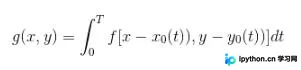
由于各种复杂运动均可视为匀速直线运动的叠加,因此只需考虑匀速直线运动的情况。鉴于研究重点在于探讨运动模糊复原方法的思想与方向,而非自行构建全新模型,此处借鉴参考文献[1]中建立的运动模糊模型。关于该模型的理论依据,可参见参考文献[1]。
接下来描述模型函数motion_process(image_size, motion_angle),该函数接收两个参数:图像的尺寸大小image_size以及运动的角度motion_angle。
例如,当运动位移为9、运动角度为45度时,该模型函数的构建过程如下:
1. 首先创建与图像同等大小的全0矩阵,找到全0矩阵的中心行数center_position,计算运动角度的tan值与cot值,并算出运动的偏移量offset。
2. 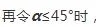 PSF[int(center_position+offset),int(center_position-offset)]=1
3.  PSF[int(center_position-offset),int(center_position+offset)]=1
则该模型对应的图像如下图所示:
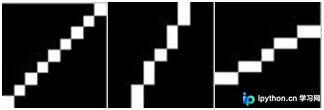
运动位移为9,运动角度分别为45°、30°、60°时,运动模糊模型对应的图像
Python代码实现与滤波复原
import matplotlib.pyplot as graph
import numpy as np
from numpy import fft
import math
import cv2

# 仿真运动模糊
def motion_process(image_size,motion_angle):
 PSF = np.zeros(image_size)
 print(image_size)
 center_position=(image_size[0]-1)/2
 print(center_position)

 slope_tan=math.tan(motion_angle*math.pi/180)
 slope_cot=1/slope_tan
 if slope_tan<=1:
  for i in range(15):
   offset=round(i*slope_tan) #((center_position-i)*slope_tan)
   PSF[int(center_position+offset),int(center_position-offset)]=1
  return PSF / PSF.sum() #对点扩散函数进行归一化亮度
 else:
  for i in range(15):
   offset=round(i*slope_cot)
   PSF[int(center_position-offset),int(center_position+offset)]=1
  return PSF / PSF.sum()

#对图片进行运动模糊
def make_blurred(input, PSF, eps):
 input_fft = fft.fft2(input)# 进行二维数组的傅里叶变换
 PSF_fft = fft.fft2(PSF)+ eps
 blurred = fft.ifft2(input_fft * PSF_fft)
 blurred = np.abs(fft.fftshift(blurred))
 return blurred

def inverse(input, PSF, eps):  # 逆滤波
 input_fft = fft.fft2(input)
 PSF_fft = fft.fft2(PSF) + eps #噪声功率,这是已知的,考虑epsilon
 result = fft.ifft2(input_fft / PSF_fft) #计算F(u,v)的傅里叶反变换
 result = np.abs(fft.fftshift(result))
 return result

def wiener(input,PSF,eps,K=0.01):  #维纳滤波,K=0.01
 input_fft=fft.fft2(input)
 PSF_fft=fft.fft2(PSF) +eps
 PSF_fft_1=np.conj(PSF_fft) /(np.abs(PSF_fft)**2 + K)
 result=fft.ifft2(input_fft * PSF_fft_1)
 result=np.abs(fft.fftshift(result))
 return result

image = cv2.imread('you.jpg')
image = cv2.cvtColor(image,cv2.COLOR_BGR2GRAY)
img_h=image.shape[0]
img_w=image.shape[1]
graph.figure(1)
graph.xlabel("Original Image")
graph.gray()
graph.imshow(image)  #显示原图像

graph.figure(2)
graph.gray()
#进行运动模糊处理
PSF = motion_process((img_h,img_w), 60)
blurred = np.abs(make_blurred(image, PSF, 1e-3))

graph.subplot(231)
graph.xlabel("Motion blurred")
graph.imshow(blurred)

result = inverse(blurred, PSF, 1e-3) #逆滤波
graph.subplot(232)
graph.xlabel("inverse deblurred")
graph.imshow(result)

result=wiener(blurred,PSF,1e-3)  #维纳滤波
graph.subplot(233)
graph.xlabel("wiener deblurred(k=0.01)")
graph.imshow(result)

blurred_noisy=blurred + 0.1 * blurred.std() * \
   np.random.standard_normal(blurred.shape) #添加噪声,standard_normal产生随机的函数

graph.subplot(234)
graph.xlabel("motion & noisy blurred")
graph.imshow(blurred_noisy)  #显示添加噪声且运动模糊的图像

result = inverse(blurred_noisy, PSF, 0.1+1e-3) #对添加噪声的图像进行逆滤波
graph.subplot(235)
graph.xlabel("inverse deblurred")
graph.imshow(result)

result=wiener(blurred_noisy,PSF,0.1+1e-3)   #对添加噪声的图像进行维纳滤波
graph.subplot(236)
graph.xlabel("wiener deblurred(k=0.01)")
graph.imshow(result)

graph.show()
参考文献
[1] 何红英. 运动模糊图像恢复算法的研究与实现[D]. 西安科技大学硕士学位论文. 2011.
[2] Rafael C.Gonzalez,Richard E.Woods,Steven L.Eddins. 数字图像处理的MATLAB实现(第2版)[M]. 阮秋琦,译. 北京:清华大学出版社,2013.
[3] 陈建功. 运动模糊图像复原算法研究[D]. 南昌航空大学硕士学位论文. 2012.
以上这篇python实现逆滤波与维纳滤波示例就是小编分享给大家的全部内容了,希望能给大家一个参考,也希望大家多多支持本站。
免责声明:本文内容仅供参考,不代表本站观点。转载或引用请注明出处。









