

解决Django 2.2与PyMySQL版本兼容报错

发布时间:2026-10-13| 5人浏览过
本文解决Django 2.2连接MySQL时因默认驱动mysqlclient版本过低(0.9.3)引发的ImproperlyConfigured错误。通过安装PyMySQL替换驱动,并修改Django源码中base.py和operations.py文件,解决版本校验及字符串编码方法调用问题,实现数据迁移。
Django与PyMySQL版本兼容问题概述
遇到的错误信息如下:
django.core.exceptions.ImproperlyConfigured: mysqlclient 1.3.13 or newer is required; you have 0.9.3.
错误原因分析
该错误的原因在于:
Django连接MySQL数据库时默认使用MySQLdb驱动,但该驱动不支持Python 3环境。因此,通常将MySQL驱动配置为pymysql,这便引发了版本兼容性问题。
PyMySQL安装与解决方案
安装pymysql的方法如下:
#安装pymysql
pip install pymysql

#__init__.py
import pymysql
pymysql.install_as_MySQLdb()
解决方案包括以下两种路径: 1. 将Django版本降级至2.1.4。 2. 修改Django源码进行适配。 2.1 定位到Python环境中的django包目录,进入backends下的mysql文件夹。
# 使用此命令可以看到对应的文件夹目录
➜ daliyfresh pip install pymysql
Looking in indexes: https://mirrors.aliyun.com/pypi/simple/
Requirement already satisfied: pymysql in /Library/Frameworks/Python.framework/Versions/3.6/lib/python3.6/site-packages (0.9.3)
2.2 打开base.py文件,注释掉第35至36行的版本检查代码。
if version < (1, 3, 3):
  raise ImproperlyConfigured("mysqlclient 1.3.3 or newer is required; you have %s" % Database.__version__)
2.3 此时运行仍会报错,需找到operations.py文件,将其中的decode方法调用改为encode。
AttributeError: ‘str' object has no attribute ‘decode'
针对上述错误的处理方式为:
#linux vim 查找快捷键:?decode
if query is not None:
 query = query.decode(errors='replace')
return query
#改为
if query is not None:
 query = query.encode(errors='replace')
return query
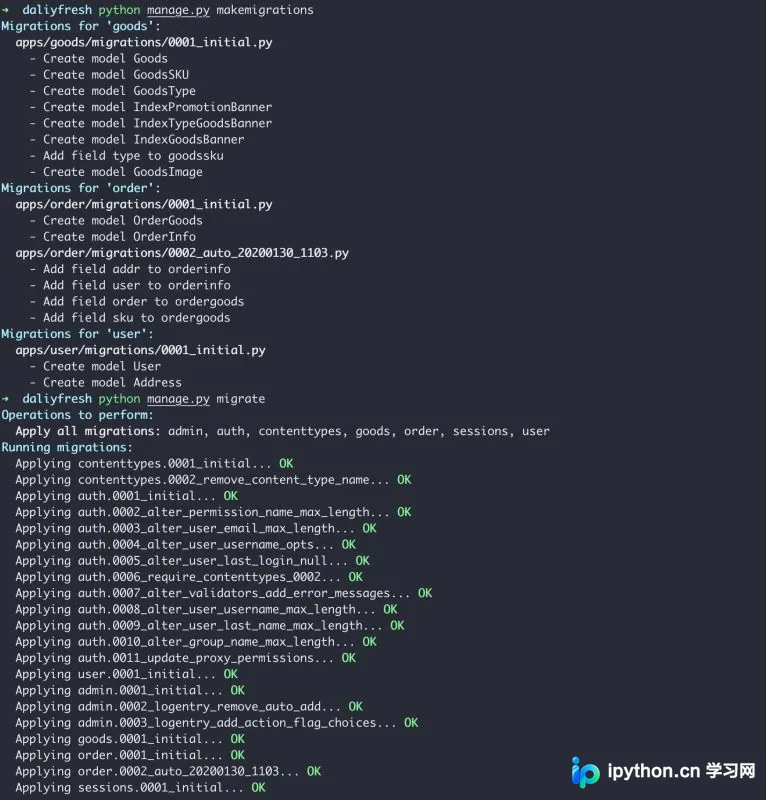
完成修改后,执行数据迁移测试。
python manage.py makemigrations
python manage.py migrate
以上内容为本文的全部解答,希望对各位的学习有所帮助,也欢迎大家继续支持本站。
免责声明:本文内容仅供参考,不代表本站观点。转载或引用请注明出处。









