

Python项目编译为SO文件完整指南:从基础到集成

本文详细介绍如何将Python项目编译为SO文件以提升执行效率并保护源码。涵盖环境准备(Cython、gcc等)、基础单文件编译步骤、集成目录编译脚本编写,以及版本兼容、__file__变量限制和权限控制等关键注意事项,帮助开发者安全高效地部署Python应用。
Python编译SO文件概述与环境准备
核心思路是将Python代码先转换为C语言代码,再进一步编译生成SO动态链接库文件。因此,首先需要确保系统中安装了必要的依赖组件。
在Python环境中,需要安装cython库。
安装Cython与系统依赖
pip install cython在Linux操作系统中,需要安装python-devel和gcc编译器。
yum install python-devel
yum install gcc
基础单文件编译流程
接下来进行初步的编译操作。
首先创建一个名为Test.py的文件,其内容如下所示。
示例代码与配置
class test:

  def __init__(self):
    print('init')

  def say(self):
    print ('hello')
接着创建setup.py文件,内容如下。
from distutils.core import setup
from Cython.Build import cythonize

setup(ext_modules = cythonize(["Test.py"]))
在终端bash环境中执行编译命令。
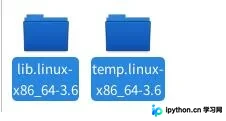
python setup.py build_ext执行命令后,系统会生成一个build文件夹,其结构如下所示。
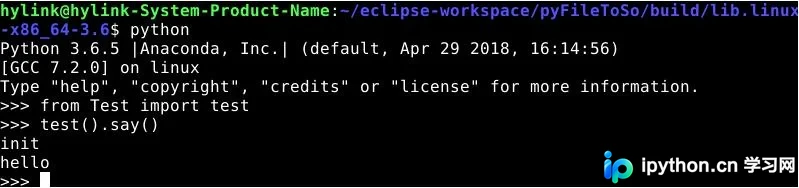
此时,生成的SO文件即可像普通的Python文件一样被导入和使用。
集成目录编译与优化
为了实现更高效的集成编译,需要对编译过程进行优化。
具体优化内容包括以下几个方面。
第一,支持对整个文件夹进行编译。
第二,自动删除编译过程中产生的.c源文件。
第三,清理编译生成的temp临时文件夹。
将需要编译的目录与setup.py放置在相同的层级目录下,然后执行python setup.py命令,最终生成的SO文件将位于build目录中。
对应的setup.py代码实现如下。
自动化编译脚本实现
'''
Created on 2019年3月27日

@author: hylink
'''
#-* -coding: UTF-8 -* -

"""
执行前提:
  系统安装python-devel 和 gcc
  Python安装cython

编译整个当前目录:
  python py-setup.py
编译某个文件夹:
  python py-setup.py BigoModel

生成结果:
  目录 build 下

生成完成后:
  启动文件还需要py/pyc担当,须将启动的py/pyc拷贝到编译目录并删除so文件

"""

import sys, os, shutil, time
from distutils.core import setup
from Cython.Build import cythonize

starttime = time.time()
currdir = os.path.abspath('.')
parentpath = sys.argv[1] if len(sys.argv)>1 else ""
setupfile= os.path.join(os.path.abspath('.'), __file__)
build_dir = "build"
build_tmp_dir = build_dir + "/temp"

def getpy(basepath=os.path.abspath('.'), parentpath='', name='', excepts=(), copyOther=False,delC=False):
  """
  获取py文件的路径
  :param basepath: 根路径
  :param parentpath: 父路径
  :param name: 文件/夹
  :param excepts: 排除文件
  :param copy: 是否copy其他文件
  :return: py文件的迭代器
  """
  fullpath = os.path.join(basepath, parentpath, name)
  for fname in os.listdir(fullpath):
    ffile = os.path.join(fullpath, fname)
    #print basepath, parentpath, name,file
    if os.path.isdir(ffile) and fname != build_dir and not fname.startswith('.'):
      for f in getpy(basepath, os.path.join(parentpath, name), fname, excepts, copyOther, delC):
        yield f
    elif os.path.isfile(ffile):
      ext = os.path.splitext(fname)[1]
      if ext == ".c":
        if delC and os.stat(ffile).st_mtime > starttime:
          os.remove(ffile)
      elif ffile not in excepts and os.path.splitext(fname)[1] not in('.pyc', '.pyx'):
        if os.path.splitext(fname)[1] in('.py', '.pyx') and not fname.startswith('__'):
          yield os.path.join(parentpath, name, fname)
        elif copyOther:
            dstdir = os.path.join(basepath, build_dir, parentpath, name)
            if not os.path.isdir(dstdir): os.makedirs(dstdir)
            shutil.copyfile(ffile, os.path.join(dstdir, fname))
    else:
      pass

#获取py列表
module_list = list(getpy(basepath=currdir,parentpath=parentpath, excepts=(setupfile)))
try:
  setup(ext_modules = cythonize(module_list),script_args=["build_ext", "-b", build_dir, "-t", build_tmp_dir])
except Exception as e:
  print (e)
else:
  module_list = list(getpy(basepath=currdir, parentpath=parentpath, excepts=(setupfile), copyOther=True))
module_list = list(getpy(basepath=currdir, parentpath=parentpath, excepts=(setupfile), delC=True))
if os.path.exists(build_tmp_dir): shutil.rmtree(build_tmp_dir)
print ("complate! time:", time.time()-starttime, 's')
关键注意事项与限制
在实际应用中,需要注意以下几个关键问题。
首先,编译后的SO文件执行时需要与编译时相同的Python版本和编码设置。
其次,如果在Python代码中使用了__file__内置变量,编译后调用时可能会出现问题,目前尚未完全解决,建议暂时使用pyc文件替代。
最后,在使用SO文件时,务必注意权限控制,以确保安全性。
以上就是将Python项目转化为SO文件的完整实例分享,希望能为读者提供参考,也欢迎大家继续支持本站获取更多技术内容。
免责声明:本文内容仅供参考,不代表本站观点。转载或引用请注明出处。









