

Python使用SymPy计算sin(x)/x的定积分与不定积分

发布时间:2026-10-13| 4人浏览过
本文介绍如何利用Python的SymPy库求解sin(x)/x函数的不定积分与定积分。代码演示了如何定义符号变量、计算不定积分(结果为Sine Integral函数)以及计算负无穷至正无穷的定积分(结果为pi),并包含绘图可视化部分。
Python SymPy积分计算示例
本文旨在演示如何使用Python求解函数 f(x) = sin(x)/x 的不定积分以及从负无穷到正无穷的定积分。
对于 sin(x)/x 函数,其不定积分对应信号处理中的 sinc 函数(在SymPy中通常表示为 Sine Integral 相关形式);而其从负无穷到正无穷的定积分结果为 pi。
代码实现与绘图
import math
import numpy as np
import matplotlib.pyplot as plt
from sympy import * #用于求导积分等科学计算

def draw_plot_set():#设置画图格式
  ax = plt.gca()
  #改变坐标轴位置
  ax.spines['right'].set_color('none')#删除原来轴
  ax.spines['top'].set_color('none')#删除原来轴
  ax.xaxis.set_ticks_position('bottom')#在0点处增加轴
  ax.spines['bottom'].set_position(('data',0))
  ax.yaxis.set_ticks_position('left')#在0点处增加轴
  ax.spines['left'].set_position(('data',0))
  #设置坐标名
  plt.ylabel('f(x)')
  plt.xlabel('x')
  plt.grid(True)#打开网格

def dif(left,right,step):#求导 左右区间以及间隔
  x,y = symbols('x y')#引入x y变量
  #expr = x*pow(E,x)#计算表达式
  expr = sin(x)/x
  x_value = [] #save x value
  y_value = [] #save x f(x) value
  y_value_int = [] #save x f(x)_dot value
  expr_int = integrate(expr,x)#求函数的不定积分 c=0
  print(integrate(expr,(x,-oo,oo)))#对x求定积分 负无穷到正无穷
  for i in np.arange(left,right,step):
    x_value.append(i)
    y_value.append(expr.subs('x',i))#将i值代入表达式
    y_value_int.append(expr_int.subs('x',i))#将i值代入积分表达式

  draw_plot_set()#设置画图格式
  plt.plot(x_value,y_value,"b-",linewidth=1,label='f(x)='+str(expr)) #画图
  plt.plot(x_value,y_value_int,"r-",linewidth=1,label='F(x)='+str(expr_int)) #画图

  plt.legend()#显示图例
  plt.show()#显示图像


if __name__ == '__main__':
  draw_plot_set()#设置画图格式
  dif(-30,30,0.1)
具体计算结果如下所示:
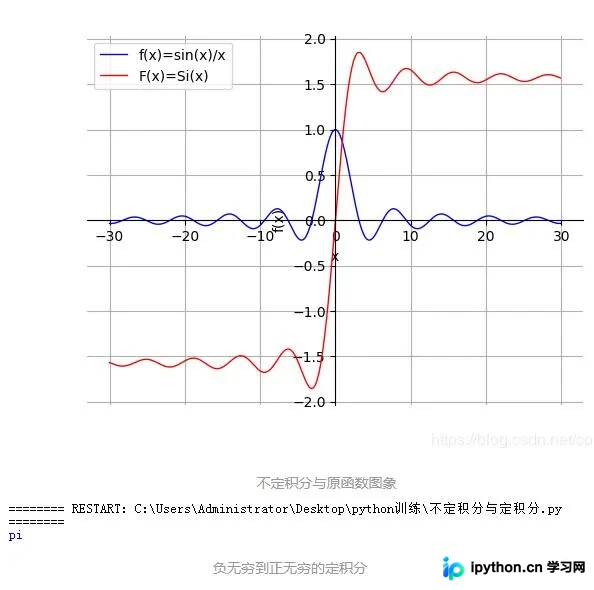
以上关于Python求解定积分和不定积分的示例内容到此结束,希望能为读者提供参考,欢迎继续支持本站获取更多技术分享。
免责声明:本文内容仅供参考,不代表本站观点。转载或引用请注明出处。









