

Python文件操作与NumPy随机整数生成详解

本文详细介绍Python中的基础文件操作代码,包括文件的打开、关闭、读取与写入实现。同时深入解析NumPy库中numpy.random.randint函数的使用方法,涵盖参数定义、返回值类型及多维数组生成的具体代码示例,帮助开发者掌握随机整数生成技巧。
Python文件操作基础代码
核心代码
import numpy as np
import os,sys

#获取当前文件夹,并根据文件名
def path(fileName):
 p=sys.path[0]+'\\'+fileName
 return p

#读文件
def readFile(fileName):
 f=open(path(fileName))
 str=f.read()
 f.close()
 return str

#写文件
def writeFile(fileName,str):
 f=open(path(fileName),'w')
 f.write(str)
 f.close()

def str1():
 str=','.join('我在中国大地上骄傲地生长着!')
 return str

def str2():
 return str(np.random.randint(-49,50,[3,3,3]))

#实验1
def test_1():
 fileName='中国大地.txt'
 writeFile(fileName,str1())
 list=readFile(fileName).split(',')
 print(list)

#实验2
def test_2():
 writeFile('str1',str1())
 writeFile('str2',str2())
 str_1=readFile('str1')
 str_2=readFile('str2')
 print(str_1)
 print(str_2)

test_2()
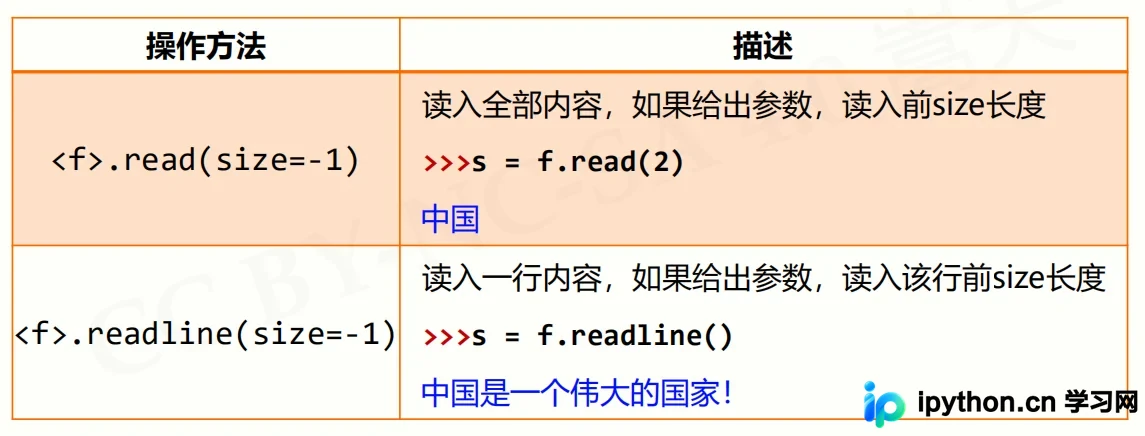
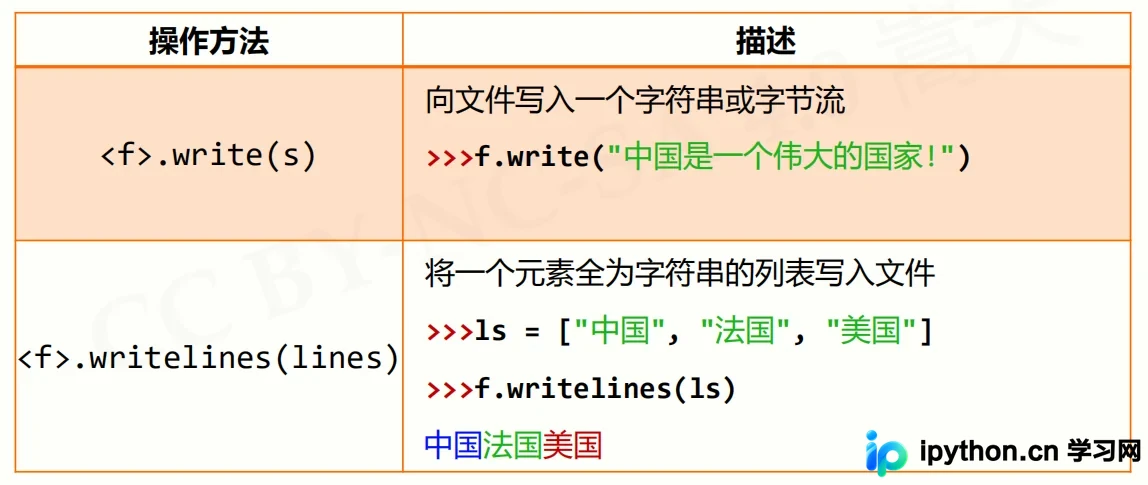
接下来展示一些具体的实现示例,主要涉及文件的读取与写入操作。
以下是关于文件打开和关闭的标准示例代码。
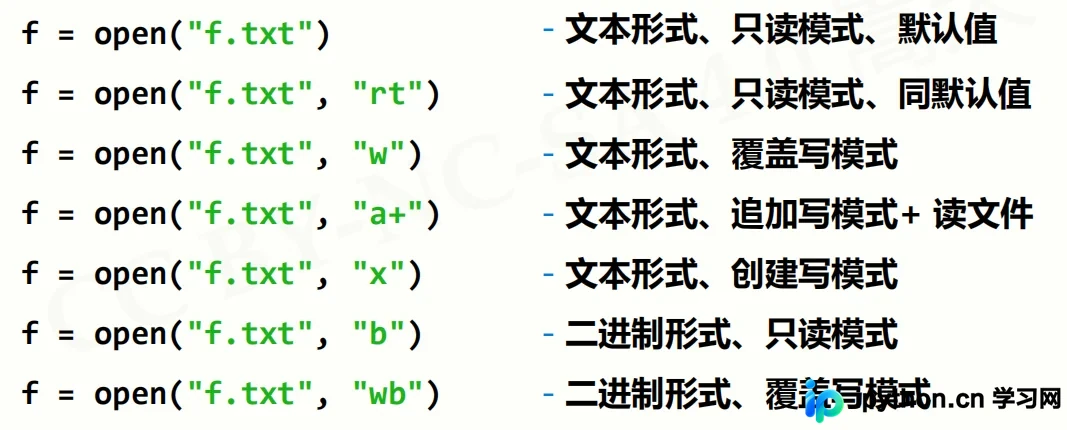
文件读取功能演示。
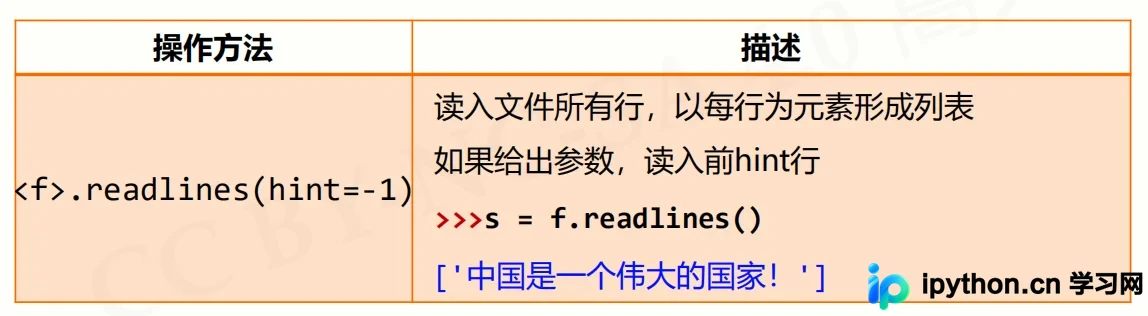
文件写入功能演示。
randint(low[,high,shape]) 函数用于根据指定的shape创建随机整数或整数数组,其数值范围位于[low, high)区间内。
NumPy随机整数生成详解
numpy.random.randint的详细用法说明。
该函数的主要作用是返回一个随机整型数,取值范围从低值(包含)到高值(不包含),即区间为[low, high)。如果未指定参数high的值,则默认返回[0, low)区间内的值。
numpy.random.randint(low, high=None, size=None, dtype='l') 相关参数定义如下:
| 参数 | 描述 |
|---|---|
| low: int | 生成的数值最低要大于等于low。 (hign = None时,生成的数值要在[0, low)区间内) |
| high: int (可选) | 如果使用这个值,则生成的数值在[low, high)区间。 |
| size: int or tuple of ints(可选) | 输出随机数的尺寸,比如size=(m * n* k)则输出同规模即m * n* k个随机数。默认是None的,仅仅返回满足要求的单一随机数。 |
| dtype: dtype(可选): | 想要输出的格式。如int64、int等等 |
输出结果示例。
该函数返回一个随机数或随机数数组。
具体使用例子。
>>> np.random.randint(2, size=10) array([1, 0, 0, 0, 1, 1, 0, 0, 1, 0]) >>> np.random.randint(1, size=10) array([0, 0, 0, 0, 0, 0, 0, 0, 0, 0]) >>> np.random.randint(5, size=(2, 4)) array([[4, 0, 2, 1], [3, 2, 2, 0]]) >>>np.random.randint(2, high=10, size=(2,3)) array([[6, 8, 7], [2, 5, 2]])
本文先介绍到这里,后续本站小编会为大家分享更多的资料。
免责声明:本文内容仅供参考,不代表本站观点。转载或引用请注明出处。









