

Python turtle模块绘制五星红旗实战解析

发布时间:2026-10-13| 3人浏览过
本文介绍利用Python turtle模块绘制五星红旗的方法,重点解析draw_rectangle和draw_star两个核心函数的实现逻辑。文章详细讲解了矩形绘制、五角星定位及角度计算技巧,特别是利用turtle.towards()处理小星星朝向的问题,并附带完整代码与运行结果演示,帮助开发者掌握Python图形编程基础。
Python turtle绘制国旗核心函数解析
利用Python的turtle模块绘制国旗,核心依赖于两个自定义函数:draw_rectangle用于绘制矩形背景,draw_star用于绘制五角星。
函数的调用逻辑与C、C++等语言相似。实现国旗绘制前,需先明确国旗的几何画法,再通过代码还原。在实践过程中,主要难点在于对turtle.circle()函数的精确控制。该函数绘制圆弧时,海龟的朝向即为圆弧切线方向,而圆心位于海龟垂直方向的直线上,通过指定radius参数即可完成绘制。此外,需特别注意小五角星与大五角星的位置关系,程序中通过turtle.left(turtle.towards(center_x,center_y)-turtle.heading())来调整小星星的朝向。虽然部分实现使用了round()函数获取近似值,但默认精度已足够满足需求。以下是具体的代码实现及运行效果演示。
国旗绘制完整代码实现
import time
import turtle
import os
'''
想要学习Python?Python学习交流群:984632579满足你的需求,资料都已经上传群文件,可以自行下载!
'''
def draw_rectangle(start_x,start_y,rec_x,rec_y):
 turtle.goto(start_x,start_y)
 turtle.color('red')
 turtle.fillcolor('red')
 turtle.begin_fill()
 for i in range(2):
  turtle.forward(rec_x)
  turtle.left(90)
  turtle.forward(rec_y)
  turtle.left(90)
 turtle.end_fill()


def draw_star(center_x,center_y,radius):
 turtle.setpos(center_x,center_y)
 #find the peak of the five-pointed star
 pt1=turtle.pos()
 turtle.circle(-radius,72)
 pt2=turtle.pos()
 turtle.circle(-radius,72)
 pt3=turtle.pos()
 turtle.circle(-radius,72)
 pt4=turtle.pos()
 turtle.circle(-radius,72)
 pt5=turtle.pos()
 #draw the five-pointed star
 turtle.color('yellow','yellow')
 turtle.fill(True)
 turtle.goto(pt3)
 turtle.goto(pt1)
 turtle.goto(pt4)
 turtle.goto(pt2)
 turtle.goto(pt5)
 turtle.fill(False)


#start the project
turtle.speed(5)
turtle.penup()
#draw the rectangle
star_x=-320
star_y=-260
len_x=660
len_y=440
draw_rectangle(star_x,star_y,len_x,len_y)
#draw the big star
pice=660/30
big_center_x=star_x+5*pice
big_center_y=star_y+len_y-pice*5
turtle.goto(big_center_x,big_center_y)
turtle.left(90)
turtle.forward(pice*3)
turtle.right(90)
draw_star(turtle.xcor(),turtle.ycor(),pice*3)
#draw the small star
turtle.goto(star_x+10*pice,star_y+len_y-pice*2)
turtle.left(turtle.towards(big_center_x,big_center_y)-turtle.heading())
turtle.forward(pice)
turtle.right(90)
draw_star(turtle.xcor(),turtle.ycor(),pice)
#draw the second star
turtle.goto(star_x+pice*12,star_y+len_y-pice*4)
turtle.left(turtle.towards(big_center_x,big_center_y)-turtle.heading())
turtle.forward(pice)
turtle.right(90)
draw_star(turtle.xcor(),turtle.ycor(),pice)
#draw the third
turtle.goto(star_x+pice*12,star_y+len_y-7*pice)
turtle.left(turtle.towards(big_center_x,big_center_y)-turtle.heading())
turtle.forward(pice)
turtle.right(90)
draw_star(turtle.xcor(),turtle.ycor(),pice)
#draw the final
turtle.goto(star_x+pice*10,star_y+len_y-9*pice)
turtle.left(turtle.towards(big_center_x,big_center_y)-turtle.heading())
turtle.forward(pice)
turtle.right(90)
draw_star(turtle.xcor(),turtle.ycor(),pice)


turtle.ht()
time.sleep(3)
os._exit(1)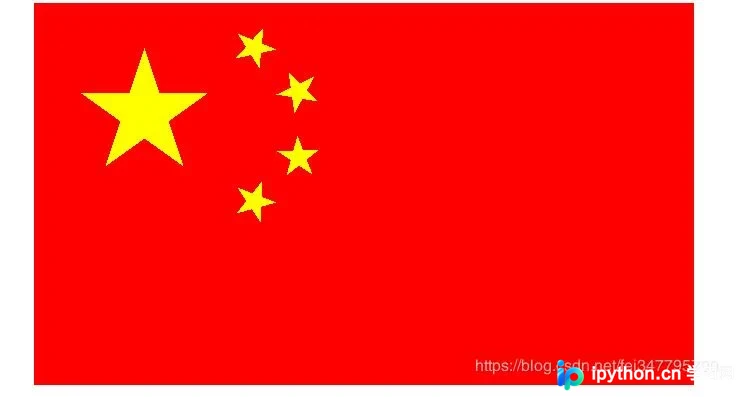
总结与展望
以上就是本文的全部内容,希望对大家的学习有所帮助,也希望大家多多支持本站。
免责声明:本文内容仅供参考,不代表本站观点。转载或引用请注明出处。









