

Python matplotlib绘制多子图饼状图完整示例

发布时间:2026-10-13| 6人浏览过
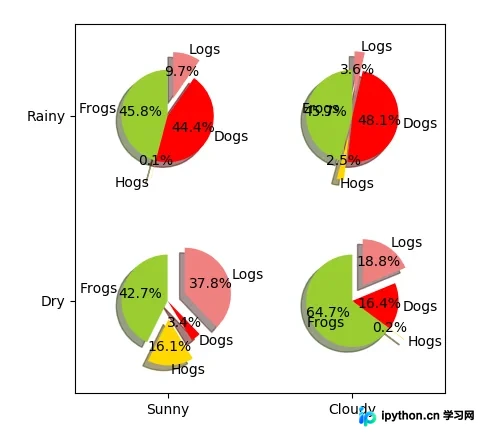
本文介绍如何使用Python的matplotlib库绘制包含四个子图的饼状图。通过配置标签、颜色、爆炸效果及坐标轴,展示如何在同一画布中生成并排列多个饼图,适用于需要对比展示多组数据的场景。
Python matplotlib绘制多子图饼状图教程
本文详细介绍利用Python matplotlib库绘制饼状图的具体实现方法,旨在为读者提供实用的参考代码与解析。
一、代码实现
import numpy as np
import matplotlib.pyplot as plt
#The slices will be ordered and plotted counter-clockwise.
labels ='Frogs','Hogs','Dogs','Logs'
sizes =[15,30,45,10]
colors =['yellowgreen','gold','#FF0000','lightcoral']
#使饼状图中第2片和第4片裂开
explode =(0,0.1,0,0.1)
fig = plt.figure()
ax = fig.gca()
ax.pie(np.random.random(4), explode=explode, labels=labels, colors=colors,
autopct='%1.1f%%', shadow=True, startangle=90,
radius=0.25, center=(0,0), frame=True)
ax.pie(np.random.random(4), explode=explode, labels=labels, colors=colors,
autopct='%1.1f%%', shadow=True, startangle=90,
radius=0.25, center=(1,1), frame=True)
ax.pie(np.random.random(4), explode=explode, labels=labels, colors=colors,
autopct='%1.1f%%', shadow=True, startangle=90,
radius=0.25, center=(0,1), frame=True)
ax.pie(np.random.random(4), explode=explode, labels=labels, colors=colors,
autopct='%1.1f%%', shadow=True, startangle=90,
radius=0.25, center=(1,0), frame=True)
#设置坐标轴刻度
ax.set_xticks([0,1])
ax.set_yticks([0,1])
#设置坐标轴刻度上显示的标签
ax.set_xticklabels(["Sunny","Cloudy"])
ax.set_yticklabels(["Dry","Rainy"])
#设置坐标轴跨度
ax.set_xlim((-0.5,1.5))
ax.set_ylim((-0.5,1.5))
#设置纵横比相等
ax.set_aspect('equal')
plt.show()
二、运行结果展示
如需了解更多Python编程技巧,建议查阅本站相关专题,包括《Python数学运算技巧总结》、《Python数据结构与算法教程》、《Python函数使用技巧总结》、《Python字符串操作技巧汇总》以及《Python入门与进阶经典教程》。
希望上述内容能对您的Python程序设计工作提供有益帮助。
免责声明:本文内容仅供参考,不代表本站观点。转载或引用请注明出处。









