

Python绘图将时间设为横坐标的两种实现方式

发布时间:2026-10-13| 5人浏览过
本文介绍在Python中将时间字符串转换为横坐标的两种主流方法。首先通过pd.to_datetime转换数据类型并设置索引,随后分别演示Matplotlib自动处理时间轴以及Pyecharts自定义配置横坐标的具体实现,帮助开发者快速完成时间序列数据的可视化展示。
时间数据预处理步骤
第一步,需将原始的时间字符串转换为标准的datetime类型,具体语法为:data['time'] = pd.to_datetime(data['time'])。
第二步,将处理后的时间列设置为数据框的索引,操作代码为:data.set_index('time')。
第三步,根据需求选择以下两种绘图方式之一进行展示。
Matplotlib自动处理时间轴
(1) 使用 matplotlib.pyplot 模块的方式。
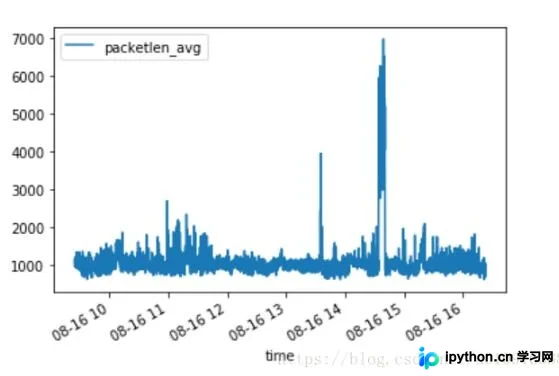
若直接调用 data['some_columns'].plot() 打印特定列数据,系统会自动识别并应用时间作为横坐标。
Pyecharts自定义时间横坐标
(2) 使用 pyecharts 模块的方式。
from pyecharts import Bar
bar = Bar("数据分析")

labels = data.columns.tolist()
for la in labels:
  # print("标签:",la,"时间:", hebing4[[la]].index,"数据:", hebing4[[la]].values)
  bar.add(la, data[la].index, data[la].values, is_stack=True, mark_point=["max", "min"],
  is_datazoom_show=True, # 默认为 X 轴,横向
  datazoom_type="slider",
  datazoom_range=[10, 25],
  # 新增额外的 dataZoom 控制条,纵向
  is_datazoom_extra_show=True,
  datazoom_extra_type="slider",
  datazoom_extra_range=[10, 25],
  is_toolbox_show=False,)
bar.render(r"/home/result/packetlen_avg.html")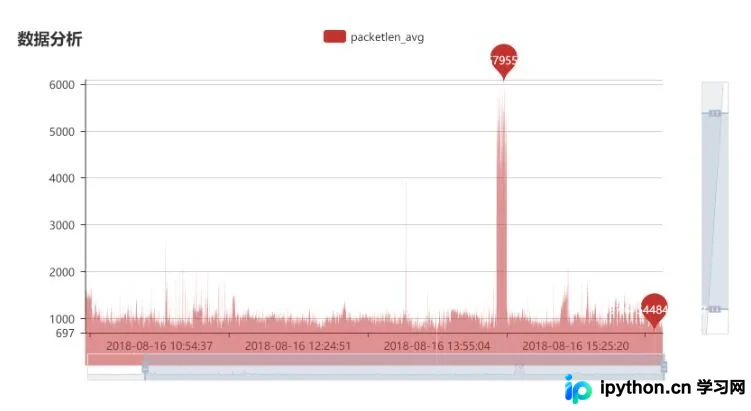
以上就是Python中将时间作为横坐标绘图的全部方法分享,希望能为读者提供参考,并欢迎大家继续支持本站获取更多技术内容。
免责声明:本文内容仅供参考,不代表本站观点。转载或引用请注明出处。









