

Python实现单线程C/S架构文件传输

发布时间:2026-10-13| 3人浏览过
本文提供基于Python Socket的单线程C/S架构文件传输完整代码。包含客户端发送进度条显示、服务器端多线程处理连接及文件保存逻辑。示例演示了通过端口映射(59999->9999)进行通信的配置方法,适用于学习网络编程基础与文件IO操作。
以下是客户端的实现代码:
#-*-encoding:utf-8-*-

import socket
import os
import sys
import math
import time

def progressbar(cur, total):
 percent = '{:.2%}'.format(float(cur) / float(total))
 sys.stdout.write('\r')
 sys.stdout.write("[%-50s] %s" % (
       '=' * int(math.floor(cur * 50 / total)),
       percent))
 sys.stdout.flush()

def getFileSize(file):
 file.seek(0, os.SEEK_END)
 fileLength = file.tell()
 file.seek(0, 0)
 return fileLength

def getFileName(fileFullPath):
 index = fileFullPath.rindex('\\')
 if index == -1:
  return fileFullPath
 else:
  return fileFullPath[index+1:]

def transferFile():
 fileFullPath = r"%s" % raw_input("File path: ").strip("\"")
 if os.path.exists(fileFullPath):
  timeStart = time.clock()
  file = open(fileFullPath, 'rb')
  fileSize = getFileSize(file)
  client = socket.socket(socket.AF_INET, socket.SOCK_STREAM)
  client.connect((targetHost, targetPort))
  # send file size
  client.send(str(fileSize))
  response = client.recv(1024)
  # send file name
  client.send(getFileName(fileFullPath))
  response = client.recv(1024)
  # send file content
  sentLength = 0
  while sentLength < fileSize:
   bufLen = 1024
   buf = file.read(bufLen)
   client.send(buf)
   sentLength += len(buf)
   process = int(float(sentLength) / float(fileSize) * 100)
   progressbar(process, 100)
  client.recv(1024)
  file.close()
  timeEnd = time.clock()
  print "\r\nFinished, spent %d seconds" % (timeEnd - timeStart)
 else:
  print "File doesn't exist"

targetHost = raw_input("Server IP Address: ")
targetPort = int(raw_input("Server port: "))

while True:
 transferFile()
以下是服务器端的实现代码:
#-*-encoding:utf-8-*-

import socket
import threading
import os
import sys
import math

bindIp = "0.0.0.0"
bindPort = 9999

server = socket.socket(socket.AF_INET, socket.SOCK_STREAM)
server.bind((bindIp, bindPort))
server.listen(1)
print "Listening on %s:%d" % (bindIp, bindPort)

def progressbar(cur, total):
 percent = '{:.2%}'.format(float(cur) / float(total))
 sys.stdout.write('\r')
 sys.stdout.write("[%-50s] %s" % (
       '=' * int(math.floor(cur * 50 / total)),
       percent))
 sys.stdout.flush()

def checkFileName(originalFileName):
 extensionIndex = originalFileName.rindex(".")
 name = originalFileName[:extensionIndex]
 extension = originalFileName[extensionIndex+1:]

 index = 1
 newNameSuffix = "(" + str(index) + ")"
 finalFileName = originalFileName
 if os.path.exists(finalFileName):
  finalFileName = name + " " + newNameSuffix + "." + extension
 while os.path.exists(finalFileName):
  index += 1
  oldSuffix = newNameSuffix
  newNameSuffix = "(" + str(index) + ")"
  finalFileName = finalFileName.replace(oldSuffix, newNameSuffix)
 return finalFileName

def handleClient(clientSocket):
 # receive file size
 fileSize = int(clientSocket.recv(1024))
 # print "[<==] File size received from client: %d" % fileSize
 clientSocket.send("Received")
 # receive file name
 fileName = clientSocket.recv(1024)
 # print "[<==] File name received from client: %s" % fileName
 clientSocket.send("Received")
 fileName = checkFileName(fileName)
 file = open(fileName, 'wb')
 # receive file content
 print "[==>] Saving file to %s" % fileName
 receivedLength = 0
 while receivedLength < fileSize:
  bufLen = 1024
  if fileSize - receivedLength < bufLen:
   bufLen = fileSize - receivedLength
  buf = clientSocket.recv(bufLen)
  file.write(buf)
  receivedLength += len(buf)
  process = int(float(receivedLength) / float(fileSize) * 100)
  progressbar(process, 100)

 file.close()
 print "\r\n[==>] File %s saved." % fileName
 clientSocket.send("Received")

while True:
 client, addr = server.accept()
 print "[*] Accepted connection from: %s:%d" % (addr[0], addr[1])

 clientHandler = threading.Thread(target=handleClient, args=(client,))
 clientHandler.start()
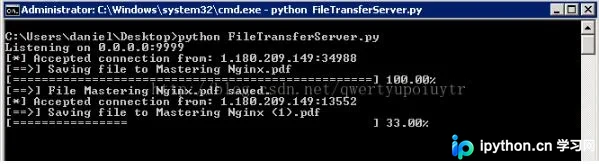
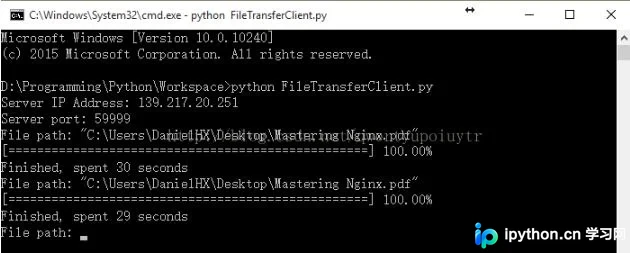
程序运行后的输出结果示例如下:
服务器端运行状态:
客户端连接情况(此处服务器端配置了端口映射,将外部端口59999映射至内部端口9999):
以上就是Python单线程C/S文件传输实例的全部内容,希望能为读者提供参考,并欢迎大家继续支持本站。
免责声明:本文内容仅供参考,不代表本站观点。转载或引用请注明出处。









