

Python调用百度AI实现多种OCR文字识别功能详解

发布时间:2026-10-13| 6人浏览过
本文介绍如何使用Python调用百度AI开放平台的OCR接口,实现通用文字、网络图片、身份证、银行卡、驾驶证、行驶证、车牌及营业执照等多种场景的文字识别功能。包含完整的代码示例、参数配置及结果解析,帮助开发者快速集成文字识别能力。
本文整理了基于Python调用百度AI接口实现各类文字识别功能的完整方案,供开发者参考使用。
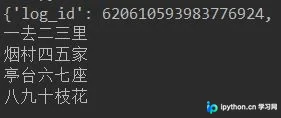
1. 通用文字识别
# -*- coding: UTF-8 -*-
from aip import AipOcr

# 定义常量
APP_ID = '11352343'
API_KEY = 'Nd5Z1NkGoLDvHwBnD2bFLpCE'
SECRET_KEY = 'A9FsnnPj1Ys2Gof70SNgYo23hKOIK8Os'

# 初始化AipFace对象
aipOcr = AipOcr(APP_ID, API_KEY, SECRET_KEY)

# 读取图片
filePath = "test3.png"

def get_file_content(filePath):
 with open(filePath, 'rb') as fp:
 return fp.read()

# 定义参数变量
options = {
 'detect_direction': 'true',
 'language_type': 'CHN_ENG',
}

# 调用通用文字识别接口
result = aipOcr.basicGeneral(get_file_content(filePath), options)
print(result)
words_result=result['words_result']
for i in range(len(words_result)):
 print(words_result[i]['words'])
2. 网络图片文字识别
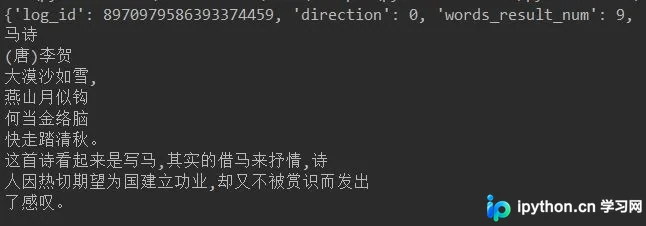
该功能专门用于识别背景复杂或字体特殊的网络图片中的文字内容。
# -*- coding: UTF-8 -*-
from aip import AipOcr

# 定义常量
APP_ID = '11352343'
API_KEY = 'Nd5Z1NkGoLDvHwBnD2bFLpCE'
SECRET_KEY = 'A9FsnnPj1Ys2Gof70SNgYo23hKOIK8Os'

# 初始化AipFace对象
aipOcr = AipOcr(APP_ID, API_KEY, SECRET_KEY)

# 读取图片
filePath = "2-5.jpg"

def get_file_content(filePath):
 with open(filePath, 'rb') as fp:
 return fp.read()

options={}
options["detect_direction"] = "true" #检测朝向
options["detect_language"] = "true" #检测语言

result= aipOcr.webImage(get_file_content(filePath),options)
print(result)
for i in range(len(result['words_result'])):
 print(result['words_result'][i]['words'])
3. 身份证识别
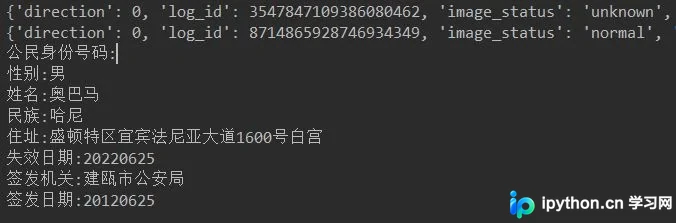
身份证识别支持处理身份证正面和背面两种图像。
# -*- coding: UTF-8 -*-
from aip import AipOcr
# 定义常量
APP_ID = '11352343'
API_KEY = 'Nd5Z1NkGoLDvHwBnD2bFLpCE'
SECRET_KEY = 'A9FsnnPj1Ys2Gof70SNgYo23hKOIK8Os'

# 初始化AipFace对象
aipOcr = AipOcr(APP_ID, API_KEY, SECRET_KEY)

# 读取图片
filePath1 = "2-6-2.jpg" #正面
filePath2 = "2-6-1.jpg" #背面
def get_file_content(filePath):
 with open(filePath, 'rb') as fp:
 return fp.read()

options={}
options["detect_direction"] = "true" #检测朝向
options["detect_risk"] = "true"
#是否开启身份证风险类型(身份证复印件、临时身份证、身份证翻拍、修改过的身份证)功能,默认不开启

result1= aipOcr.idcard(get_file_content(filePath1),'front',options)
result2= aipOcr.idcard(get_file_content(filePath2),'back',options)
print(result1)
print(result2)
for key in result1['words_result'].keys():
 print(key+':'+result1['words_result'][key]['words'])

for key in result2['words_result'].keys():
 print(key+':'+result2['words_result'][key]['words'])
4. 银行卡识别
此功能用于识别银行卡图像,并返回银行卡号及发卡行信息。
# -*- coding: UTF-8 -*-
from aip import AipOcr

# 定义常量
APP_ID = '11352343'
API_KEY = 'Nd5Z1NkGoLDvHwBnD2bFLpCE'
SECRET_KEY = 'A9FsnnPj1Ys2Gof70SNgYo23hKOIK8Os'

# 初始化AipFace对象
aipOcr = AipOcr(APP_ID, API_KEY, SECRET_KEY)

# 读取图片
filePath = "2-7.jpeg"

def get_file_content(filePath):
 with open(filePath, 'rb') as fp:
 return fp.read()

options={}

result=aipOcr.bankcard(get_file_content(filePath),options)
print(result)
#bank_card_type 银行卡类型,0:不能识别; 1: 借记卡; 2: 信用卡
for key in result['result']:
 print(key+':'+str(result['result'][key]))

5. 驾驶证识别
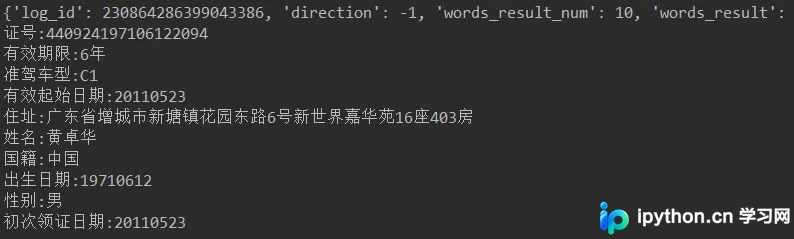
该接口可对机动车驾驶证的所有关键字段进行自动识别。
# -*- coding: UTF-8 -*-
from aip import AipOcr

# 定义常量
APP_ID = '11352343'
API_KEY = 'Nd5Z1NkGoLDvHwBnD2bFLpCE'
SECRET_KEY = 'A9FsnnPj1Ys2Gof70SNgYo23hKOIK8Os'

# 初始化AipFace对象
aipOcr = AipOcr(APP_ID, API_KEY, SECRET_KEY)

# 读取图片
filePath = "2-8.jpg"

def get_file_content(filePath):
 with open(filePath, 'rb') as fp:
 return fp.read()

options={}

result=aipOcr.drivingLicense(get_file_content(filePath),options)
print(result)

for key in result['words_result']:
 print(key+':'+str(result['words_result'][key]['words']))
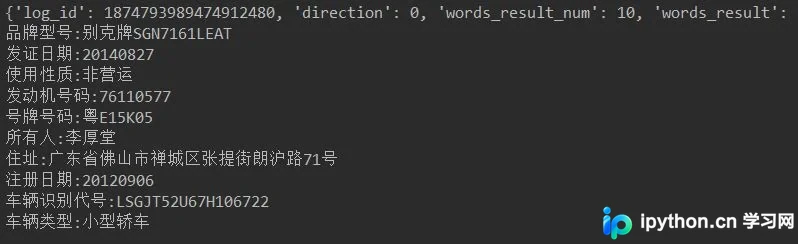
6. 行驶证识别
此功能用于识别机动车行驶证正本,并提取所有关键字段信息。
# -*- coding: UTF-8 -*-
from aip import AipOcr

# 定义常量
APP_ID = '11352343'
API_KEY = 'Nd5Z1NkGoLDvHwBnD2bFLpCE'
SECRET_KEY = 'A9FsnnPj1Ys2Gof70SNgYo23hKOIK8Os'

# 初始化AipFace对象
aipOcr = AipOcr(APP_ID, API_KEY, SECRET_KEY)

# 读取图片
filePath = "2-9.jpg"

def get_file_content(filePath):
 with open(filePath, 'rb') as fp:
 return fp.read()

options={}

result=aipOcr.vehicleLicense(get_file_content(filePath),options)
print(result)

for key in result['words_result']:
 print(key+':'+str(result['words_result'][key]['words']))
7. 车牌识别
# -*- coding: UTF-8 -*-
from aip import AipOcr

# 定义常量
APP_ID = '11352343'
API_KEY = 'Nd5Z1NkGoLDvHwBnD2bFLpCE'
SECRET_KEY = 'A9FsnnPj1Ys2Gof70SNgYo23hKOIK8Os'

# 初始化AipFace对象
aipOcr = AipOcr(APP_ID, API_KEY, SECRET_KEY)

# 读取图片
filePath = "2-3.png"

def get_file_content(filePath):
 with open(filePath, 'rb') as fp:
 return fp.read()

options={}
options["multi_detect"] = "true"
#是否检测多张车牌,默认为false,当置为true的时候可以对一张图片内的多张车牌进行识别

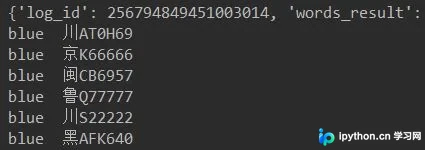
result= aipOcr.licensePlate(get_file_content(filePath),options)

for i in range(len(result['words_result'])):
 print(result['words_result'][i]['color']+' '+result['words_result'][i]['number'])
8. 营业执照识别
该功能用于识别营业执照图像,并返回单位名称、法人、地址、有效期、证件编号、社会信用代码等关键字段的值。
# -*- coding: UTF-8 -*-
from aip import AipOcr

# 定义常量
APP_ID = '11352343'
API_KEY = 'Nd5Z1NkGoLDvHwBnD2bFLpCE'
SECRET_KEY = 'A9FsnnPj1Ys2Gof70SNgYo23hKOIK8Os'

# 初始化AipFace对象
aipOcr = AipOcr(APP_ID, API_KEY, SECRET_KEY)

# 读取图片
filePath = "2-10.jpg"

def get_file_content(filePath):
 with open(filePath, 'rb') as fp:
 return fp.read()

options={}

result=aipOcr.businessLicense(get_file_content(filePath),options)
print(result)

for key in result['words_result']:
 print(key+':'+str(result['words_result'][key]['words']))
以上就是本文的全部内容,希望对各位的学习有所帮助,也欢迎大家继续支持本站。
免责声明:本文内容仅供参考,不代表本站观点。转载或引用请注明出处。









