

Python使用Turtle库绘制动态钟表

发布时间:2026-10-14| 6人浏览过
本文介绍如何利用Python的Turtle库绘制一个动态运行的钟表。通过面向对象编程思想,使用五个Turtle对象分别负责绘制表盘、模拟三根表针以及输出文字。程序利用ontimer()函数实现每秒刷新画面,展示完整的代码实现与注释说明。
Python Turtle库动态钟表绘制教程
Python拥有庞大的函数库资源,且持续迭代更新。因此,学习这些函数库最高效的方式是直接查阅Python官方文档,并配合Google和百度等搜索引擎进行辅助学习。
本文所涉及的turtle库,其对应的官方文档地址为。
绘制动态钟表的核心思路基于面向对象编程,具体方案如下:
整个绘制过程需要调用5个Turtle对象来完成。
其中1个Turtle对象专门用于绘制钟表的外盘。
另外3个Turtle对象用于模拟时针、分针和秒针的运动行为。
最后1个Turtle对象用于在表盘上输出相关的文字信息。
程序根据实时时间,利用ontimer()函数不断刷新表盘画面,最终显示效果如所示。
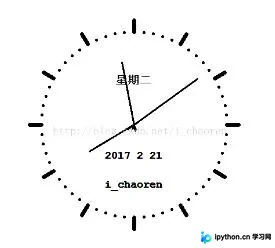
代码中相关函数的具体用法已添加详细注释,完整代码如下:
from turtle import *
from datetime import *

def Skip(step):
 penup()
 forward(step)
 pendown()

def mkHand(name, length):
 #注册Turtle形状,建立表针Turtle
 reset() #清空当前窗口,并重置位置等信息为默认值
 Skip(-length*0.1)
 begin_poly()
 forward(length*1.1)
 end_poly()
 handForm = get_poly()
 register_shape(name, handForm)

def Init():
 global secHand, minHand, hurHand, printer
 mode("logo")# 重置Turtle指向北
 #建立三个表针Turtle并初始化
 mkHand("secHand", 135)
 mkHand("minHand", 110)
 mkHand("hurHand", 90)
 secHand = Turtle()
 secHand.shape("secHand")
 minHand = Turtle()
 minHand.shape("minHand")
 hurHand = Turtle()
 hurHand.shape("hurHand")
 for hand in secHand, minHand, hurHand:
  hand.shapesize(1, 1, 3)
  hand.speed(0)
 #建立输出文字Turtle
 printer = Turtle()
 printer.hideturtle()
 printer.penup()

def SetupClock(radius):
 #建立表的外框
 reset()
 pensize(7)
 for i in range(60):
  Skip(radius)
  if i % 5 == 0:
   forward(20)
   Skip(-radius-20)
  else:
   dot(5)
   Skip(-radius)
  right(6)

def Week(t):
 week = ["星期一", "星期二", "星期三",
   "星期四", "星期五", "星期六", "星期日"]
 return week[t.weekday()]

def Date(t):
 y = t.year
 m = t.month
 d = t.day
 return "%s %d %d" % (y, m, d)

def Tick():
 #绘制表针的动态显示
 t = datetime.today()
 second = t.second + t.microsecond*0.000001
 minute = t.minute + second/60.0
 hour = t.hour + minute/60.0
 secHand.setheading(6*second) #设置朝向,每秒转动6度
 minHand.setheading(6*minute)
 hurHand.setheading(30*hour)

 tracer(False) #不显示绘制的过程,直接显示绘制结果
 printer.forward(65)
 printer.write(Week(t), align="center",
     font=("Courier", 14, "bold"))
 printer.back(130)
 printer.write(Date(t), align="center",
     font=("Courier", 14, "bold"))
 printer.back(50)
 printer.write("i_chaoren", align="center",
     font=("Courier", 14, "bold"))
 printer.home()
 tracer(True)

 ontimer(Tick, 1000)#1000ms后继续调用tick

def main():
 tracer(False) #使多个绘制对象同时显示
 Init()
 SetupClock(160)
 tracer(True)
 Tick()
 mainloop()

if __name__ == "__main__":
 main()
以上就是本文的全部内容,希望能为您的学习提供一定帮助,也欢迎大家多多支持本站。
免责声明:本文内容仅供参考,不代表本站观点。转载或引用请注明出处。









