

Python重建二叉树的三种实现方式:输入、递归与堆栈

本文详解Python中重建二叉树的三种方法:通过input手动输入、前序字符串递归解析及堆栈解析。文章提供节点类定义、核心算法代码及完整实例,适用于数据结构学习与算法解题参考,并附GitHub源码链接。
本文通过具体实例,介绍在Python中重建二叉树的三种实现方案,供读者参考学习。
在算法学习过程中,针对重建二叉树这一主题,主要探讨以下三种实现路径:
- 方法一:通过input按前序遍历顺序输入字符来重建二叉树
- 方法二:利用前序遍历顺序字符串,通过递归方式解析并重建二叉树
- 方法三:利用前序遍历顺序字符串,通过堆栈方式解析并重建二叉树
若无需阅读后续详细内容,可直接点击此处本站下载完整实例代码。
思路分析
在算法学习领域,Python相关的算法资料相对稀缺,涉及二叉树解析与重建的内容更为少见,因此本文旨在通过实践探索,逐步理清实现逻辑。
不同的二叉树遍历方式会产生不同的节点排序序列。在已知节点排序序列的前提下,结合特定的遍历规则,即可对序列进行解析,进而构建出对应的二叉树结构。
在实际应用中,该技术可用于解析多项式、网页结构、XML文档等场景。
本文选取前序遍历的排列方式,对已知字符串进行解析以生成二叉树。本文主要面向解题目的,尚未进行深度优化,可能未能完全体现Python代码的简洁与优美之处,欢迎资深开发者指正。
首先介绍基于input输入的实现方式
定义节点类
class treeNode:
 def __init__(self, rootObj = None, leftChild = None, rightChild = None):
  self.key = rootObj
  self.leftChild = None
  self.rightChild = None
利用input方法重建二叉树的代码实现
 def createTreeByInput(self, root):
  tmpKey = raw_input("please input a key, input '#' for Null")
  if tmpKey == '#':
   root = None
  else:
   root = treeNode(rootObj=tmpKey)
   root.leftChild = self.createTreeByInput(root.leftChild)
   root.rightChild = self.createTreeByInput(root.rightChild)
  return root
以下两种方法均使用预先编写好的字符串,通过list方法转换为列表后传入进行解析
myTree用于实例化一棵空树
调用递归方法完成二叉树重建
 treeElementList = '124#8##5##369###7##'
 myTree = myTree.createTreeByListWithRecursion(list(treeElementList))
 printBTree(myTree, 0)
递归方法重建二叉树的代码实现
 def createTreeByListWithRecursion(self, preOrderList):
  """
  根据前序列表重建二叉树
  :param preOrder: 输入前序列表
  :return: 二叉树
  """
  preOrder = preOrderList
  if preOrder is None or len(preOrder) <= 0:
   return None
  currentItem = preOrder.pop(0) # 模拟C语言指针移动
  if currentItem is '#':
   root = None
  else:
   root = treeNode(currentItem)
   root.leftChild = self.createTreeByListWithRecursion(preOrder)
   root.rightChild = self.createTreeByListWithRecursion(preOrder)
  return root
调用堆栈方法完成二叉树重建
 treeElementList = '124#8##5##369###7##'
 myTree = myTree.createTreeByListWithStack(list(treeElementList))
 printBTree(myTree, 0)
使用堆栈重建二叉树的代码实现
def createTreeByListWithStack(self, preOrderList):
 """
 根据前序列表重建二叉树
 :param preOrder: 输入前序列表
 :return: 二叉树
 """
 preOrder = preOrderList
 pStack = SStack()
 # check
 if preOrder is None or len(preOrder) <= 0 or preOrder[0] is '#':
  return None
 # get the root
 tmpItem = preOrder.pop(0)
 root = treeNode(tmpItem)
 # push root
 pStack.push(root)
 currentRoot = root
 while preOrder:
  # get another item
  tmpItem = preOrder.pop(0)
  # has child
  if tmpItem is not '#':
   # does not has left child, insert one
   if currentRoot.leftChild is None:
    currentRoot = self.insertLeft(currentRoot, tmpItem)
    pStack.push(currentRoot.leftChild)
    currentRoot = currentRoot.leftChild
   # otherwise insert right child
   elif currentRoot.rightChild is None:
    currentRoot = self.insertRight(currentRoot, tmpItem)
    pStack.push(currentRoot.rightChild)
    currentRoot = currentRoot.rightChild
  # one child is null
  else:
   # if has no left child
   if currentRoot.leftChild is None:
    currentRoot.leftChild = None
    # get another item fill right child
    tmpItem = preOrder.pop(0)
    # has right child
    if tmpItem is not '#':
     currentRoot = self.insertRight(currentRoot, tmpItem)
     pStack.push(currentRoot.rightChild)
     currentRoot = currentRoot.rightChild
    # right child is null
    else:
     currentRoot.rightChild = None
     # pop itself
     parent = pStack.pop()
     # pos parent
     if not pStack.is_empty():
      parent = pStack.pop()
     # parent become current root
     currentRoot = parent
     # return from right child, so the parent has right child, go to parent's parent
     if currentRoot.rightChild is not None:
      if not pStack.is_empty():
       parent = pStack.pop()
       currentRoot = parent
   # there is a leftchild ,fill right child with null and return to parent
   else:
    currentRoot.rightChild = None
    # pop itself
    parent = pStack.pop()
    if not pStack.is_empty():
     parent = pStack.pop()
    currentRoot = parent
 return root
显示二叉树的功能实现
def printBTree(bt, depth):
 '''''
 递归打印这棵二叉树,#号表示该节点为NULL
 '''
 ch = bt.key if bt else '#'
 if depth > 0:
  print '%s%s%s' % ((depth - 1) * ' ', '--', ch)
 else:
  print ch
 if not bt:
  return
 printBTree(bt.leftChild, depth + 1)
 printBTree(bt.rightChild, depth + 1)
打印二叉树的代码参考自某位开发者的实现,在此表示感谢。
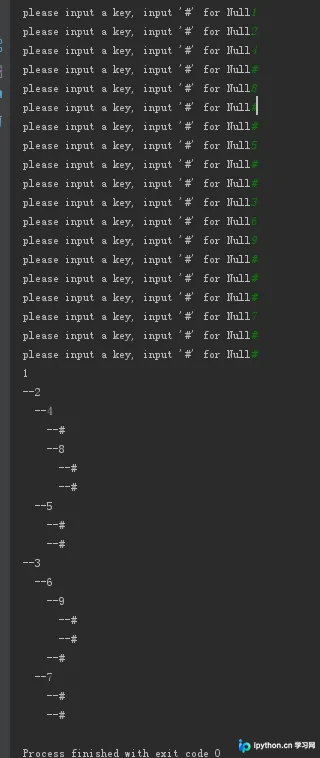
input输入及显示二叉树的结果展示
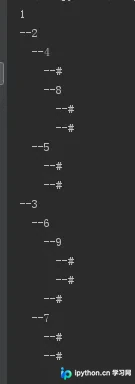
解析字符串后的结果展示
完整代码参见:https://github.com/flyhawksz/study-algorithms/blob/master/Class_BinaryTree2.py
更多关于Python相关内容感兴趣的读者可查看本站专题:《Python数据结构与算法教程》、《Python加密解密算法与技巧总结》、《Python编码操作技巧总结》、《Python函数使用技巧总结》、《Python字符串操作技巧汇总》及《Python入门与进阶经典教程》
希望本文所述内容对大家学习Python程序设计有所帮助。
免责声明:本文内容仅供参考,不代表本站观点。转载或引用请注明出处。









