

Python验证码识别:基于滴水算法的粘连字符分割实战

发布时间:2026-10-13| 6人浏览过
本文介绍利用Python实现验证码中粘连字符的分割技术。通过对比传统直线切割,详细解析模拟水滴滚动路径的滴水算法原理,并结合垂直投影预处理与具体代码示例,展示如何处理双字符粘连场景。文章提供Python3兼容代码及效果分析,探讨算法局限性与多字符扩展可能性。
滴水算法概述
作为一种专门针对手写粘连字符分割的技术,滴水算法摒弃了传统的直线切割方式。它通过模拟水滴在字符表面的滚动轨迹,依据水流路径来界定字符边界,从而有效避免了因直线切割可能导致的过度分割问题。
引言
前文曾提及,面对字符粘连问题,滴水算法是一个可行的解决方案。然而,由于该算法逻辑较为复杂,深入理解其核心机制存在一定难度。幸运的是,已有开发者实现了相关功能代码,为后续研究提供了基础。
笔者对现有代码进行了适度优化,并将其升级适配至Python3环境,以确保在现代开发环境中能够顺利运行。
以下述图片为例进行说明:
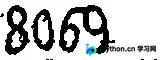
此前我们已探讨过,对于此类简单的粘连情况,通过调整阈值即可实现分割。但在本例中,我们将采用滴水算法来执行分割操作。
首先,利用前文介绍的垂直投影法或连通域分析进行初步切割处理,得到的中间结果如下所示:
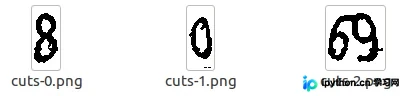
针对上述处理后仍存在的粘连部分,应用滴水算法进行进一步处理:
from itertools import groupby

def binarizing(img,threshold):
 """传入image对象进行灰度、二值处理"""
 img = img.convert("L") # 转灰度
 pixdata = img.load()
 w, h = img.size
 # 遍历所有像素,大于阈值的为黑色
 for y in range(h):
  for x in range(w):
   if pixdata[x, y] < threshold:
    pixdata[x, y] = 0
   else:
    pixdata[x, y] = 255
 return img

def vertical(img):
 """传入二值化后的图片进行垂直投影"""
 pixdata = img.load()
 w,h = img.size
 result = []
 for x in range(w):
  black = 0
  for y in range(h):
   if pixdata[x,y] == 0:
    black += 1
  result.append(black)
 return result

def get_start_x(hist_width):
 """根据图片垂直投影的结果来确定起点
  hist_width中间值 前后取4个值 再这范围内取最小值
 """
 mid = len(hist_width) // 2 # 注意py3 除法和py2不同
 temp = hist_width[mid-4:mid+5]
 return mid - 4 + temp.index(min(temp))

def get_nearby_pix_value(img_pix,x,y,j):
 """获取临近5个点像素数据"""
 if j == 1:
  return 0 if img_pix[x-1,y+1] == 0 else 1
 elif j ==2:
  return 0 if img_pix[x,y+1] == 0 else 1
 elif j ==3:
  return 0 if img_pix[x+1,y+1] == 0 else 1
 elif j ==4:
  return 0 if img_pix[x+1,y] == 0 else 1
 elif j ==5:
  return 0 if img_pix[x-1,y] == 0 else 1
 else:
  raise Exception("get_nearby_pix_value error")


def get_end_route(img,start_x,height):
 """获取滴水路径"""
 left_limit = 0
 right_limit = img.size[0] - 1
 end_route = []
 cur_p = (start_x,0)
 last_p = cur_p
 end_route.append(cur_p)

 while cur_p[1] < (height-1):
  sum_n = 0
  max_w = 0
  next_x = cur_p[0]
  next_y = cur_p[1]
  pix_img = img.load()
  for i in range(1,6):
   cur_w = get_nearby_pix_value(pix_img,cur_p[0],cur_p[1],i) * (6-i)
   sum_n += cur_w
   if max_w < cur_w:
    max_w = cur_w
  if sum_n == 0:
   # 如果全黑则看惯性
   max_w = 4
  if sum_n == 15:
   max_w = 6

  if max_w == 1:
   next_x = cur_p[0] - 1
   next_y = cur_p[1]
  elif max_w == 2:
   next_x = cur_p[0] + 1
   next_y = cur_p[1]
  elif max_w == 3:
   next_x = cur_p[0] + 1
   next_y = cur_p[1] + 1
  elif max_w == 5:
   next_x = cur_p[0] - 1
   next_y = cur_p[1] + 1
  elif max_w == 6:
   next_x = cur_p[0]
   next_y = cur_p[1] + 1
  elif max_w == 4:
   if next_x > cur_p[0]:
    # 向右
    next_x = cur_p[0] + 1
    next_y = cur_p[1] + 1
   if next_x < cur_p[0]:
    next_x = cur_p[0]
    next_y = cur_p[1] + 1
   if sum_n == 0:
    next_x = cur_p[0]
    next_y = cur_p[1] + 1
  else:
   raise Exception("get end route error")

  if last_p[0] == next_x and last_p[1] == next_y:
   if next_x < cur_p[0]:
    max_w = 5
    next_x = cur_p[0] + 1
    next_y = cur_p[1] + 1
   else:
    max_w = 3
    next_x = cur_p[0] - 1
    next_y = cur_p[1] + 1
  last_p = cur_p

  if next_x > right_limit:
   next_x = right_limit
   next_y = cur_p[1] + 1
  if next_x < left_limit:
   next_x = left_limit
   next_y = cur_p[1] + 1
  cur_p = (next_x,next_y)
  end_route.append(cur_p)
 return end_route

def get_split_seq(projection_x):
 split_seq = []
 start_x = 0
 length = 0
 for pos_x, val in enumerate(projection_x):
  if val == 0 and length == 0:
   continue
  elif val == 0 and length != 0:
   split_seq.append([start_x, length])
   length = 0
  elif val == 1:
   if length == 0:
    start_x = pos_x
   length += 1
  else:
   raise Exception('generating split sequence occurs error')
 # 循环结束时如果length不为0,说明还有一部分需要append
 if length != 0:
  split_seq.append([start_x, length])
 return split_seq


def do_split(source_image, starts, filter_ends):
 """
 具体实行切割
 : param starts: 每一行的起始点 tuple of list
 : param ends: 每一行的终止点
 """
 left = starts[0][0]
 top = starts[0][1]
 right = filter_ends[0][0]
 bottom = filter_ends[0][1]
 pixdata = source_image.load()
 for i in range(len(starts)):
  left = min(starts[i][0], left)
  top = min(starts[i][1], top)
  right = max(filter_ends[i][0], right)
  bottom = max(filter_ends[i][1], bottom)
 width = right - left + 1
 height = bottom - top + 1
 image = Image.new('RGB', (width, height), (255,255,255))
 for i in range(height):
  start = starts[i]
  end = filter_ends[i]
  for x in range(start[0], end[0]+1):
   if pixdata[x,start[1]] == 0:
    image.putpixel((x - left, start[1] - top), (0,0,0))
 return image

def drop_fall(img):
 """滴水分割"""
 width,height = img.size
 # 1 二值化
 b_img = binarizing(img,200)
 # 2 垂直投影
 hist_width = vertical(b_img)
 # 3 获取起点
 start_x = get_start_x(hist_width)

 # 4 开始滴水算法
 start_route = []
 for y in range(height):
  start_route.append((0,y))

 end_route = get_end_route(img,start_x,height)
 filter_end_route = [max(list(k)) for _,k in groupby(end_route,lambda x:x[1])] # 注意这里groupby
 img1 = do_split(img,start_route,filter_end_route)
 img1.save('cuts-d-1.png')

 start_route = list(map(lambda x : (x[0]+1,x[1]),filter_end_route)) # python3中map不返回list需要自己转换
 end_route = []
 for y in range(height):
  end_route.append((width-1,y))
 img2 = do_split(img,start_route,end_route)
 img2.save('cuts-d-2.png')

if __name__ == '__main__':
 p = Image.open("cuts-2.png")
 drop_fall(p)
执行该算法后,最终得到两张分离后的图片:
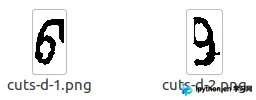
从结果图观察,虽然实现了字符分离,但分割效果仍有提升空间。此外,当前代码仅适用于两个字符粘连的场景。若希望处理多个字符粘连的情况,建议深入理解滴水算法原理后对代码进行扩展改造。
总结
至此,本文的全部内容已介绍完毕。希望本文提供的技术细节与代码示例能为读者的学习或工作带来参考价值。如有任何疑问,欢迎在评论区留言交流,感谢大家对本站的支持。
免责声明:本文内容仅供参考,不代表本站观点。转载或引用请注明出处。









