

Python MySQLdb数据库操作基类与批量处理实战

发布时间:2026-10-13| 6人浏览过
本文详解Python中MySQLdb库的高级用法,通过封装DbBase基类实现数据库连接的统一管理。重点介绍利用executemany进行批量插入和更新的技巧,结合JSON配置文件管理数据库参数,并提供处理索引冲突及大数据量分批处理的完整代码示例,帮助开发者提升数据库操作效率与代码可维护性。
本文主要探讨在Python中使用MySQLdb库进行数据库批量插入(insert)和更新(update)操作的具体实现方法。
首先,我们构建一个DbBase基类,供其他具体的数据库服务类继承,以简化开发流程。数据库的连接信息,如IP地址、端口等,统一通过JSON格式的配置文件进行读取和管理,确保配置与代码分离。
其次,介绍常见的数据库查询操作,以及针对大量数据的高效批量插入和更新策略。
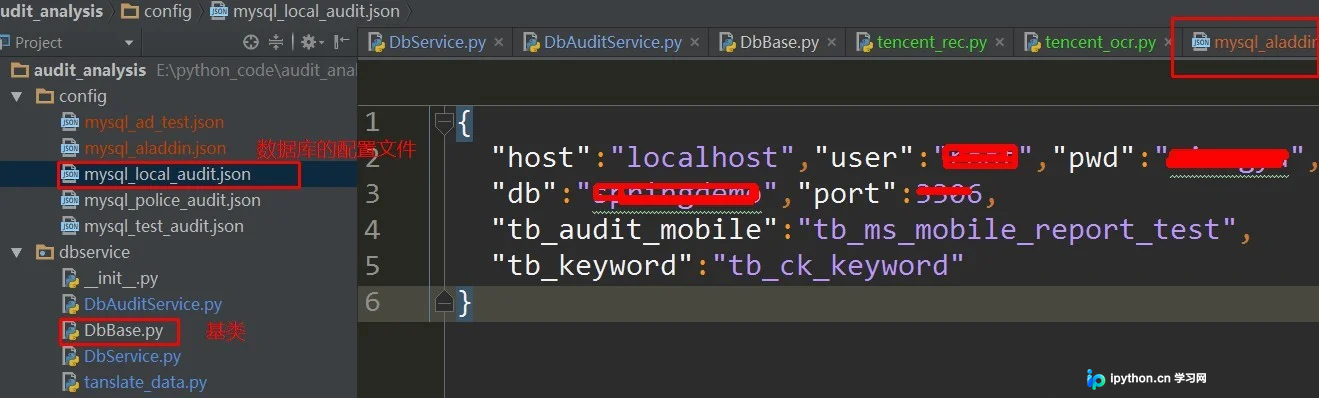
以下是DbBase基类的核心代码实现:
# _*_ coding:utf-8 _*_
import MySQLdb
import json
import codecs
# 这个自己改一下啊
from utils.JsonUtil import get_json_from_file
def byteify(input):
  """
  the string of json typed unicode to str in python
  This function coming from stack overflow
  :param input: {u'first_name': u'Guido', u'last_name': u'jack'}
  :return:   {'first_name': 'Guido', 'last_name': 'jack'}
  """
  if isinstance(input, dict):
    return {byteify(key): byteify(value)
        for key, value in input.iteritems()}
  elif isinstance(input, list):
    return [byteify(element) for element in input]
  elif isinstance(input, unicode):
    return input.encode('utf-8')
  else:
    return input
def get_json_from_file(filename):
  with open(filename) as jf:
    jsondata = json.load(jf)
  return byteify(jsondata)
class DbBase(object):
  def __init__(self, **kwargs):
    self.db_config_file = kwargs['db_config_file']
    self.config_db(self.db_config_file)
  def config_db(self, db_config_file):
    data = get_json_from_file(db_config_file)
    host = data['host']
    user = data['user']
    pwd = data['pwd']
    db = data['db']
    port = data['port']
    self.tb_audit_mobile = data['tb_audit_mobile']
    self.conn = MySQLdb.connect(host=host, port=port, user=user, passwd=pwd, db=db, charset="utf8", use_unicode=True)
    self.cursor = self.conn.cursor()
接着展示一个继承自DbBase的具体子类示例:
class DbAuditTestService(DbBase):
  def __init__(self, **kwargs):
    super(DbAuditTestService, self).__init__(**kwargs)
  def getAdTestURl(self, beg, end):
    sql = """select url, source from tb_name where create_date BETWEEN '%s' and '%s' """ % (beg, end)
    self.cursor.execute(sql)
    res = [row for row in self.cursor]
    return res
  def insert(self, lst_row):
  """batch insert, use ignore 避免索引唯一问题"""
    try:
      insert_sql = 'INSERT ignore INTO tb_ms_mobile_report_test (appid, source) VALUES (%s, %s)'
      self.cursor.executemany(insert_sql, lst_row)
      self.conn.commit()
    except MySQLdb.OperationalError as e:
      logger.info('%s' % e)
      self.cursor.close()
      self.conn.close()
      self.config_db(self.db_config_file)
  def update_ip_info(self, ip_info):
    """
    batch update
      [[voilate_right_rate, ip]]
    :param ip_info:
    :return:
    """
    query = """
        update tb_ms_audit_ip_info set
        ip_right_rate=%s
        where submit_ip=%s """
    self.cursor.executemany(query, ip_info)
    self.conn.commit()
def insert_all():
"""批量操作的示例"""
  db_audit = DbAuditService(db_config_file='../config/mysql_police_audit.json')
  size = db_audit.count()
  db_audit_test = DbAuditTestService(db_config_file='../config/mysql_local_audit.json')
  batch_size = 2000
  for k in xrange(100000, size, batch_size):
    logger.info('query limit %s ~ %s' % (k, batch_size))
    lst_row = db_audit.query_limit(k, batch_size)
    logger.info('convert_rows ')
    lst_row = convert_rows(lst_row)
    db_audit_test.insert(lst_row)
最后对上述内容进行总结。
以上介绍了Python MySQLdb的使用教程,希望能为读者提供实际帮助。如有任何疑问,欢迎留言交流,小编会及时回复。感谢大家对本站的支持!
免责声明:本文内容仅供参考,不代表本站观点。转载或引用请注明出处。









