

Python实现安卓游戏《单词英雄》自动答题外挂教程

本文介绍使用Python编写安卓游戏《单词英雄》自动答题外挂的实现方案。通过PIL截取屏幕图像,利用Tesseract-OCR引擎识别英文题目与中文选项,结合字典翻译与汉字相似度匹配算法确定最佳答案,最后调用autopy模拟鼠标点击完成游戏操作。教程涵盖环境配置、代码逻辑及注意事项,识别准确率约70%。
本次教程以安卓游戏《单词英雄》为目标对象,建议读者先下载该游戏以便对照操作。
游戏主界面如图所示:
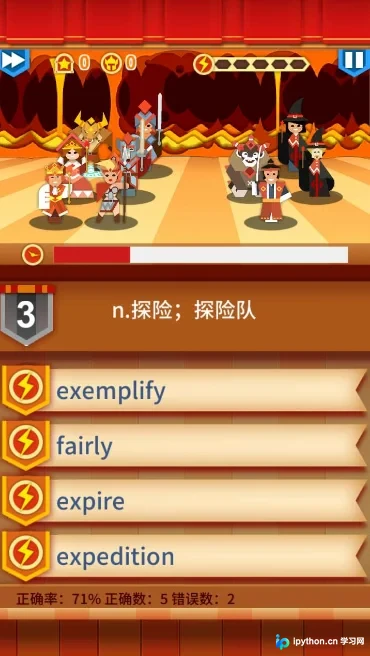
游戏机制要求玩家通过选择单词的正确释义进行攻击,选对则正常攻击,选错则受到象征性惩罚。经过一段时间游玩,作者构思了自动化方案:利用PIL库截取屏幕图片,通过OCR识别图中的单词和选项,将英文单词翻译为中文释义,再根据中文释义与选项进行模糊匹配,从而自动选择对应答案。
经过大量资料查阅,程序主要依赖以下组件:
PIL:Python Imaging Library,知名的图像处理库。
pytesser:Python环境下调用tesseract-ocr进行图像识别的封装模块。
Tesseract-OCR:开源图像识别引擎,支持英文、中文及其他语言的文本识别。
autopy:Python环境下用于模拟鼠标和键盘操作的模块。
在Windows 7环境下,请按以下步骤安装所需组件:
(1) 安装PIL库,下载地址为:http://www.pythonware.com/products/pil/,请安装适用于Python 2.7的Python Imaging Library 1.1.7版本。
(2) 安装pytesser,下载地址为:http://code.google.com/p/pytesser/,下载并解压后,将文件夹直接放置于C:\Python27\Lib\site-packages目录下。在该文件夹内新建一个名为pytesser.pth的文件,文件内容填写为C:\Python27\Lib\site-packages\pytesser_v0.0.1。
(3) 安装Tesseract OCR引擎,访问https://github.com/tesseract-ocr/tesseract/wiki/Downloads,下载Windows installer of tesseract-ocr 3.02.02 (including English language data)安装包并进行安装。
(4) 安装中文语言包,访问https://github.com/tesseract-ocr/tessdata下载chi_sim.traineddata简体中文语言包,将其放入Tesseract安装目录下的tessdata文件夹中,以便支持简体中文识别。
(5) 修改C:\Python27\Lib\site-packages\pytesser_v0.0.1目录下的pytesser.py文件,在image_to_string函数中增加language参数,设置language='chi_sim'即可识别中文,默认值为eng(英文)。
修改后的pytesser.py代码如下:
"""OCR in Python using the Tesseract engine from Google
http://code.google.com/p/pytesser/
by Michael J.T. O'Kelly
V 0.0.1, 3/10/07"""
import Image
import subprocess
import util
import errors
tesseract_exe_name = 'tesseract' # Name of executable to be called at command line
scratch_image_name = "temp.bmp" # This file must be .bmp or other Tesseract-compatible format
scratch_text_name_root = "temp" # Leave out the .txt extension
cleanup_scratch_flag = True # Temporary files cleaned up after OCR operation
def call_tesseract(input_filename, output_filename, language):
 """Calls external tesseract.exe on input file (restrictions on types),
 outputting output_filename+'txt'"""
 args = [tesseract_exe_name, input_filename, output_filename, "-l", language]
 proc = subprocess.Popen(args)
 retcode = proc.wait()
 if retcode!=0:
  errors.check_for_errors()
def image_to_string(im, cleanup = cleanup_scratch_flag, language = "eng"):
 """Converts im to file, applies tesseract, and fetches resulting text.
 If cleanup=True, delete scratch files after operation."""
 try:
  util.image_to_scratch(im, scratch_image_name)
  call_tesseract(scratch_image_name, scratch_text_name_root,language)
  text = util.retrieve_text(scratch_text_name_root)
 finally:
  if cleanup:
   util.perform_cleanup(scratch_image_name, scratch_text_name_root)
 return text
def image_file_to_string(filename, cleanup = cleanup_scratch_flag, graceful_errors=True, language = "eng"):
 """Applies tesseract to filename; or, if image is incompatible and graceful_errors=True,
 converts to compatible format and then applies tesseract. Fetches resulting text.
 If cleanup=True, delete scratch files after operation."""
 try:
  try:
   call_tesseract(filename, scratch_text_name_root, language)
   text = util.retrieve_text(scratch_text_name_root)
  except errors.Tesser_General_Exception:
   if graceful_errors:
    im = Image.open(filename)
    text = image_to_string(im, cleanup)
   else:
    raise
 finally:
  if cleanup:
   util.perform_cleanup(scratch_image_name, scratch_text_name_root)
 return text
if __name__=='__main__':
 im = Image.open('phototest.tif')
 text = image_to_string(im)
 print text
 try:
  text = image_file_to_string('fnord.tif', graceful_errors=False)
 except errors.Tesser_General_Exception, value:
  print "fnord.tif is incompatible filetype. Try graceful_errors=True"
  print value
 text = image_file_to_string('fnord.tif', graceful_errors=True)
 print "fnord.tif contents:", text
 text = image_file_to_string('fonts_test.png', graceful_errors=True)
 print text
(6) 安装autopy,下载地址为:https://pypi.python.org/pypi/autopy,下载autopy-0.51.win32-py2.7.exe进行安装,该模块用于模拟鼠标点击操作。
以下是程序的具体运行思路:
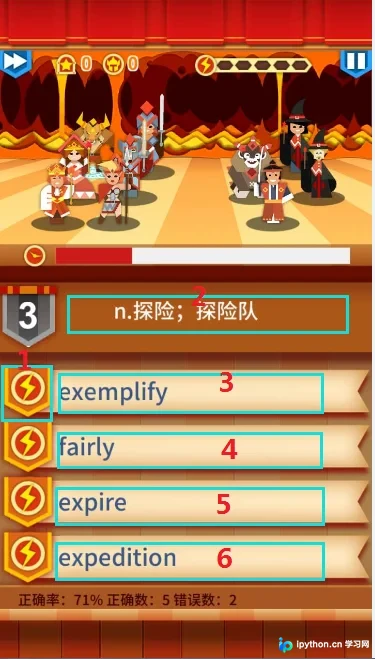
1. 首先通过Windows下的安卓模拟器运行游戏,使用PicPick工具截取屏幕,测量战斗画面中关键区域的位置并记录坐标。利用图中区域1判断战斗是否开始(保存基准图用于比对),利用区域2、3、4、5、6抓取图像并识别为文字。
计算图片指纹(Hash)的程序如下:
def get_hash(self, img):
    #计算图片的hash值
    image = img.convert("L")
    pixels = list(image.getdata())
    avg = sum(pixels) / len(pixels)
    return "".join(map(lambda p : "1" if p > avg else "0", pixels))
将图片识别为字符的代码如下:
#识别出对应位置图像成字符,把字符交给chose处理
  def getWordMeaning(self):
    pic_up = ImageGrab.grab((480,350, 480+300, 350+66))
    pic_aws1 = ImageGrab.grab((463,456, 463+362, 456+45))
    pic_aws2 = ImageGrab.grab((463,530, 463+362, 530+45))
    pic_aws3 = ImageGrab.grab((463,601, 463+362, 601+45))
    pic_aws4 = ImageGrab.grab((463,673, 463+362, 673+45))
    str_up = image_to_string(pic_up).strip().lower()
    #判断当前单词和上次识别单词相同,就不继续识别
    if str_up <> self.lastWord:
      #如果题目单词是英文,选项按中文进行识别
      if str_up.isalpha():
        eng_up = self.dt[str_up].decode('gbk') if self.dt.has_key(str_up) else ''
        chs1 = image_to_string(pic_aws1, language='chi_sim').decode('utf-8').strip()
        chs2 = image_to_string(pic_aws2, language='chi_sim').decode('utf-8').strip()
        chs3 = image_to_string(pic_aws3, language='chi_sim').decode('utf-8').strip()
        chs4 = image_to_string(pic_aws4, language='chi_sim').decode('utf-8').strip()
        print str_up, ':', eng_up
        self.chose(eng_up, (chs1, chs2, chs3, chs4))
      #如果题目单词是中文,选项按英文进行识别
      else:
        chs_up = image_to_string(pic_up, language='chi_sim').decode('utf-8').strip()
        eng1 = image_to_string(pic_aws1).strip()
        eng2 = image_to_string(pic_aws2).strip()
        eng3 = image_to_string(pic_aws3).strip()
        eng4 = image_to_string(pic_aws4).strip()

        e2c1 = self.dt[eng1].decode('gbk') if self.dt.has_key(eng1) else ''
        e2c2 = self.dt[eng2].decode('gbk') if self.dt.has_key(eng2) else ''
        e2c3 = self.dt[eng3].decode('gbk') if self.dt.has_key(eng3) else ''
        e2c4 = self.dt[eng4].decode('gbk') if self.dt.has_key(eng4) else ''
        print chs_up
        self.chose(chs_up, (e2c1, e2c2, e2c3, e2c4))
      self.lastWord = str_up
    return str_up
2. 预先截取区域1的图片并保存,通过计算当前画面与保存图片的距离,若距离小于40,则判定已进入选择界面。随后识别区域2、3、4、5、6的内容。若区域2识别结果为英文,则通过字典获取其中文意思,再将该中文意思与区域3、4、5、6的文字进行匹配,选择汉字匹配度最高的选项;若无法匹配,则默认选择最后一个选项。此前曾考虑使用Fuzzywuzzy库进行模糊匹配,但测试发现对中文效果不佳,故改为按单个汉字计算相似度。
匹配文字并做出选择的逻辑如下:
#根据传入的题目和选项进行匹配选择
  def chose(self, g, chs_list):
    j, max_score = -1, 0
    same_list = None
    #替换掉题目里的特殊字符
    re_list = [u'~', u',', u'.', u';', u' ', u'a', u'V', u'v', u'i', u'n', u'【', u')', u'_', u'W', u'd', u'j', u'-', u't']
    for i in re_list:
      g = g.replace(i, '')
    print type(g)
    #判断2个字符串中相同字符,相同字符最多的为最佳答案
    for i, chsWord in enumerate(chs_list):
      print type(chsWord)
      l = [x for x in g if x in chsWord and len(x)>0]
      score = len(l) if l else 0

      if score > max_score:
        max_score = score
        j = i
        same_list = l
    #如果没有匹配上默认选最后一个
    if j ==-1:
      print '1. %s; 2. %s; 3. %s; 4. %s; Not found choice.' % (chs_list[0], chs_list[1], chs_list[2], chs_list[3])
    else:
      print '1. %s; 2. %s; 3. %s; 4. %s; choice: %s' % (chs_list[0], chs_list[1], chs_list[2], chs_list[3], chs_list[j])
      for k, v in enumerate(same_list):
        print str(k) + '.' + v,
    order = j + 1
    self.mouseMove(order)
    return order
3. 最后通过调用autopy的mouseMove函数,控制鼠标点击对应位置完成选择。
程序运行录像链接:http://v.youku.com/v_show/id_XMTYxNTAzMDUwNA==.html
程序运行正常,受限于图片识别准确率和字典覆盖范围,整体正确率约为70%,效果尚可。该程序逻辑简单,主要作为娱乐项目,串联使用了图像识别、中文模糊匹配及鼠标模拟操作,可视为一个简易外挂。源程序及相关文件托管于:
http://git.oschina.net/highroom/My-Project/tree/master/Word%20Hero
免责声明:本文内容仅供参考,不代表本站观点。转载或引用请注明出处。









