

Python获取磁盘剩余空间的两种实现方案

发布时间:2026-10-13| 3人浏览过
本文介绍在Python中获取磁盘剩余空间的两种常用方法。第一种利用ctypes调用系统API,兼容Windows与Linux环境;第二种基于win32com组件,适用于Windows共享驱动器。文章提供完整代码示例及运行效果说明,帮助开发者根据实际需求选择合适的技术方案。
本文详细讲解了在Python中获取磁盘剩余空间的两类实现方式,供读者参考借鉴。
第一种方案:
import ctypes
import os
import platform
import sys
def get_free_space_mb(folder):
  """ Return folder/drive free space (in bytes)
  """
  if platform.system() == 'Windows':
    free_bytes = ctypes.c_ulonglong(0)
    ctypes.windll.kernel32.GetDiskFreeSpaceExW(ctypes.c_wchar_p(folder), None, None, ctypes.pointer(free_bytes))
    return free_bytes.value/1024/1024/1024
  else:
    st = os.statvfs(folder)
    return st.f_bavail * st.f_frsize/1024/1024
print(get_free_space_mb('C:\\'),'GB')
第二种方案:
import win32com.client as com
def TotalSize(drive):
  """ Return the TotalSize of a shared drive [GB]"""
  try:
    fso = com.Dispatch("Scripting.FileSystemObject")
    drv = fso.GetDrive(drive)
    return drv.TotalSize/2**30
  except:
    return 0
def FreeSpace(drive):
  """ Return the FreeSpace of a shared drive [GB]"""
  try:
    fso = com.Dispatch("Scripting.FileSystemObject")
    drv = fso.GetDrive(drive)
    return drv.FreeSpace/2**30
  except:
    return 0
workstations = ['dolphins']
print ('Hard drive sizes:')
for compName in workstations:
  drive = '\\\\' + compName + '\\c$'
  print ('*************************************************\n')
  print (compName)
  print ('TotalSize of %s = %f GB' % (drive, TotalSize(drive)))
  print ('FreeSpace on %s = %f GB' % (drive, FreeSpace(drive)))
  print ('*************************************************\n')
程序运行结果如图所示:
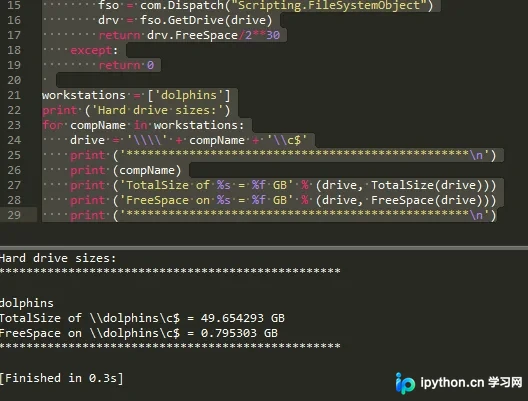
如需了解更多Python相关技巧,可参考本站的《Python编码操作技巧总结》、《Python数据结构与算法教程》、《Python Socket编程技巧总结》、《Python函数使用技巧总结》、《Python字符串操作技巧汇总》、《Python入门与进阶经典教程》以及《Python文件与目录操作技巧汇总》等专题文章。
希望上述内容能对您的Python编程实践提供帮助。
免责声明:本文内容仅供参考,不代表本站观点。转载或引用请注明出处。









