

Python3中http.server模块的快速使用指南

发布时间:2026-10-12| 2人浏览过
本文介绍如何利用Python3内置的http.server模块快速搭建Web服务。内容涵盖通过命令行直接启动服务器,以及编写Python代码自定义处理GET和POST请求的方法。详细解析了BaseHTTPRequestHandler的使用,包括响应头设置、静态页面返回及表单数据获取,帮助开发者快速实现轻量级HTTP服务。
在某些场景下,我们需要迅速构建一个Web服务,此时可以利用Python内置的http.server模块来快速搭建HTTP服务器。
具体实现方式主要包含以下两种。
需要注意的是,Python3中已不再单独使用BaseHTTPServer模块,其功能已整合至http.server中。
1. 命令行启动方式
python -m http.server 80           #pyhton3中启动方式,开启的端口为80
python -m SimpleHTTPServer 8080    #python2启动方式

这是最为常用且简便的操作方法。
2. 通过代码调用实现
from http.server import HTTPServer, BaseHTTPRequestHandler
data = {'result': 'this is a test'}
host = ('localhost', 8888)
class Resquest(BaseHTTPRequestHandler):
    timeout = 5
    server_version = "Apache"   #设置服务器返回的的响应头
    def do_GET(self):
        self.send_response(200)
        self.send_header("Content-type","text/html")  #设置服务器响应头
        self.send_header("test1","This is test!")     #设置服务器响应头
        self.end_headers()
        buf = '''<!DOCTYPE HTML>
                <html>
                    <head>
                        <title>Get page</title>
                    </head>
                <body>
                    <form action="post_page" method="post">
                        username: <input type="text" name="username" /><br />
                        password: <input type="text" name="password" /><br />
                        <input type="submit" value="POST" />
                    </form>
                </body>
                </html>'''
        self.wfile.write(buf.encode())  #里面需要传入二进制数据,用encode()函数转换为二进制数据   #设置响应body,即前端页面要展示的数据
    def do_POST(self):
        path = self.path
        print(path)
        #获取post提交的数据
        datas = self.rfile.read(int(self.headers['content-length']))    #固定格式,获取表单提交的数据
        #datas = urllib.unquote(datas).decode("utf-8", 'ignore')
        self.send_response(200)
        self.send_header("Content-type","text/html")    #设置post时服务器的响应头
        self.send_header("test","This is post!")
        self.end_headers()
        html = '''<!DOCTYPE HTML>
        <html>
            <head>
                <title>Post page</title>
            </head>
            <body>
                Post Data:%s  <br />
                Path:%s
            </body>
        </html>''' %(datas,self.path)
        self.wfile.write(html.encode())  #提交post数据时,服务器跳转并展示的页面内容
if __name__ == '__main__':
    server = HTTPServer(host, Resquest)
    print("Starting server, listen at: %s:%s" % host)
    server.serve_forever()
完成代码编写后,即可启动HTTP服务。

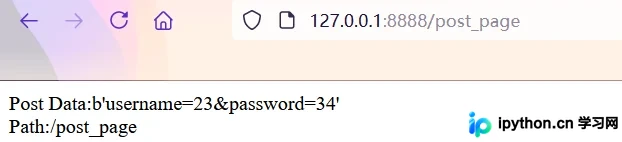
启动服务后,可以通过浏览器访问,并提交测试数据以验证功能。
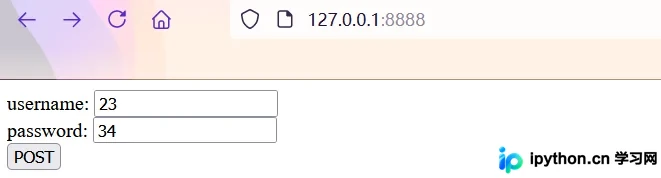
服务器端成功接收并获取到POST提交的数据。
总结
以上为个人经验分享,旨在提供参考,欢迎大家支持。
免责声明:本文内容仅供参考,不代表本站观点。转载或引用请注明出处。









