

C# 设计模式:组合模式详解与实现

组合模式将对象组合成树形结构以表示“部分-整体”的层次结构,使得用户对单个对象和组合对象的使用具有一致性。本文将通过 C# 代码实例,详细展示如何实现这一设计模式,并探讨透明方式与安全方式的区别及适用场景。
组合模式的核心概念
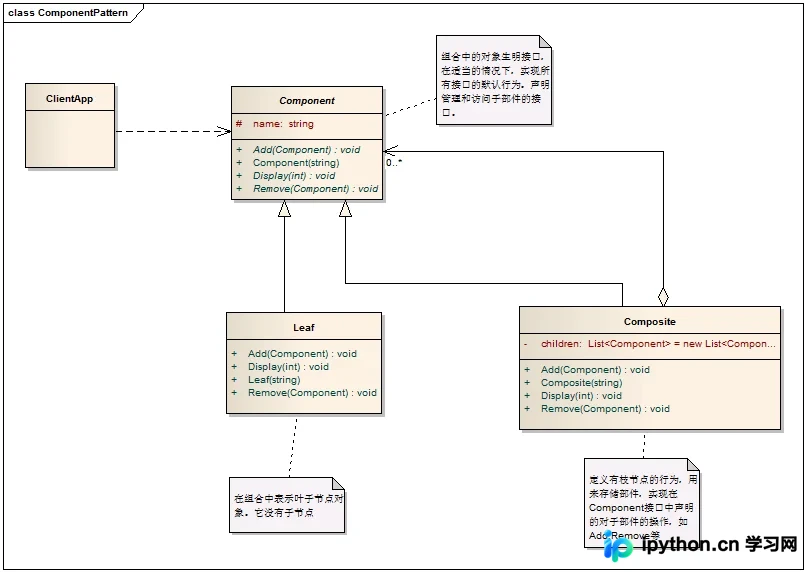
组合模式的结构包含三个关键角色:Component(抽象构件),为所有对象提供统一接口;Leaf(叶子节点),表示没有子节点的末端对象;以及 Composite(组合节点),用于存储和管理子部件。
该模式主要解决当需求中忽略单个对象与组合对象的区别,希望统一使用组合结构中所有对象的问题。其核心在于封装这种“统一性”,让客户端代码无需区分处理个体与集合。
C# 组合模式的类图与结构
在实现之前,理解类之间的继承与聚合关系至关重要。以下是组合模式的类图示意:
C# 代码实现步骤
第 1 步:定义抽象构件 Component
目的:建立统一的接口基类,声明管理子部件的方法(Add, Remove)和基本行为方法(Display)。
动作:创建一个抽象类 Component,包含组件名称属性和虚方法。注意,虽然叶子节点不需要 Add/Remove,但为了保持接口一致性,这些方法必须在基类中声明为抽象或虚方法。
/// <summary>
/// 一个抽象构件,声明一个接口用于访问和管理Component的子部件
/// </summary>
public abstract class Component
{
    protected string name;

    public Component(string name)
    {
        this.name = name;
    }

    /// <summary>
    /// 增加一个节点
    /// </summary>
    public abstract void Add(Component component);

    /// <summary>
    /// 移除一个节点
    /// </summary>
    public abstract void Remove(Component component);

    /// <summary>
    /// 显示层级结构
    /// </summary>
    public abstract void Display(int level);
}
第 2 步:实现叶子节点 Leaf
目的:实现具体的末端对象行为。由于叶子没有子节点,Add/Remove 方法在此处无实际意义,但必须实现以满足接口约束。
动作:继承 Component,在 Add 和 Remove 中打印提示信息或抛出异常,在 Display 中输出具体层级名称。
/// <summary>
/// 叶子节点
/// </summary>
public class Leaf : Component
{
    public Leaf(string name) : base(name) { }

    public override void Add(Component component)
    {
        Console.WriteLine("Can not add a component to a leaf.");
    }

    public override void Remove(Component component)
    {
        Console.WriteLine("Can not remove a component to a leaf.");
    }

    public override void Display(int level)
    {
        // 使用短横线模拟层级缩进
        Console.WriteLine(new string('-', level) + name);
    }
}
第 3 步:实现组合节点 Composite
目的:定义有枝节点的行为,负责存储子部件并递归执行操作。
动作:继承 Component,内部维护一个 List<Component> 集合来存储子节点。实现 Add 和 Remove 直接操作集合;在 Display 中先显示自身,再遍历调用所有子节点的 Display 方法。
/// <summary>
/// 定义有枝节点的行为,用来存储部件
/// </summary>
public class Composite : Component
{
    public Composite(string name) : base(name) { }

    // 一个子对象集合,用来存储其下属的枝节点和叶节点
    private List<Component> children = new List<Component>();

    public override void Add(Component component)
    {
        children.Add(component);
    }

    public override void Remove(Component component)
    {
        children.Remove(component);
    }

    public override void Display(int level)
    {
        Console.WriteLine(new string('-', level) + name);

        // 遍历其子节点并显示
        foreach (Component component in children)
        {
            component.Display(level + 2);
        }
    }
}
第 4 步:编写客户端代码测试
目的:构建一个树形结构并验证递归显示功能。
入口:Program 类的 Main 方法。
步骤:
- 创建根节点
Composite(“Root”)。 - 向根添加叶子节点和分支节点。
- 在分支节点下继续添加叶子或更深层的分支。
- 调用
root.Display(1)触发整棵树的递归输出。
class Program
{
    static void Main(string[] args)
    {
        // 生成树根
        Component root = new Composite("Root");
        root.Add(new Leaf("Leaf A in Root"));
        root.Add(new Leaf("Leaf B in Root"));

        // 为根增加两个枝节点
        Component branchX = new Composite("Branch X in Root");
        Component branchY = new Composite("Branch Y in Root");
        root.Add(branchX);
        root.Add(branchY);

        // 为BranchX增加页节点和枝节点
        branchX.Add(new Leaf("Leaf A in Branch X"));
        Component branchZ = new Composite("Branch Z in Branch X");
        branchX.Add(branchZ);

        // 为BranchY和BranchZ增加叶节点
        branchY.Add(new Leaf("Leaf in Branch Y"));
        branchZ.Add(new Leaf("Leaf in Branch Z"));

        // 显示树结构
        root.Display(1);

        Console.Read();
    }
}
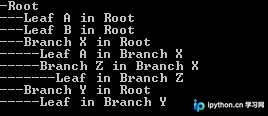
运行上述代码后,控制台输出如下层级结构,直观展示了部分-整体的嵌套关系:
透明方式与安全方式的权衡
在设计组合模式时,存在两种主流的实现策略,需根据实际需求选择:
- 透明方式(Transparent):
在Component抽象类中声明所有管理子对象的方法(如Add,Remove)。这样实现了完全的接口一致性,客户端无需区分叶子和组合对象。缺点是违背了单一职责原则,因为叶子节点必须实现不需要的空方法或报错逻辑。 - 安全方式(Safe):
不在Component中声明Add/Remove,仅在Composite中声明。这样叶子节点不需要实现无效方法,符合语义。缺点是对客户端不透明,使用时必须进行类型判断,增加了客户端代码的复杂性。
总结与适用场景
组合模式的主要优点在于简化了客户端代码,使得可以一致地对待单个对象和组合对象,同时也便于在组合体内增加新的部件而不修改现有代码。然而,它要求在设计初期决定采用透明还是安全方式。
适用场景包括:
- 需要表达对象的部分-整体层次结构。
- 希望用户忽略组合对象与单个对象的不同,统一地使用组合结构中的所有对象。
免责声明:本文内容仅供参考,不代表本站观点。转载或引用请注明出处。









