

基于 Raphael.js 与 jQuery 实现汽车销量环形统计图

发布时间:2026-10-13| 7人浏览过
本文介绍如何使用 Raphael.js 和 jQuery 在网页中构建动态的环形统计图,以汽车销量数据为例,提供从 HTML 结构搭建到 SVG 路径生成及交互效果的完整代码实现。
结果与目标
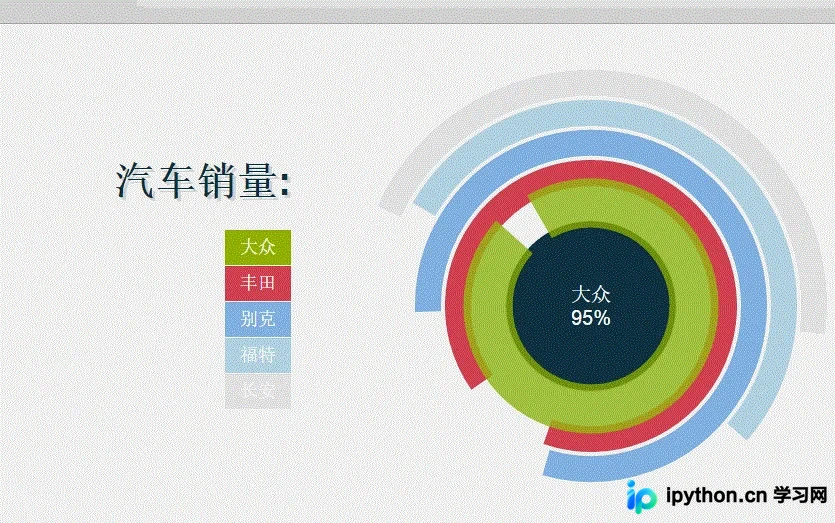
最终将在页面中心呈现一个多层级的环形统计图(Donut Chart),左侧显示品牌名称列表,右侧为对应颜色的圆弧段。当用户将鼠标悬停在某一段圆弧上时,该段会变宽并高亮,同时中间显示对应的品牌名称和百分比数值。此示例不涉及复杂的图表框架,而是展示底层 SVG 绘图库 Raphael.js 的基本用法。
准备条件
- 依赖库:需要引入
Raphael.js用于 SVG/VML 绘图,以及jQuery用于 DOM 操作和事件绑定。 - 浏览器支持:代码包含针对 IE 浏览器的兼容性判断,建议在现代浏览器或 IE9+ 环境下运行以获得最佳体验(SVG 模式)。
真实操作顺序
第 1 步:构建 HTML 数据容器
目的:建立页面布局,将图例(Legend)与控制数据(Arc Data)分离,便于 JS 读取配置。
- 入口:创建容器
<div id="content">。 - 动作:
- 左半部分
<div class="legend">放置标题和列表项,对应各个汽车品牌。 - 右半部分
<div id="diagram">作为 Raphael 画布的挂载点。 - 隐藏区域
<div class="get">存放每个圆弧段的配置数据,包括<span>显示文本和两个<input type="hidden">分别存储百分比值(value)和颜色值(color)。
- 左半部分
- 关键参数:确保每个
.arc子元素内的.percent和.color输入框属性正确闭合。
<div id="content">
    <div class="legend">
        <h1>汽车销量:</h1>
        <div class="skills">
            <ul>
                <li class="jq">大众</li>
                <li class="css">丰田</li>
                <li class="html">别克</li>
                <li class="php">福特</li>
                <li class="sql">长安</li>
            </ul>
        </div>
    </div>
    <div id="diagram"></div>
    </div>
    <div class="get">
        <!-- 示例:第一个圆弧配置 -->
        <div class="arc">
            <span class="text">大众</span>
            <input type="hidden" class="percent" value="95" />
            <input type="hidden" class="color" value="#97BE0D" />
        </div>
        <!-- 其他 arc 结构类似 ... -->
    </div>
第 2 步:设置 CSS 布局与样式
目的:固定容器位置,区分左右布局,美化文字与边框。
- 入口:全局样式
#content。 - 动作:
- 使用
position: absolute配合margin将内容垂直水平居中。 - 图例区
.legend左浮动,宽度限制为250px。 - 列表项
.skills li右浮动,设置字体颜色和行高,去除默认列表样式。
- 使用
#content {
    position:absolute;
    top:50%;
    left:50%;
    margin:-340px 0 0 -450px;
    width:900px;
    height:600px;
}
.legend {
    float:left;
    width:250px;
    margin-top:140px;
}
/* ... 其他省略样式 ... */
.skills li {
    float:right;
    clear:both;
    padding:0 15px;
    height:35px;
    line-height:35px;
    color:#fff;
    margin-bottom:1px;
    font-size:18px;
}
第 3 步:编写 Raphael.js 绘图逻辑
目的:核心步骤,初始化画布,注册自定义圆弧属性(customAttributes),并遍历 DOM 元素生成图形。
- 入口:
var o = { init: function() { ... } }。 - 动作:
- 初始化画布:
调用Raphael('diagram', 600, 600)创建600x600的画布对象r。
绘制中心背景圆:r.circle(300, 300, 85).attr({ stroke: 'none', fill: '#193340' })。 - 定义圆弧属性:
通过r.customAttributes.arc扩展 Raphaël 的属性集。该函数接收value(百分比),color,rad(半径)。
计算公式:将百分比转换为角度v = 3.6 * value。利用三角函数计算圆弧起点(sx, sy)和终点(x, y),生成 SVGM(MoveTo) 和A(ArcTo) 路径字符串。 - 遍历数据生成路径:
选择所有.get .arc元素,逐个提取文本、值和颜色。
每次循环半径rad增加30,形成嵌套同心圆效果。
调用r.path().attr({ arc: [value, color, rad], 'stroke-width': 26 })绘制路径对象z。
- 初始化画布:
- 重要参数:
rad初始值为73,随循环递增;stroke-width控制环的粗细。
var o = {
    init: function () {
        this.diagram();
    },
    random: function (l, u) {
        return Math.floor((Math.random() * (u - l + 1)) + l);
    },
    diagram: function () {
        var r = Raphael('diagram', 600, 600),
            rad = 73;

        // 绘制中心黑色圆盘
        r.circle(300, 300, 85).attr({ stroke: 'none', fill: '#193340' });

        // 中心文字提示
        var title = r.text(300, 300, 'loading...').attr({
            font: '20px Arial',
            fill: '#fff'
        }).toFront();

        // 自定义圆弧属性
        r.customAttributes.arc = function (value, color, rad) {
            var v = 3.6 * value,
                alpha = v == 360 ? 359.99 : v,
                random = o.random(91, 240), // 旋转偏移量
                a = (random - alpha) * Math.PI / 180,
                b = random * Math.PI / 180,
                sx = 300 + rad * Math.cos(b),
                sy = 300 - rad * Math.sin(b),
                x = 300 + rad * Math.cos(a),
                y = 300 - rad * Math.sin(a),
                path = [['M', sx, sy], ['A', rad, rad, 0, +(alpha > 180), 1, x, y]];
            return { path: path, stroke: color }
        }

        // 遍历 DOM 生成图表
        $('.get').find('.arc').each(function (i) {
            var t = $(this),
                color = t.find('.color').val(),
                value = t.find('.percent').val(),
                text = t.find('.text').text();
            rad += 30; // 内圈半径递增

            var z = r.path().attr({ arc: [value, color, rad], 'stroke-width': 26 });

            // 鼠标悬停交互
            z.mouseover(function () {
                this.animate({ 'stroke-width': 50, opacity: .75 }, 1000, 'elastic');
                if (Raphael.type != 'VML')
                    this.toFront(); // 提升层级避免遮挡
                title.animate({ opacity: 0 }, 500, '>', function () {
                    this.attr({ text: text + '\n' + value + '%' }).animate({ opacity: 1 }, 500, '<');
                });
            }).mouseout(function () {
                this.animate({ 'stroke-width': 26, opacity: 1 }, 1000, 'elastic');
            });
        });
    }
}
$(function () { o.init(); });
完成判断
打开包含上述代码的 HTML 文件,若页面中央出现彩色同心圆环,左侧显示汽车列表,且鼠标移入圆环时中心数字变化,则说明功能实现成功。需注意 Raphael.js 较老,现代开发可考虑 D3.js 或 Canvas/WebGL 方案,但此逻辑仍具参考价值。
简要总结
本实例通过 Raphael.js 的手动路径计算,实现了无需复杂框架的动态统计图。核心在于理解 SVG Arc 命令的参数含义以及如何通过 JavaScript 动态映射数据到几何坐标。以上就是基于 Raphael.js 与 jQuery 实现动态统计图的详细内容,更多关于 JavaScript 前端可视化编程的资料请关注本站其它相关文章!
免责声明:本文内容仅供参考,不代表本站观点。转载或引用请注明出处。









