

Python实现自动备份并同步至阿里云盘的脚本教程

发布时间:2026-10-12| 5人浏览过
本文介绍一个基于Python的自动备份脚本,支持从指定目录筛选特定后缀文件并备份至本地文件夹,随后自动同步至阿里云盘。脚本通过AutoTransfer类管理配置,支持屏蔽指定子目录,并可结合Windows定时任务实现自动化运行。
一、前言
此前因疫情原因,常面临居家办公且不便携带电脑往返的情况,因此编写了此自动备份脚本以解决文件同步需求。
该脚本主要具备以下功能:
- 自动扫描指定根目录,提取所有符合指定后缀名的文件,并将其备份至指定的备份文件夹中;
- 将备份文件夹内的文件自动与阿里云盘进行同步;
- 保持原文件目录结构不变;
- 支持屏蔽根目录下一级中不需要的文件夹或文件,但不支持多级深层屏蔽;
- 支持设置定时运行任务。
二、代码实现
定义了一个AutoTransfer类,该类在初始化时会自动读取配置文件中的参数。若未提供配置文件,也可在后续调用相关函数时直接传入参数。
通过调用类中的move_scripts函数,可将指定后缀名的文件备份至指定的备份文件夹。
调用ali_login函数以完成阿里云登录操作。
使用find_id函数,可根据阿里云盘中文件夹的名称查找对应的文件夹ID,该ID将在后续同步操作中用到。
调用sync_folder函数执行同步操作,其中file_id为前述获取的文件夹ID,flag参数用于指定同步方式,设置为True时表示以本地文件为主进行同步。
import os
import json
from tqdm import tqdm
from shutil import copy
from aligo import Aligo


class AutoTransfer:
    def __init__(self, config_file='transfer_config.json'):
        self.config_file = config_file
        # 自动从配置json里获取参数
        if os.path.exists(config_file):
            with open(config_file, mode='r', encoding='utf-8') as c:
                cfg = json.load(c)
            for k, v in cfg.items():
                setattr(self, k, v)

    def __setattr__(self, k, v):
        print(f"Current attribute '{k}' is '{v}'")
        self.__dict__[k] = v

    def move_scripts(self, org_root='', new_root='', blocks=[], exts=[]):
        # 更新参数
        if org_root:
            self.org_root = org_root
        if new_root:
            self.new_root = new_root
        if blocks:
            self.blocks = blocks
        if exts:
            self.exts = exts

        # 检查参数有无缺少
        missing_attr = [attr for attr in ['org_root', 'new_root', 'exts'] if attr not in self.__dict__.keys()]
        if missing_attr:
            raise AttributeError

        folders = os.listdir(self.org_root)
        backup_folders = [os.path.join(self.org_root, fd) for fd in folders if fd not in self.blocks]
        for fdr in tqdm(backup_folders):
            cur_files = self.list_dir(fdr)
            for f in cur_files:
                if os.path.splitext(f)[-1] in self.exts:
                    total_path = f.replace(self.org_root, self.new_root)
                    new_folder, f_name = os.path.split(total_path)
                    if not os.path.exists(new_folder):
                        os.makedirs(new_folder)
                    copy(f, total_path)

        self.remember_configs()

    @staticmethod
    def list_dir(cur_path: str):
        """
        列举文件根目录下各文件路径的函数。
        :param cur_path: 根目录。
        :return: 根目录下所有子目录里的所有文件。
        """
        file_paths = []
        for root, dirs, files in os.walk(cur_path):
            for file in files:
                file_paths.append(os.path.join(root, file))
        return file_paths

    def ali_login(self):
        self.aligo = Aligo()

    def find_id(self, target_name):
        for f in self.aligo.get_file_list():
            if f.name == target_name:
                return f.file_id

    def sync_folder(self, file_id='', flag=None):
        if file_id:
            self.file_id = file_id
        if flag:
            self.flag = flag
        self.remember_configs()
        self.aligo.sync_folder(self.new_root, self.file_id, self.flag)

    def remember_configs(self):
        config_dict = {k: v for k, v in self.__dict__.items() if
                       k in ['org_root', 'new_root', 'blocks', 'exts', 'file_id', 'flag']}
        with open(self.config_file, mode='w', encoding='utf-8') as f:
            json.dump(config_dict, f)

if __name__ == '__main__':
    at = AutoTransfer()
    at.move_scripts()
    # print(at.find_id('BF_projects'))
    at.ali_login()
    at.sync_folder()
接下来需要创建一个.bat批处理文件以执行脚本:
@echo off

D:

cd 脚本路径

start python 脚本文件名.py

exit
最后,配置系统的定时任务即可实现自动化运行:
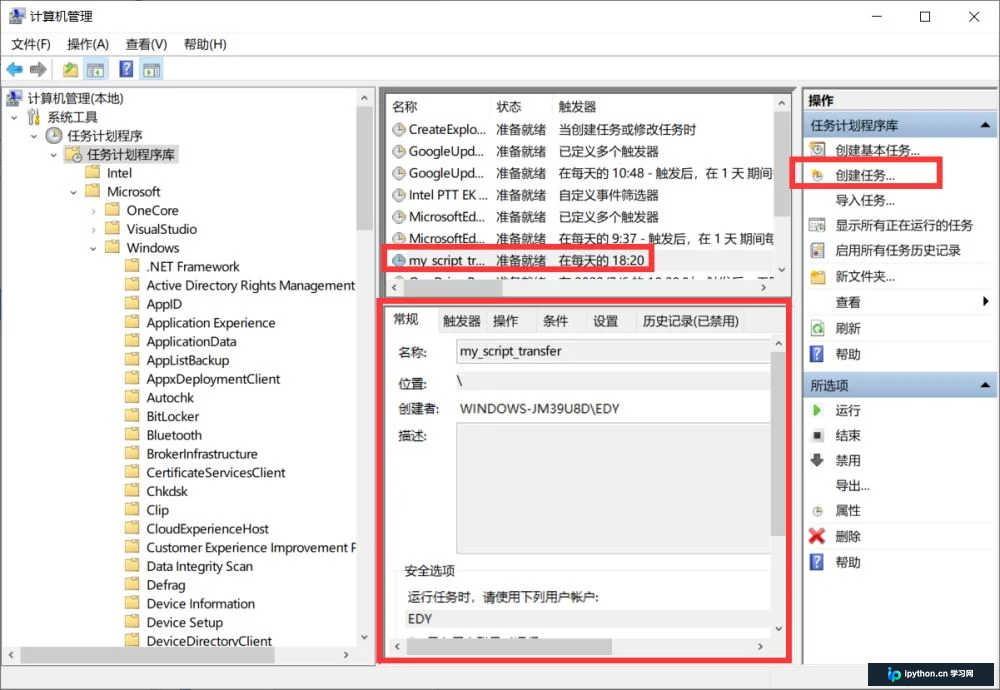
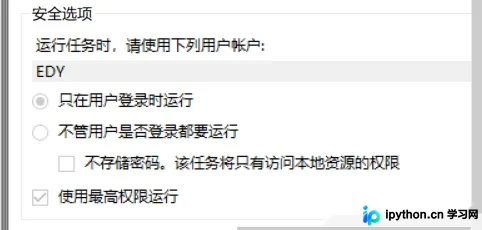
若希望每天查看脚本运行状态,请务必勾选“只在用户登录时运行”选项。
至此,关于Python自动备份脚本的介绍已完成,更多相关Python自动备份脚本内容请搜索本站历史文章或继续浏览下方相关文章,希望大家以后多多支持本站!
免责声明:本文内容仅供参考,不代表本站观点。转载或引用请注明出处。









