

Spring Boot 整合 Spring Security 详细配置指南

在 Spring Boot 项目开发中,权限安全是核心需求之一。相比于 Shiro,Spring Security 与 Spring 生态天然契合,配置更加轻量且功能强大。本文将演示如何从零开始集成 Spring Security,包括环境配置、默认登录处理、四种用户数据存储方式的实现,以及细粒度的 URL 访问权限控制。
结果或目标
完成上述步骤后,系统将具备以下特性:
- 所有未授权请求将被拦截并跳转至默认登录页。
- 支持通过配置文件或代码设定特定账号密码进行登录。
- 可根据用户角色(Role)或权限(Authority)对指定 API 接口进行访问控制。
准备条件
开发环境需包含 JDK 8 或以上版本、Maven 构建工具以及 IDE。本文基于 Spring Boot 2.7.1 版本进行讲解。
真实操作顺序
第 1 步:引入 Maven 依赖
目的:将 Spring Security 核心组件加入项目classpath。
操作:在 pom.xml 中引入父工程及 Security 启动器。
<parent>
    <groupId>org.springframework.boot</groupId>
    <artifactId>spring-boot-starter-parent</artifactId>
    <version>2.7.1</version>
    <relativePath/>
</parent>

<dependency>
    <groupId>org.springframework.boot</groupId>
    <artifactId>spring-boot-starter-security</artifactId>
    <version>2.6.7</version>
</dependency>
第 2 步:启动项目并查看默认认证状态
目的:验证集成是否成功,掌握默认的账号管理机制。
操作:启动 Application 主类。访问任意 URL,系统会自动重定向至登录页面。
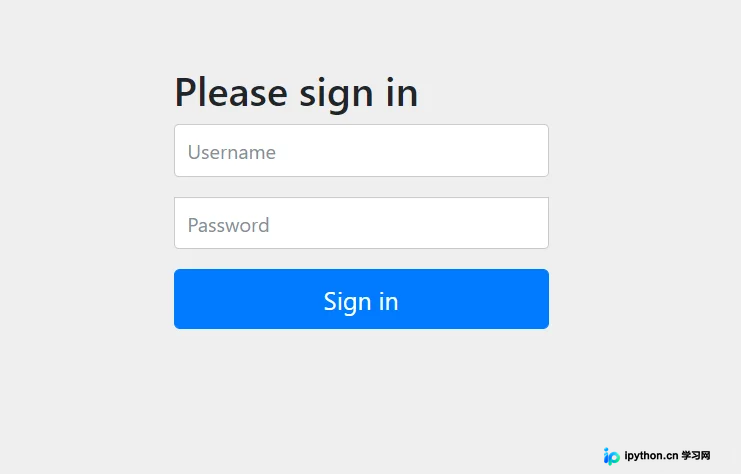
默认情况下,用户名固定为 user,随机生成的密码会打印在启动日志的命令行输出中。

如果每次重启都重新生成密码不方便测试,可以在 application.yml 或 properties 文件中显式指定账号信息。
spring:
  security:
    user:
      name: admin
      password: 123456
      roles: admin
第 3 步:创建安全配置类
目的:覆盖默认的安全配置,开启 Web 安全支持。
入口:创建一个继承自 WebSecurityConfigurerAdapter 的类。注意:在 Spring Boot 2.7+ 及更高版本中,此类已标记为废弃,但在旧版或兼容模式下仍广泛使用,新架构推荐使用 SecurityFilterChain Bean 定义。
动作:添加 @Configuration 和 @EnableWebSecurity 注解。
@Configuration
@EnableWebSecurity
public class SecurityConfig extends WebSecurityConfigurerAdapter {
    @Override
    protected void configure(AuthenticationManagerBuilder auth) throws Exception {
        // 在此处配置认证逻辑
    }
}
第 4 步:选择用户数据存储方式
目的:决定用户身份认证的来源。Spring Security 提供四种主要实现方式。
1. 内存用户存储(不推荐生产使用)
参数:硬编码在代码中的用户集合。
说明:优点是配置简单、速度快;缺点是数据无法持久化,重启后丢失,且不支持动态权限更新。
@Override
protected void configure(AuthenticationManagerBuilder auth) throws Exception {
    auth.inMemoryAuthentication()
        .passwordEncoder(passwordEncoder())
        .withUser("admin").password(passwordEncoder().encode("123456")).authorities("ADMIN")
        .and()
        .withUser("anduoduo").password(passwordEncoder().encode("123456")).authorities("ORDINARY");
}

private PasswordEncoder passwordEncoder() {
    return new BCryptPasswordEncoder();
}
2. 数据库用户存储(JDBC)
参数:数据源 DataSource,查询 SQL。
说明:最常用方式,适合常规 Web 项目。需要编写两条 SQL,分别用于查询用户凭证和查询用户权限。
@Autowired
private DataSource dataSource;

@Override
protected void configure(AuthenticationManagerBuilder auth) throws Exception {
    auth.jdbcAuthentication()
        .dataSource(dataSource)
        .passwordEncoder(passwordEncoder())
        .usersByUsernameQuery(
            "select username, password, status from Users where username = ?")
        .authoritiesByUsernameQuery(
            "select username, authority from Authority where username = ?");
}
此处务必确保数据库中的密码也是经过相同的 BCryptPasswordEncoder 加密后的密文。
3. LDAP 用户存储
说明:适用于企业级大型系统,需连接独立的 LDAP 服务器。需注意防范 LDAP 注入风险。
@Override
protected void configure(AuthenticationManagerBuilder auth) throws Exception {
    LdapAuthenticationProviderConfigurer configurer =
        auth.ldapAuthentication()
            .userSearchBase("ou=people")
            .userSearchFilter("(uid={0})")
            .groupSearchBase("ou=groups")
            .groupSearchFilter("member={0}");
    configurer.passwordCompare()
        .passwordEncoder(passwordEncoder())
        .passwordAttribute("passcode");
    configurer.contextSource().url("ldap://xxxxx.com:17099/dc=xxxxxx,dc=com");
}
4. 自定义 UserDetailsService
目的:完全掌控用户加载逻辑,通常结合 MyBatis/JPA 等 ORM 框架使用。
动作:实现 UserDetailsService 接口,并重写 loadUserByUsername 方法返回 UserDetails 对象。
服务实现示例:
public class UserServiceImpl implements UserDetailsService {
    @Autowired
    private UserMapper userMapper;

    @Override
    public UserDetails loadUserByUsername(String username) throws UsernameNotFoundException {
        User user = userMapper.getUserByUsername(username);
        if (user == null) throw new UsernameNotFoundException("User not found");
        return user; // 实体必须实现 UserDetails
    }
}
配置引用:
@Autowired
private MyUserDetailsService userDetailsService;

@Override
protected void configure(AuthenticationManagerBuilder auth) throws Exception {
    auth.userDetailsService(userDetailsService)
        .passwordEncoder(passwordEncoder());
}
第 5 步:配置 URL 访问权限拦截
目的:限制不同角色的用户对特定接口的访问权。
入口:重载 configure(HttpSecurity http) 方法。
@Override
protected void configure(HttpSecurity http) throws Exception {
    http.authorizeRequests()
        // 允许 OPTIONS 预检请求直接通过
        .antMatchers(HttpMethod.OPTIONS, "/**").permitAll()
        // 需要 ADMIN 或 USER 角色可访问
        .antMatchers("/api/demo/user").hasAnyRole("user", "admin")
        // 注意:hasAnyAuthority 要求传入的字符串前缀带 ROLE_
        .antMatchers("/api/demo/admin").hasAnyAuthority("ROLE_admin")
        // 所有人均可访问(如登录页、静态资源)
        .antMatchers("/api/demo/hello").permitAll()
        .and()
        // 开启表单登录模式
        .formLogin().permitAll()
        // 开启注销功能
        .logout().permitAll();
}
完成判断
当重启应用并输入正确的账号密码后,能够正常进入系统且仅能访问被赋予权限的接口;若尝试访问无权路径则被拒绝(HTTP 403)或重定向,即表示整合与配置成功。
简要总结
本文梳理了 Spring Boot 接入 Spring Security 的全流程。从最简单的默认配置到复杂的数据库交互,关键在于理解其认证(Authentication)与授权(Authorization)的分离机制。通过灵活配置 WebSecurityConfigurerAdapter,可以满足绝大多数中小型项目的安全管理需求。以上就是 Spring boot 整合 security 详解的详细内容,更多关于 Spring boot security 权限管理的资料请关注本站其它相关文章!
免责声明:本文内容仅供参考,不代表本站观点。转载或引用请注明出处。









