

Python基于Tkinter实现俄罗斯方块游戏详解

发布时间:2026-10-12| 3人浏览过
本文分享使用Python和Tkinter库开发俄罗斯方块游戏的实践过程。重点解析了Canvas控件中矩形重绘的性能陷阱,指出应使用itemconfig而非重复创建对象以优化内存。文章包含完整代码逻辑说明及多线程下落机制的实现细节,适合Python初学者参考。
在公司实习期间,由于团队主要采用Python语言及Django框架,因此我也需要跟进学习相关技术栈。
初步调研了Tkinter库,发现其与Canvas组件结合使用,能够提供相对简洁的界面开发API。同时,利用threading.Thread创建新线程的多线程机制也显得十分便捷。
然而,在使用canvas.create_rectangle时遇到了一个令人意外的情况:该函数并非直接绘制矩形,而是创建了一个矩形控件。起初,我在线程中根据数组变化每次重绘多个矩形,这实际上导致了每次循环都新建N个矩形对象,进而引发内存占用急剧增加。后来发现,对已有矩形进行状态变更时,应当使用canvas.itemconfig方法。
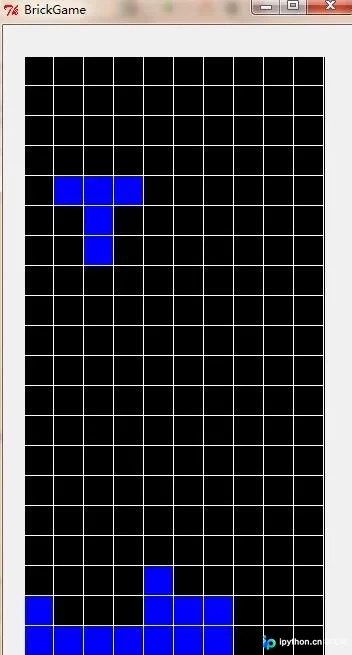
以下是游戏运行时的截图(由于时间较晚,次日还需工作,目前界面较为粗糙,后续有空会逐步优化)。
具体的实现代码如下:
#coding=utf-8
from Tkinter import *;
from random import *;
import thread;
from tkMessageBox import showinfo;
import threading;
from time import sleep;
class BrickGame(object):

 #是否开始
 start = True;
 #是否到达底部
 isDown = True;

 #窗体
 window = None;
 #frame
 frame1 = None;

 #绘图类
 canvas = None;

 #标题
 title = "BrickGame";
 #宽和高
 width = 350;
 height = 670;

 #行和列
 rows = 20;
 cols = 10;

 #几种方块
 brick = [

 [
 [
 [1,1,1],
 [0,0,1],
 [0,0,0]
 ],
 [
 [0,0,1],
 [0,0,1],
 [0,1,1]
 ],
 [
 [0,0,0],
 [1,0,0],
 [1,1,1]
 ],
 [
 [1,1,0],
 [1,0,0],
 [1,0,0]
 ]
 ],
 [
 [
 [0,0,0],
 [0,1,1],
 [0,1,1]
 ],
 [
 [0,0,0],
 [0,1,1],
 [0,1,1]
 ],
 [
 [0,0,0],
 [0,1,1],
 [0,1,1]
 ],
 [
 [0,0,0],
 [0,1,1],
 [0,1,1]
 ]
 ],
 [
 [
 [1,1,1],
 [0,1,0],
 [0,1,0]
 ],
 [
 [0,0,1],
 [1,1,1],
 [0,0,1]
 ],
 [
 [0,1,0],
 [0,1,0],
 [1,1,1]
 ],
 [
 [1,0,0],
 [1,1,1],
 [1,0,0]
 ]
 ],
 [
 [
 [0,1,0],
 [0,1,0],
 [0,1,0]
 ],
 [
 [0,0,0],
 [1,1,1],
 [0,0,0]
 ],
 [
 [0,1,0],
 [0,1,0],
 [0,1,0]
 ],
 [
 [0,0,0],
 [1,1,1],
 [0,0,0]
 ]
 ]
 ];

 #当前的方块
 curBrick = None;
 #当前方块数组
 arr = None;
 #当前方块形状
 shape = -1;
 #当前方块的行和列(最左上角)
 curRow = -10;
 curCol = -10;

 #背景
 back = list();
 #格子
 gridBack = list();

 #初始化
 def init(self):

 for i in range(0,self.rows):

 self.back.insert(i,list());
 self.gridBack.insert(i,list());

 for i in range(0,self.rows):

 for j in range(0,self.cols):

 self.back[i].insert(j,0);
 self.gridBack[i].insert(j,self.canvas.create_rectangle(30*j,30*i,30*(j+1),30*(i+1),fill="black"));

 #绘制游戏的格子
 def drawRect(self):

 for i in range(0,self.rows):

 for j in range(0,self.cols):


 if self.back[i][j]==1:

 self.canvas.itemconfig(self.gridBack[i][j],fill="blue",outline="white");

 elif self.back[i][j]==0:

 self.canvas.itemconfig(self.gridBack[i][j],fill="black",outline="white");


 #绘制当前正在运动的方块
 if self.curRow!=-10 and self.curCol!=-10:

 for i in range(0,len(self.arr)):

 for j in range(0,len(self.arr[i])):

 if self.arr[i][j]==1:

 self.canvas.itemconfig(self.gridBack[self.curRow+i][self.curCol+j],fill="blue",outline="white");

 #判断方块是否已经运动到达底部
 if self.isDown:

 for i in range(0,3):

 for j in range(0,3):

 if self.arr[i][j]!=0:

 self.back[self.curRow+i][self.curCol+j] = self.arr[i][j];

 #判断整行消除
 self.removeRow();

 #获得下一个方块
 self.getCurBrick();

 #判断是否有整行需要消除
 def removeRow(self):

 for i in range(0,self.rows):

 tag1 = True;
 for j in range(0,self.cols):

 if self.back[i][j]==0:

 tag1 = False;
 break;

 if tag1==True:

 #从上向下挪动
 for m in xrange(i-1,0,-1):

 for n in range(0,self.cols):

 self.back[m+1][n] = self.back[m][n];

 #获得当前的方块
 def getCurBrick(self):

 self.curBrick = randint(0,len(self.brick)-1);
 self.shape = 0;
 #当前方块数组
 self.arr = self.brick[self.curBrick][self.shape];

 self.curRow = 0;
 self.curCol = 1;

 #是否到底部为False
 self.isDown = False;

 #监听键盘输入
 def onKeyboardEvent(self,event):

 #未开始,不必监听键盘输入
 if self.start == False:

 return;

 #记录原来的值
 tempCurCol = self.curCol;
 tempCurRow = self.curRow;
 tempShape = self.shape;
 tempArr = self.arr;
 direction = -1;

 if event.keycode==37:

 #左移
 self.curCol-=1;
 direction = 1;
 elif event.keycode==38:
 #变化方块的形状
 self.shape+=1;
 direction = 2;

 if self.shape>=4:

 self.shape=0;
 self.arr = self.brick[self.curBrick][self.shape];
 elif event.keycode==39:

 direction = 3;
 #右移
 self.curCol+=1;
 elif event.keycode==40:

 direction = 4;
 #下移
 self.curRow+=1;

 if self.isEdge(direction)==False:

 self.curCol = tempCurCol;
 self.curRow = tempCurRow;
 self.shape = tempShape;
 self.arr = tempArr;

 self.drawRect();

 return True;

 #判断当前方块是否到达边界
 def isEdge(self,direction):

 tag = True;

 #向左,判断边界
 if direction==1:

 for i in range(0,3):

 for j in range(0,3):

 if self.arr[j][i]!=0 and (self.curCol+i<0 or self.back[self.curRow+j][self.curCol+i]!=0):

 tag = False;
 break;
 #向右,判断边界
 elif direction==3:

 for i in range(0,3):

 for j in range(0,3):

 if self.arr[j][i]!=0 and (self.curCol+i>=self.cols or self.back[self.curRow+j][self.curCol+i]!=0):

 tag = False;
 break;
 #向下,判断底部
 elif direction==4:

 for i in range(0,3):

 for j in range(0,3):

 if self.arr[i][j]!=0 and (self.curRow+i>=self.rows or self.back[self.curRow+i][self.curCol+j]!=0):

 tag = False;
 self.isDown = True;
 break;
 #进行变形,判断边界
 elif direction==2:

 if self.curCol<0:

 self.curCol=0;

 if self.curCol+2>=self.cols:

 self.curCol = self.cols-3;

 if self.curRow+2>=self.rows:

 self.curRow = self.curRow-3;


 return tag;

 #方块向下移动
 def brickDown(self):

 while True:

 if self.start==False:

 print("exit thread");
 break;

 tempRow = self.curRow;
 self.curRow+=1;

 if self.isEdge(4)==False:

 self.curRow = tempRow;

 self.drawRect();

 #每一秒下降一格
 sleep(1);

 #运行
 def __init__(self):

 self.window = Tk();
 self.window.title(self.title);
 self.window.minsize(self.width,self.height);
 self.window.maxsize(self.width,self.height);

 self.frame1 = Frame(self.window,width=300,height=600,bg="black");
 self.frame1.place(x=20,y=30);

 self.canvas = Canvas(self.frame1,width=300,height=600,bg="black");

 self.init();

 #获得当前的方块
 self.getCurBrick();

 #按照数组,绘制格子
 self.drawRect();

 self.canvas.pack();

 #监听键盘事件
 self.window.bind("<KeyPress>",self.onKeyboardEvent);

 #启动方块下落线程
 downThread = threading.Thread(target=self.brickDown,args=());
 downThread.start();

 self.window.mainloop();

 self.start=False;

 pass;

if __name__=='__main__':

 brickGame = BrickGame();
虽然作为Web开发人员,使用图形界面库的机会较少,但依然无法抑制编写游戏代码的热情。
如需了解更多俄罗斯方块相关精彩文章,请点击专题:俄罗斯方块游戏集合 进行深入学习。
更多关于Python游戏开发的精彩文章,请点击查看以下专题:
python经典小游戏汇总
python微信跳一跳游戏集合
以上就是本文的全部内容,希望能为各位的学习带来帮助,也欢迎大家多多支持本站。
免责声明:本文内容仅供参考,不代表本站观点。转载或引用请注明出处。









