

Python实现可配置时长、线程数及间隔的多线程异步POST请求

发布时间:2026-10-12| 3人浏览过
本文介绍一种基于Python的多线程异步POST请求实现方案,支持自定义持续运行时间、线程数量及请求间隔。通过随机生成数据并模拟HTTP POST请求,展示如何控制并发行为与执行周期,适用于压力测试或批量接口调用场景。
本文详细介绍如何使用Python实现一个支持自定义持续运行时间、线程数量以及请求间隔的多线程异步POST请求功能。该方案适用于需要模拟高并发或批量发送POST请求的场景,例如接口压力测试或自动化数据提交任务。
#coding=utf8
'''
random.randint(a, b):用于生成一个指定范围内的整数。
其中参数a是下限,参数b是上限,生成的随机数n: a <= n <= b
random.choice(sequence):从序列中获取一个随机元素
参数sequence表示一个有序类型(列表,元组,字符串)
'''
import httplib,json
import time
import threading
from random import randint,choice
#创建请求函数
def postRequest(threadNum):
  postJson={
        }
  #定义需要进行发送的数据
  postData=json.dumps(postJson)
  #定义一些文件头
  headerdata = {
    "content-type":"application/json",
     }
  #接口
  requrl ="/v1/query"
  #请求服务,例如:www.baidu.com
  hostServer=""
  #连接服务器
  conn = httplib.HTTPConnection(hostServer)
  #发送请求
  conn.request(method="POST",url=requrl,body=postData,headers=headerdata)
  #获取请求响应
  response=conn.getresponse()
  #打印请求状态
  if response.status in range(200,300):
    print u"线程"+str(threadNum)+u"状态码:"+str(response.status)
  conn.close()
def run(threadNum,internTime,duration):
  #创建数组存放线程
  threads=[]
  try:
    #创建线程
    for i in range(1,threadNum):
      #针对函数创建线程
      t=threading.Thread(target=postRequest,args=(i,))
      #把创建的线程加入线程组
      threads.append(t)
  except Exception,e:
    print e
  try:
    #启动线程
    for thread in threads:
        thread.setDaemon(True)
        thread.start()
        time.sleep(internTime)
    #等待所有线程结束
    for thread in threads:
        thread.join(duration)
  except Exception,e:
      print e
if __name__ == '__main__':
  startime=time.strftime("%Y%m%d%H%M%S")
  now=time.strftime("%Y%m%d%H%M%S")
  duratiion=raw_input(u"输入持续运行时间:")
  while (startime+str(duratiion))!=now:
    run(10,1,int(duratiion))
    now=time.strftime("%Y%m%d%H%M%S")
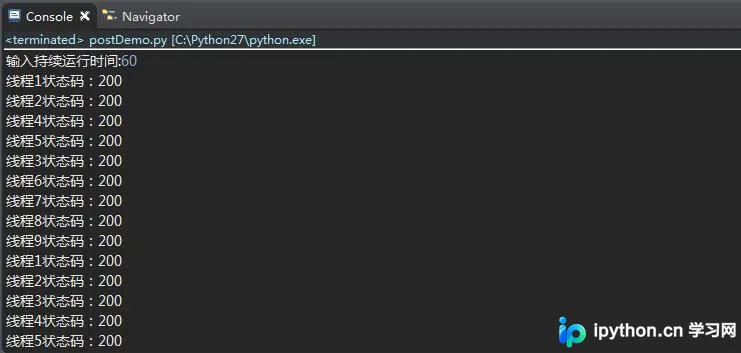
运行结果如下:
更多关于Python相关内容可查看本站专题:《Python Socket编程技巧总结》、《Python数据结构与算法教程》、《Python函数使用技巧总结》、《Python字符串操作技巧汇总》、《Python入门与进阶经典教程》及《Python文件与目录操作技巧汇总》
希望本文所述对大家Python程序设计有所帮助。
免责声明:本文内容仅供参考,不代表本站观点。转载或引用请注明出处。









