

利用Python提取PDF文本的简单方法实例

本文介绍如何利用Python从包含文字和图片的PDF文件中提取文本。通过安装tika、wand和pytesseract库,结合Tika进行基础文本解析与Pytesseract进行OCR图像识别,实现完整的内容提取。文章提供了完整的代码示例、中文语言包配置方法及命令行执行步骤,帮助开发者快速处理复杂PDF文档。
通常情况下,直接复制粘贴是最便捷的方式。但当遇到无法通过Ctrl+C复制的情况时,我们可以借助Python脚本进行提取,具体操作流程如下。
第一步,安装工具库
首先需安装tika,该库用于从多种文件格式中检测文档类型并提取内容。
其次安装wand,这是一个基于ctypes的ImageMagick简单绑定,用于处理图像转换。
最后安装pytesseract,这是一款OCR识别工具,用于处理图像中的文字识别。
接下来创建一个虚拟环境,并在其中安装上述工具以确保依赖隔离。
python -m venv venv
source venv/bin/activate
pip install tika wand pytesseract
第二步,编写代码
假设PDF文件中同时包含文字和图片,以下代码可以直接识别其中的纯文本部分。
import io
import pytesseract
import sys

from PIL import Image
from tika import parser
from wand.image import Image as wi

text_raw = parser.from_file("example.pdf")
print(text_raw['content'].strip())
仅处理文字还不够,我们需要补充处理图片部分的功能,以提取图像中的文字。
def extract_text_image(from_file, lang='deu', image_type='jpeg', resolution=300):
    print("-- Parsing image", from_file, "--")
    print("---------------------------------")
    pdf_file = wi(filename=from_file, resolution=resolution)
    image = pdf_file.convert(image_type)
    image_blobs = []
    for img in image.sequence:
        img_page = wi(image=img)
        image_blobs.append(img_page.make_blob(image_type))
    extract = []
    for img_blob in image_blobs:
        image = Image.open(io.BytesIO(img_blob))
        text = pytesseract.image_to_string(image, lang=lang)
        extract.append(text)
    for item in extract:
        for line in item.split("\n"):
            print(line)
将上述两部分功能合并,得到完整的代码实现如下。
import io
import sys

from PIL import Image
import pytesseract
from wand.image import Image as wi
from tika import parser

def extract_text_image(from_file, lang='deu', image_type='jpeg', resolution=300):
    print("-- Parsing image", from_file, "--")
    print("---------------------------------")
    pdf_file = wi(filename=from_file, resolution=resolution)
    image = pdf_file.convert(image_type)
    for img in image.sequence:
        img_page = wi(image=img)
        image = Image.open(io.BytesIO(img_page.make_blob(image_type)))
        text = pytesseract.image_to_string(image, lang=lang)
        for part in text.split("\n"):
            print("{}".format(part))

def parse_text(from_file):
    print("-- Parsing text", from_file, "--")
    text_raw = parser.from_file(from_file)
    print("---------------------------------")
    print(text_raw['content'].strip())
    print("---------------------------------")

if __name__ == '__main__':
    parse_text(sys.argv[1])
    extract_text_image(sys.argv[1], sys.argv[2])
第三步,执行
假设我们的目标文件example.pdf包含上述内容。
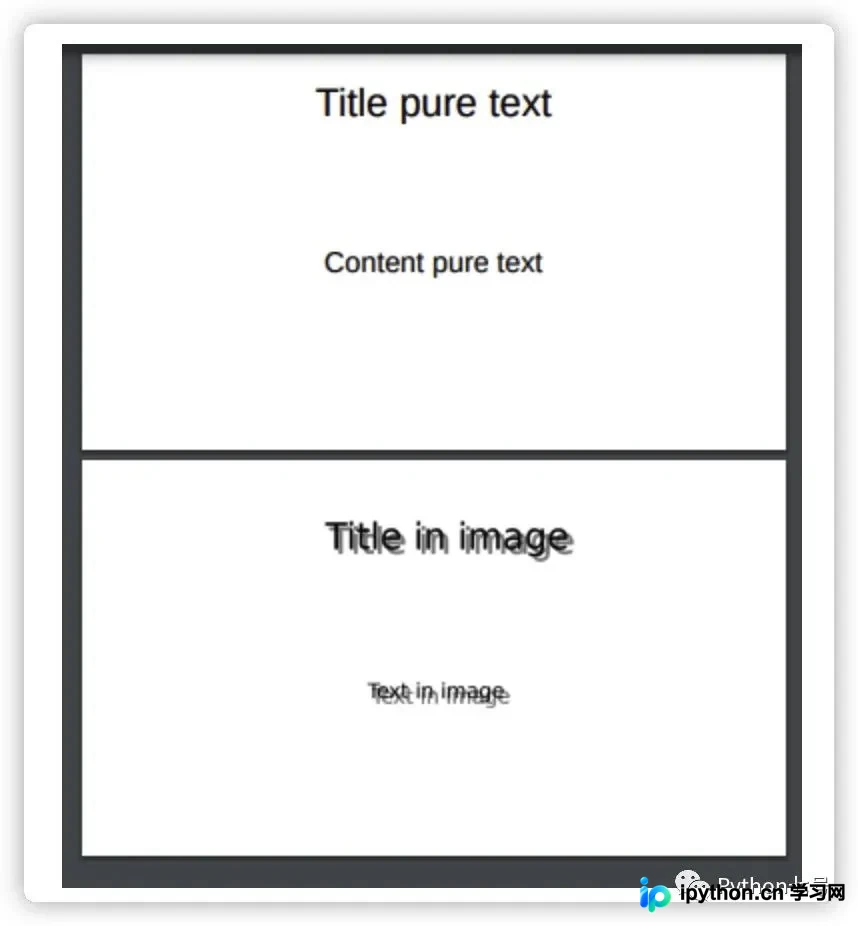
在命令行中执行以下命令来运行脚本。
python run.py example.pdf deu | xargs -0 echo > extract.txt最终生成的extract.txt文件结果如下所示。
-- Parsing text example.pdf -- --------------------------------- Title pure text Content pure text Slide 1 Slide 2 --------------------------------- -- Parsing image example.pdf -- --------------------------------- Title pure text Content pure text Title in image Text in image
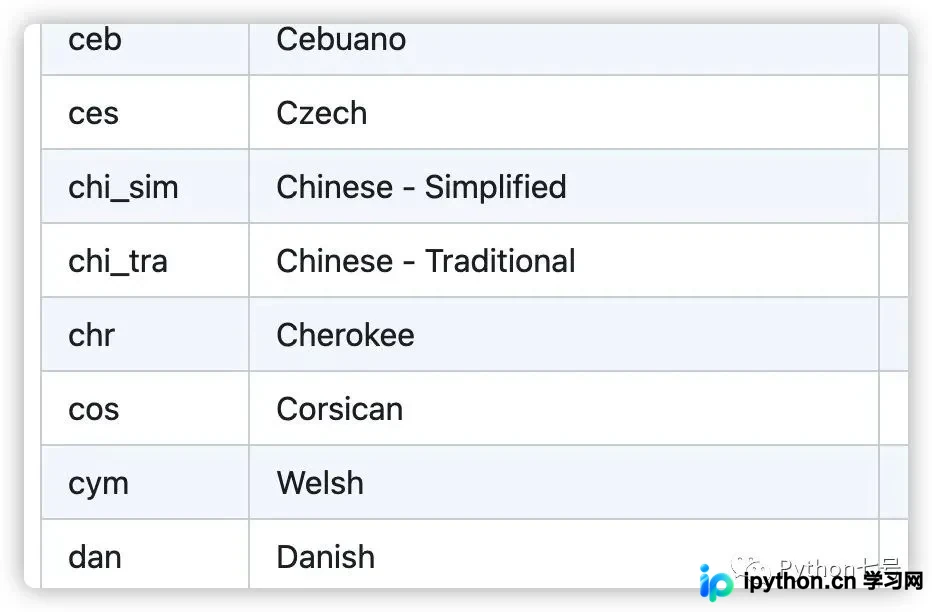
读者可能会疑问,若需处理简体中文,lang参数应如何设置?实际上应传递'chi_sim',官方对此有明确说明,相关链接如下。
https://github.com/tesseract-ocr/tessdoc/blob/main/Data-Files-in-different-versions.md
最后的话
从PDF中提取文本的脚本实现并不复杂,利用现有的多个库可以简化工作流程并达到良好的效果。
到此这篇关于利用Python提取PDF文本的简单方法的文章就介绍到这了,更多相关Python提取PDF文本内容请搜索本站以前的文章或继续浏览下面的相关文章希望大家以后多多支持本站!
免责声明:本文内容仅供参考,不代表本站观点。转载或引用请注明出处。









