

Python实现打砖块小游戏完整代码解析

发布时间:2026-10-15| 4人浏览过
本文提供基于Python和Pygame库的打砖块小游戏完整实现代码。通过导入必要的模块并初始化游戏窗口,展示了如何构建游戏主循环、处理用户交互以及渲染游戏画面。适合希望学习Python图形界面编程和基础游戏逻辑的开发者参考。
Python打砖块游戏实现概述
本文分享了一个使用Python编写的打砖块小游戏的具体代码示例,供读者参考学习。
这是一款益智类的打砖块游戏,你可以尝试运行代码,看看自己能够击碎多少块砖。
游戏核心代码结构
import pygame,sys,time,random
from pygame.locals import *        #
from static_params import *   #引入所有静态参数
from GameClass import *


pygame.init()   #初始化游戏
mainclock = pygame.time.Clock() #时钟设置
Exit =0
global Surface
Surface = pygame.display.set_mode([WindowWidth,WindowHeight],0,32) #窗口设置
pygame.display.set_caption('打砖块游戏')    #设置窗口标题
def BeforeGame():
    StartImage = pygame.image.load('intro_Ball.png').convert_alpha() #开始图像的界面
    button = Button(Surface,FontColor,TextLocation,'StartGame')
    flag = True
    while flag:
        for event in pygame.event.get():
            if event.type ==QUIT:
                Exit = 1
                pygame.quit()
                exit()
            if event.type == MOUSEBUTTONUP:
                if button.is_overed():
                    flag = False
        Surface.blit(StartImage,ImageLocation)
        button.ButtonBlit()
        pygame.display.update()
        mainclock.tick(100)

def Gaming():
    #设置一个暂停函数
    def pause():
        button = Button(Surface,FontColor,TextLocation,'Continue')
        Surface.fill((0,0,0))
        flag = True
        while flag:
            for event in pygame.event.get():
                if event.type ==QUIT:
                    Exit = 1
                    pygame.quit()
                    exit()
                if event.type == MOUSEBUTTONUP:
                    if button.is_overed():
                        flag = False
            pygame.mouse.set_visible(True)
            button.ButtonBlit()
            pygame.display.update()
            mainclock.tick(100)

    Ball = ball(BallCenter,BallRadius,BallColor,BallSpeed,MoveAngle,Surface)
    paddle = Paddle(0,WindowHeight-PaddleHeight,PaddleWidth,PaddleHeight,PaddleColor,Surface)
    # 设置一个砖块类的矩阵
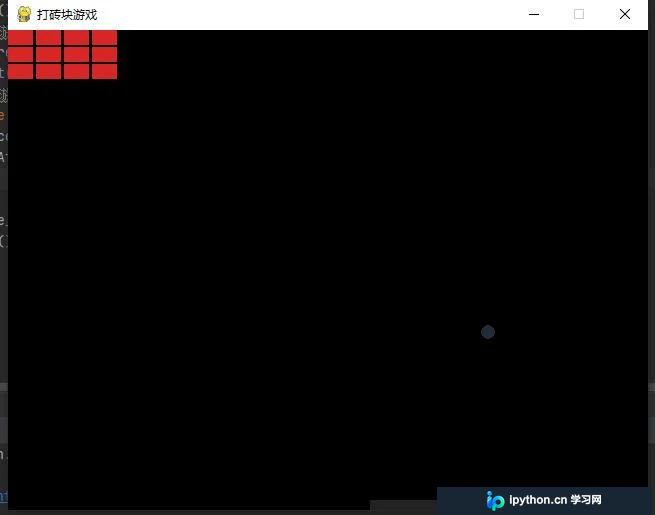
    BrickMatrix = [[Brick(i,j,BrickWidth,BrickHeight,BrickHitNumber,BrickColor,Surface) for i in range(0,100,BrickWidth+3) if i+BrickWidth<640]\
    for j in range(0,50,BrickHeight+2)]
    mouse_x,mouse_y = pygame.mouse.get_pos()
    while True:
        for event in pygame.event.get():
            if event.type == QUIT:
                pygame.quit()
                exit()
            if event.type == MOUSEMOTION:
                mouse_x, mouse_y = event.pos  #判断鼠标的位置
            if event.type == KEYDOWN:   #按下空格键暂停
                if event.key == K_SPACE:
                    pause()
        Surface.fill((0,0,0))
        #设置鼠标为不可见状态
        pygame.mouse.set_visible(False)
        #判断球的运动
        #判断是否撞上了边界或者挡板
        if Ball.center[1]+Ball.radius+paddle.height > WindowHeight:
            if Ball.center[0]>paddle.left and Ball.center[0]<paddle.left+paddle.width:
                Ball.rebound4()
        #判断是否装上了左边界
        elif Ball.center[0]-Ball.radius<interval:
            Ball.rebound1()
        elif Ball.center[0]+Ball.radius>WindowWidth-interval:
            Ball.rebound2()
        #判断是否撞上了上边界
        elif Ball.center[1]-Ball.radius<interval:
            Ball.rebound3()
        for brickline in BrickMatrix:
            for brick in brickline:
                if brick.exist == 1:
                    if brick.top >Ball.center[1] and brick.top-Ball.center[1]-Ball.radius<interval and Ball.speedy>0 and Ball.center[0]>brick.left and Ball.center[0]<brick.right:
                        print(1,Ball.center,brick.left,brick.right,brick.top,brick.bottom,Ball.radius)
                        Ball.rebound4()
                        brick.hitnumber =brick.hitnumber-1
                    if Ball.center[1]>brick.bottom and Ball.center[1]-Ball.radius-brick.bottom<interval and Ball.speedy<0 and Ball.center[0]>brick.left and Ball.center[0]<brick.right:
                        print(2,Ball.center,brick.left,brick.right,brick.top,brick.bottom,Ball.radius)
                        Ball.rebound3()
                        brick.hitnumber =brick.hitnumber-1
                    if Ball.center[0]< brick.left and brick.left-Ball.center[0]-Ball.radius<interval and Ball.speedx>0 and Ball.center[1]>brick.top and Ball.center[1]<brick.bottom:
                        print(3,Ball.center,brick.left,brick.right,brick.top,brick.bottom,Ball.radius)
                        Ball.rebound2()
                        brick.hitnumber =brick.hitnumber-1
                    if Ball.center[0]>brick.right and Ball.center[0]-Ball.radius-brick.right<interval and Ball.speedx<0 and Ball.center[1]>brick.top and Ball.center[1]<brick.bottom:
                        print(4,Ball.center,brick.left,brick.right,brick.top,brick.bottom,Ball.radius)
                        Ball.rebound1()
                        brick.hitnumber =brick.hitnumber-1
                    if brick.hitnumber <= 0:
                        brick.exist = 0
        #所有的砖块都不存在了,则游戏胜利
        if all([not any([brick.exist for brick in line]) for line in BrickMatrix] ):
            return 'Win'
        # print(brick.hitnumber,brick.exist)
        Ball.move()
        paddle.get_pos(mouse_x)
        if Ball.fall():
            return 'Fail'
        #画出图形
        for brickline in BrickMatrix:
            for brick in brickline:
                brick.draw()
        Ball.draw()
        paddle.draw()
        pygame.display.update()
        #每秒钟执行100次该代码,用来控制游戏循环频率
        mainclock.tick(100)


def AfterGame(text):
    result = pygame.font.SysFont('comicsansms',100).render(text,1,(0,255,0))
    Surface.blit(result,ImageLocation)
    button1 = Button(Surface,FontColor,TextLocation,'PLAY IT AGAIN')
    button2 = Button(Surface,FontColor,TextLocation2,'QUIT')
    flag = True
    while flag:
        pygame.mouse.set_visible(True)
        for event in pygame.event.get():
            if event.type == QUIT:
                Exit = 1
                pygame.quit()
                exit()
            if event.type == MOUSEBUTTONUP:
                if button1.is_overed():
                    flag = False
                if button2.is_overed():
                    Exit = 1
                    pygame.quit()
                    exit()
        button1.ButtonBlit()
        button2.ButtonBlit()
        pygame.display.update()
        mainclock.tick(100)


def main():
    #展示游戏开始前的信息
    BeforeGame()
    print(Exit)
    #开始游戏循环
    while not Exit:
        com=Gaming()
        AfterGame(com)


if __name__ =='__main__':
    main()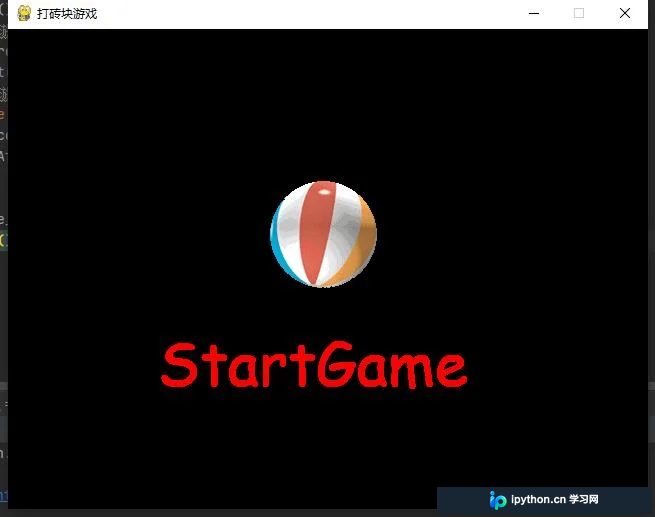
以上就是本文的全部内容,希望这些代码能对读者的学习有所帮助,同时也欢迎大家继续支持本站获取更多技术资源。
免责声明:本文内容仅供参考,不代表本站观点。转载或引用请注明出处。









