

使用OpenCV与Python识别七段数码管显示内容

发布时间:2026-10-15| 4人浏览过
本文介绍如何使用OpenCV和Python对七段数码显示器进行数字识别。通过边缘检测、图像分割和轮廓匹配技术,无需深度学习即可高效提取0-9数字。文章提供了完整的代码示例及处理流程,适用于恒温器等设备的LCD屏幕识别场景。
一、什么是七段数码显示器
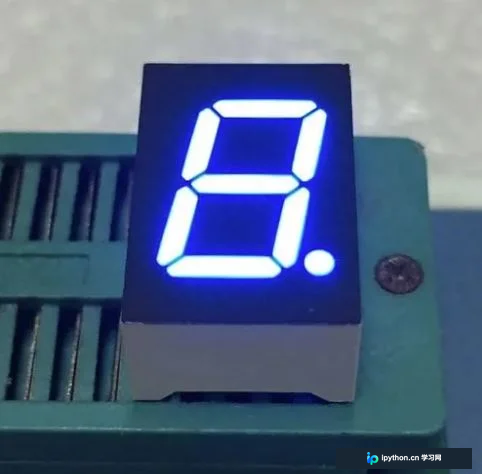
七段LCD数码显示器拥有多种名称,包括段码液晶屏、段式液晶屏、黑白笔段屏、段码LCD液晶屏、段式显示器、TN液晶屏、段码液晶显示器、段码屏幕、笔段式液晶屏、段码液晶显示屏、段式LCD以及笔段式LCD等。
如图所示,每个数字均由一个七段组件构成。
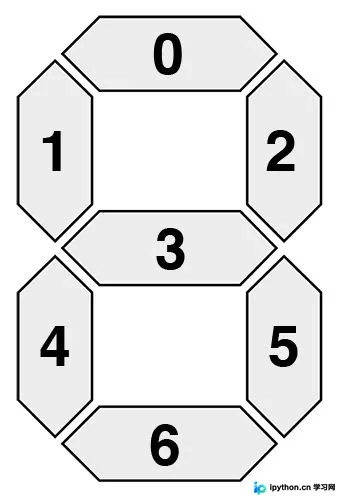
七段显示器总共可以呈现128种可能的状态:
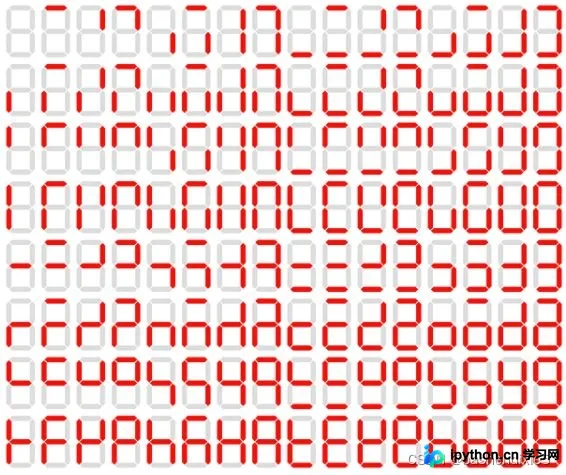
我们的目标是识别其中的0-9数字。若采用深度学习方式,显得过于复杂且小题大做。此外,若要实际应用,还需完成诸多前置工作,例如确认识别对象设备、定位数字区域并进行分割等。

二、创建opencv数字识别器
此处以空调恒温器为例进行识别,首先梳理整体流程。
1、定位恒温器上的LCD屏幕。
2、提取LCD的图像。
3、提取数字区域
4、识别数字。
我们创建名为recognize_digits.py的文件,代码如下。此思路仅供参考(因为代码中的部分参数仅适用于测试图片)
# import the necessary packages
from imutils.perspective import four_point_transform
from imutils import contours
import imutils
import cv2
# define the dictionary of digit segments so we can identify
# each digit on the thermostat

DIGITS_LOOKUP = {
	(1, 1, 1, 0, 1, 1, 1): 0,
	(0, 0, 1, 0, 0, 1, 0): 1,
	(1, 0, 1, 1, 1, 1, 0): 2,
	(1, 0, 1, 1, 0, 1, 1): 3,
	(0, 1, 1, 1, 0, 1, 0): 4,
	(1, 1, 0, 1, 0, 1, 1): 5,
	(1, 1, 0, 1, 1, 1, 1): 6,
	(1, 0, 1, 0, 0, 1, 0): 7,
	(1, 1, 1, 1, 1, 1, 1): 8,
	(1, 1, 1, 1, 0, 1, 1): 9
}

# load the example image
image = cv2.imread("example.jpg")#
# pre-process the image by resizing it, converting it to
# graycale, blurring it, and computing an edge map
image = imutils.resize(image, height=500)
gray = cv2.cvtColor(image, cv2.COLOR_BGR2GRAY)
blurred = cv2.GaussianBlur(gray, (5, 5), 0)
edged = cv2.Canny(blurred, 50, 200, 255)

# find contours in the edge map, then sort them by their
# size in descending order
cnts = cv2.findContours(edged.copy(), cv2.RETR_EXTERNAL, cv2.CHAIN_APPROX_SIMPLE)
cnts = imutils.grab_contours(cnts)
cnts = sorted(cnts, key=cv2.contourArea, reverse=True)
displayCnt = None
# loop over the contours
for c in cnts:
	# approximate the contour
	peri = cv2.arcLength(c, True)
	approx = cv2.approxPolyDP(c, 0.02 * peri, True)
	# if the contour has four vertices, then we have found
	# the thermostat display
	if len(approx) == 4:
		displayCnt = approx
		break

# extract the thermostat display, apply a perspective transform
# to it
warped = four_point_transform(gray, displayCnt.reshape(4, 2))
output = four_point_transform(image, displayCnt.reshape(4, 2))

# threshold the warped image, then apply a series of morphological
# operations to cleanup the thresholded image
thresh = cv2.threshold(warped, 0, 255, cv2.THRESH_BINARY_INV | cv2.THRESH_OTSU)[1]
kernel = cv2.getStructuringElement(cv2.MORPH_ELLIPSE, (1, 5))
thresh = cv2.morphologyEx(thresh, cv2.MORPH_OPEN, kernel)

# find contours in the thresholded image, then initialize the
# digit contours lists
cnts = cv2.findContours(thresh.copy(), cv2.RETR_EXTERNAL, cv2.CHAIN_APPROX_SIMPLE)
cnts = imutils.grab_contours(cnts)
digitCnts = []
# loop over the digit area candidates
for c in cnts:
	# compute the bounding box of the contour
	(x, y, w, h) = cv2.boundingRect(c)
	# if the contour is sufficiently large, it must be a digit
	if w >= 15 and (h >= 30 and h <= 40):
		digitCnts.append(c)

# sort the contours from left-to-right, then initialize the
# actual digits themselves
digitCnts = contours.sort_contours(digitCnts, method="left-to-right")[0]
digits = []

# loop over each of the digits
for c in digitCnts:
	# extract the digit ROI
	(x, y, w, h) = cv2.boundingRect(c)
	roi = thresh[y:y + h, x:x + w]
	# compute the width and height of each of the 7 segments
	# we are going to examine
	(roiH, roiW) = roi.shape
	(dW, dH) = (int(roiW * 0.25), int(roiH * 0.15))
	dHC = int(roiH * 0.05)
	# define the set of 7 segments
	segments = [
		((0, 0), (w, dH)),	# top
		((0, 0), (dW, h // 2)),	# top-left
		((w - dW, 0), (w, h // 2)),	# top-right
		((0, (h // 2) - dHC) , (w, (h // 2) + dHC)), # center
		((0, h // 2), (dW, h)),	# bottom-left
		((w - dW, h // 2), (w, h)),	# bottom-right
		((0, h - dH), (w, h))	# bottom
	]
	on = [0] * len(segments)

	# loop over the segments
	for (i, ((xA, yA), (xB, yB))) in enumerate(segments):
		# extract the segment ROI, count the total number of
		# thresholded pixels in the segment, and then compute
		# the area of the segment
		segROI = roi[yA:yB, xA:xB]
		total = cv2.countNonZero(segROI)
		area = (xB - xA) * (yB - yA)
		# if the total number of non-zero pixels is greater than
		# 50% of the area, mark the segment as "on"
		if total / float(area) > 0.5:
			on[i]= 1
	# lookup the digit and draw it on the image
	digit = DIGITS_LOOKUP[tuple(on)]
	digits.append(digit)
	cv2.rectangle(output, (x, y), (x + w, y + h), (0, 255, 0), 1)
	cv2.putText(output, str(digit), (x - 10, y - 10),
		cv2.FONT_HERSHEY_SIMPLEX, 0.65, (0, 255, 0), 2)

# display the digits
print(u"{}{}.{} \u00b0C".format(*digits))
cv2.imshow("Input", image)
cv2.imshow("Output", output)
cv2.waitKey(0)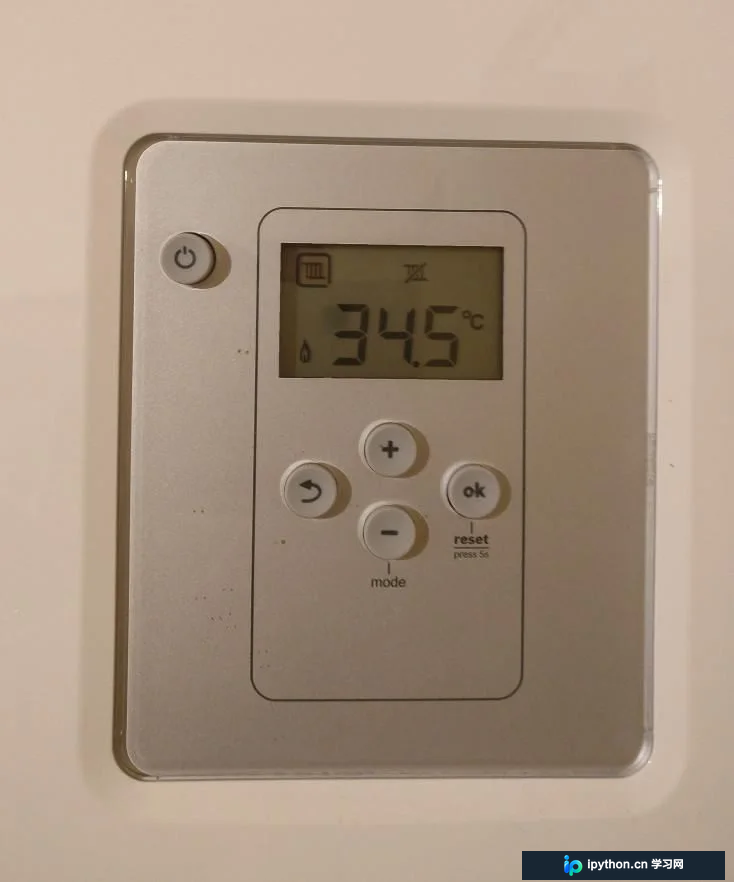
原始图片
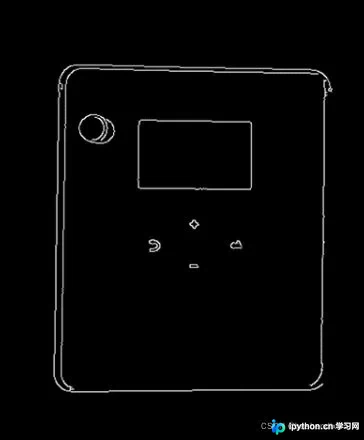
边缘检测

识别的结果图片
到此这篇关于opencv+python识别七段数码显示器的数字(数字识别)的文章就介绍到这了,更多相关opencv数字识别内容请搜索本站以前的文章或继续浏览下面的相关文章希望大家以后多多支持本站!
免责声明:本文内容仅供参考,不代表本站观点。转载或引用请注明出处。









