

Python类定义、对象创建与继承基础教程

本文详细介绍Python中类的定义、对象的创建以及继承机制。涵盖构造方法__init__的使用、字符串表示__str__的重写、实例化对象的两种常见方式,以及子类通过super()调用父类初始化并扩展属性的继承写法。
1、类的定义
首先创建一个名为rectangle.py的文件,并在其中定义一个Rectangle类。在该类中,__init__方法充当构造函数的角色。每个类定义的方法中,self参数必须作为第一个参数出现(虽然可以使用其他变量名,但Python社区惯例使用self)。当实例化对象时,self参数指向当前创建的对象实例,类似于指针的作用。此外,构造方法中初始化了_width和_height两个属性(也称为实例变量),并将它们的默认值设为1。
__str__方法用于以字符串形式表示对象,便于打印输出,其功能类似于Java中重写toString方法。__init__和__str__是Python类中提供的基础方法。
class Rectangle:
    # 构造方法
    def __init__(self, width=1, height=1):
        self._width = width
        self._height = height
    # 状态表示方法
    def __str__(self):
        return ("Width: " + str(self._width)
                + "\nHeight: " + str(self._height))
    # 赋值方法
    def setWidth(self, width):
        self._width = width
    def setHeight(self, height):
        self._height = height
    # 取值方法
    def getWidth(self):
        return self._width
    def getHeight(self):
        return self._height
    # 其它方法
    def area(self):
        return self._width * self._height
2、创建对象
新建一个Test.py文件,通过导入模块的方式调用rectangle模块中的Rectangle类。
import rectangle as rec
r = rec.Rectangle(4, 5)
print(r)
print()
r = rec.Rectangle()
print(r)
print()
r = rec.Rectangle(3)
print(r)
运行后输出结果如下:
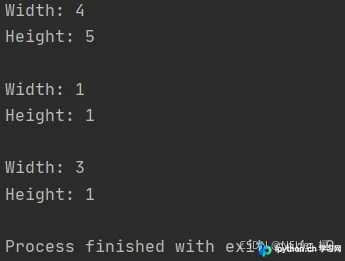
打印Rectangle类的对象时,系统会自动调用其__str__方法。上图展示了初始化Rectangle对象时,构造方法接收参数的三种不同形式。
创建对象主要有以下两种形式,其伪代码表示为:
1)objectName = ClassName(arg1,arg2,…)
2)objectName = moduleName.ClassName(arg1,arg2,…)
变量名objectName指向新创建的对象实例。
3、继承
如果在父类中增加属性,子类必须首先包含调用父类属性初始化的方法,然后再添加子类特有的新属性。伪代码如下:
super().__init__(parentParameter1,…,parentParameterN)
新建一个square.py文件:
import rectangle as rec
class Square(rec.Rectangle):
    def __init__(self, square, width=1, height=1):
        super().__init__(width, height)
        self._square = square
    def __str__(self):
        return ("正方形边长为:" + str(self._width) +
                "\n面积为:" + str(self._square))
    def isSquare(self):
        if self._square == self.getWidth() * self.getWidth():
            return True
        else:
            return False
s = Square(1)
print(s)
print(s.isSquare())
s = Square(2)
print(s)
print(s.isSquare())
输出结果如下:
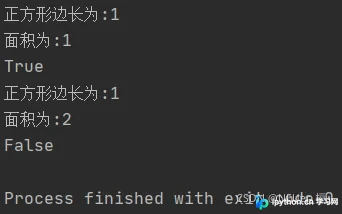
以上内容参考自机械工业出版社《Python程序设计》。
总结
本文到此结束,希望对你有所帮助。欢迎继续关注本站获取更多技术内容!
免责声明:本文内容仅供参考,不代表本站观点。转载或引用请注明出处。









