

Python正则表达式入门:re模块与基础匹配语法详解

发布时间:2026-10-14| 5人浏览过
本文介绍Python中正则表达式的基本概念及re模块的使用方法。重点讲解re.match()函数的从头匹配机制,以及\d、\D、\s、\S、\w、\W等单字符匹配规则的具体应用与示例,帮助开发者快速掌握字符串模式匹配的核心技巧。
正则表达式的介绍
在实际开发中,经常需要查找符合特定复杂规则的字符串,例如邮箱地址或手机号码。此时,若需匹配或检索符合这些规则的文本,正则表达式是理想的工具。
正则表达式本质上是用于描述文本规则的一种代码语言。
re模块
在Python中,若需利用正则表达式对字符串进行匹配操作,应引入并使用内置的re模块。
# 导入re模块
import re
# 使用match方法进行匹配操作
result = re.match(正则表达式,要匹配的字符串)
# 如果上一步匹配到数据的话,可以使用group方法来提取数据
result.group()

# 导入re模块
import re

# 使用match方法进行匹配操作
result = re.match("test","test.cn")
# 获取匹配结果
info = result.group()
print(info)
结果: test
re.match()函数依据给定的正则表达式,从字符串起始位置开始尝试匹配。若首个字符不匹配,则匹配失败并报错。
匹配单个字符
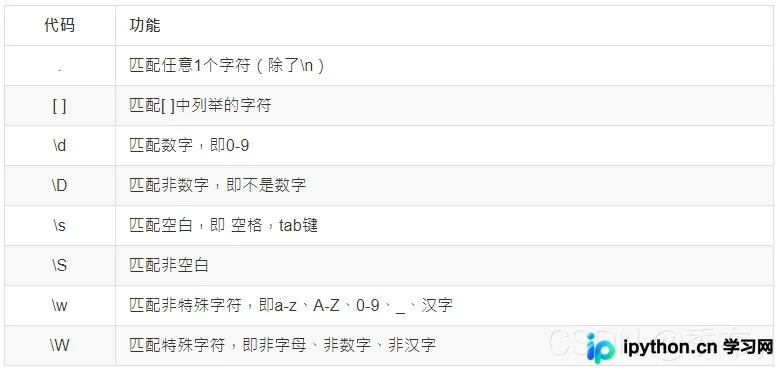
1.匹配任意一个字符
# 匹配任意一个字符
import re

ret = re.match(".","x")
print(ret.group())

ret = re.match("t.o","too")
print(ret.group())

ret = re.match("o.e","one")
print(ret.group())
运行结果: x too one
2.匹配[ ]中列举的字符
import re

ret = re.match("[hH]","hello Python")
print(ret.group())
ret = re.match("[hH]","Hello Python")
print(ret.group())
运行结果: h H
3.\d匹配数字,即0-9
import re

ret = re.match("神州\d号","神州6号")
print(ret.group())
运行结果: 神州6号
4.\D匹配非数字,即不是数字
non_obj = re.match("\D", "s")
print(non_obj .group())
运行结果: s
5.\s匹配空白,即 空格,tab键
match_obj = re.match("hello\sworld", "hello world")
print(match_obj .group())
运行结果: hello world
6.\S匹配非空白
match_obj = re.match("hello\Sworld", "hello&world")
result = match_obj.group()
print(result)
运行结果: hello&world
7.\w匹配非特殊字符,即a-z、A-Z、0-9、_、汉字
match_obj = re.match("\w", "A")
result = match_obj.group()
print(result)
运行结果: A
8.\W匹配特殊字符,即非字母、非数字、非汉字
match_obj = re.match("\W", "&")
result = match_obj.group()
print(result)
运行结果: &
总结
本篇文章就到这里了,希望能给你带来帮助,也希望您能够多多关注本站的更多内容!
免责声明:本文内容仅供参考,不代表本站观点。转载或引用请注明出处。









