

Python使用xlrd、xlwt和xlutils读写修改Excel文件详解

本文详细介绍Python中处理Excel文件的三个核心库:xlrd用于读取,xlwt用于写入,xlutils用于修改。通过安装模块、写入带格式数据、读取Sheet内容及使用copy方法修改现有文件等实例,演示如何高效操作Excel表格,并指出复制xls文件时格式保留的局限性。
在Python中,处理Excel文件通常涉及三种常用方法。
- xlwt库专门用于创建和写入Excel文件。
- xlrd库主要用于读取现有的Excel文件内容。
- xlutils库提供了一系列实用工具,如复制、分割和筛选Excel文件等操作。
首先需要安装所需的模块。
pip3 install xlrd xlwt xlutils接下来演示如何写入Excel文件。
相关代码示例可参考GitHub仓库:https://github.com/python-excel/xlwt/tree/master/examples
以下是写入操作的实际效果展示。
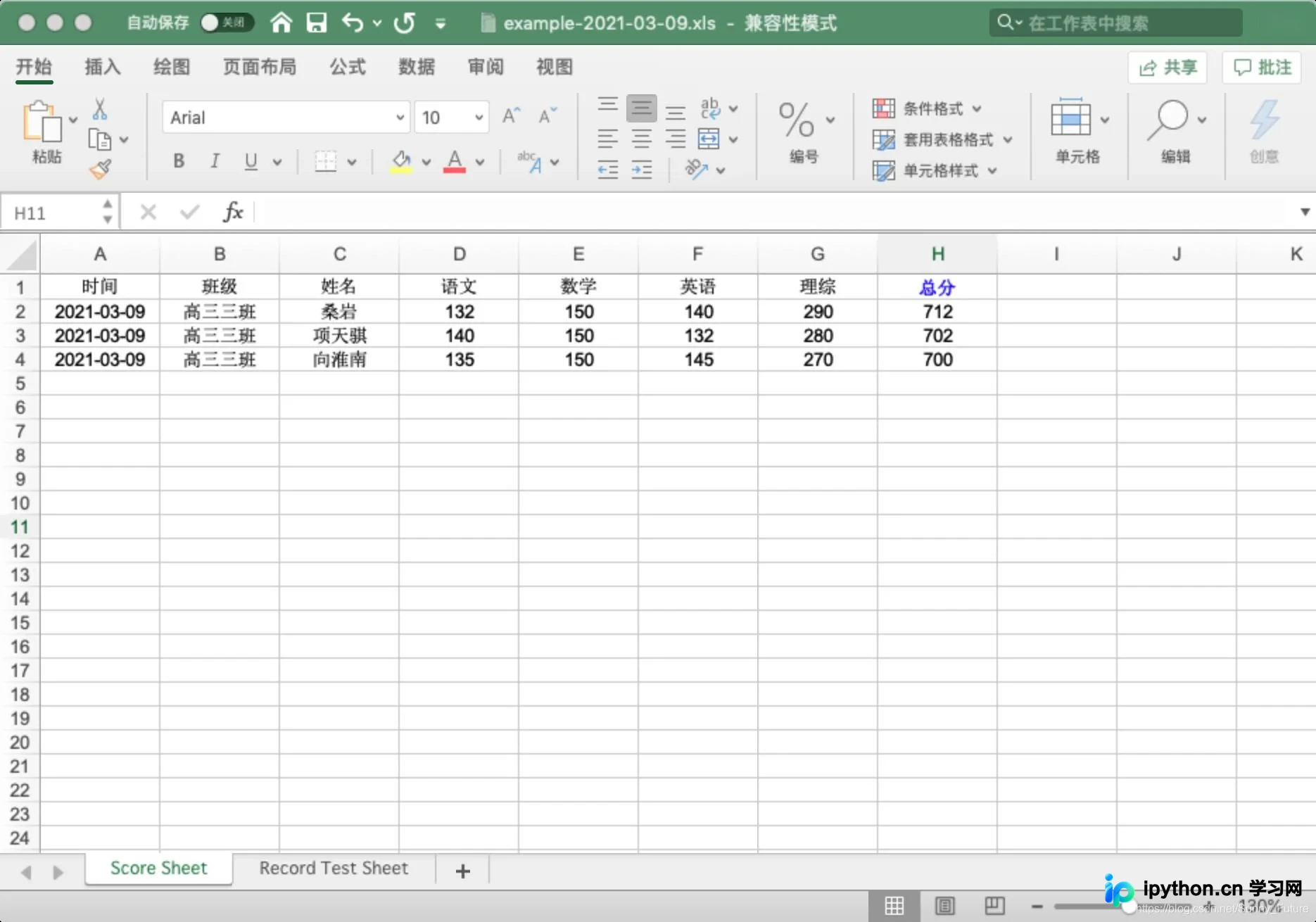
具体实现代码如下。
from datetime import datetime

import xlwt

font0 = xlwt.Font()

# font0.name = 'Times New Roman' # 适用于字母或数字
font0.name = '宋体'  # 适用于中文,适配字体或者不指定字体才能体现出指定的颜色

# font0.colour_index = 1  # 白色
# font0.colour_index = 2  # 红色
# font0.colour_index = 3  # 绿色
# font0.colour_index = 4  # 蓝色
# font0.colour_index = 5  # 黄色
# font0.colour_index = 6  # 紫色
# font0.colour_index = 7  # 青色
# font0.colour_index = 8  # 黑色,比默认加黑,不加粗
font0.colour_index = 4  # 蓝色
font0.bold = True

style0 = xlwt.XFStyle()
style0.font = font0

# 创建样式对象:日期格式
style1 = xlwt.XFStyle()
style1.num_format_str = 'YYYY-MM-DD'

# 创建样式对象:字体居中对齐
style2 = xlwt.XFStyle()
al = xlwt.Alignment()
al.horz = 0x02 # 设置水平居中
al.vert = 0x01 # 设置垂直居中
style2.alignment = al

# 创建样式对象,设置日期格式与字体居中对齐
style3 = xlwt.XFStyle()
style3.num_format_str = 'YYYY-MM-DD'
style3.alignment = al

# 创建样式对象,设置字体居中 且 设置字体颜色
style4 = xlwt.XFStyle()
style4.alignment = al
style4.font = font0

now_time = datetime.now().strftime('%Y-%m-%d %X')
date_time = datetime.now().strftime('%Y-%m-%d')

# 创建表格
wb = xlwt.Workbook()

# 新建一个名为 Score Sheet 的表单页
score_sheet = wb.add_sheet('Score Sheet')

# 新建一个名为 Record Test Sheet 的表单页
record_test_sheet = wb.add_sheet('Record Test Sheet')

# 1、写入 Score Sheet 表单
# 设置 表头, 第一个参数是行,第二个参数是列
score_sheet.write(0, 0, '时间', style2)
score_sheet.write(0, 1, '班级', style2)
score_sheet.write(0, 2, '姓名', style2)
score_sheet.write(0, 3, '语文', style2)
score_sheet.write(0, 4, '数学', style2)
score_sheet.write(0, 5, '英语', style2)
score_sheet.write(0, 6, '理综', style2)
score_sheet.write(0, 7, '总分', style4)

# 按照位置添加数据
score_sheet.write(1, 0, datetime.now(), style3)
score_sheet.write(1, 1, '高三三班', style2)
score_sheet.write(1, 2, '桑岩', style2)
score_sheet.write(1, 3, 132, style2)
score_sheet.write(1, 4, 150, style2)
score_sheet.write(1, 5, 140, style2)
score_sheet.write(1, 6, 290, style2)
score_sheet.write(1, 7, xlwt.Formula("D2+E2+F2+G2"), style2)

score_sheet.write(2, 0, datetime.now(), style3)
score_sheet.write(2, 1, '高三三班', style2)
score_sheet.write(2, 2, '项天骐', style2)
score_sheet.write(2, 3, 140, style2)
score_sheet.write(2, 4, 150, style2)
score_sheet.write(2, 5, 132, style2)
score_sheet.write(2, 6, 280, style2)
score_sheet.write(2, 7, xlwt.Formula("D3+E3+F3+G3"), style2)

score_sheet.write(3, 0, datetime.now(), style3)
score_sheet.write(3, 1, '高三三班', style2)
score_sheet.write(3, 2, '向淮南', style2)
score_sheet.write(3, 3, 135, style2)
score_sheet.write(3, 4, 150, style2)
score_sheet.write(3, 5, 145, style2)
score_sheet.write(3, 6, 270, style2)
score_sheet.write(3, 7, xlwt.Formula("D4+E4+F4+G4"), style2)


# 2、写入 Record Test Sheet 表单
record_test_sheet.write(0, 0, '时间')
record_test_sheet.write(0, 1, '学科', style1)
record_test_sheet.write(0, 2, '成绩', style1)
record_test_sheet.write(1, 0, datetime.now(), style1)
record_test_sheet.write(1, 1, '语文', style2)
record_test_sheet.write(1, 2, 80)
record_test_sheet.write(2, 0, datetime.now(), style3)
record_test_sheet.write(2, 1, '数学', style2)
record_test_sheet.write(2, 2, 99)
record_test_sheet.write(3, 0, now_time, style2)
record_test_sheet.write(3, 1, '英语', style2)
record_test_sheet.write(3, 2, 98)


# 保存表格,这里应该是覆盖写,注意每次都是覆盖所有表单内容,建议每次生成的表单加上时间版本区分
# wb.save('example.xls')
wb.save('example-{0}.xls'.format(date_time))
随后介绍如何读取Excel文件。
xlrd的相关资源位于:https://github.com/python-excel/xlrd
读取操作的效果主要是获取Sheet表单中的具体内容。
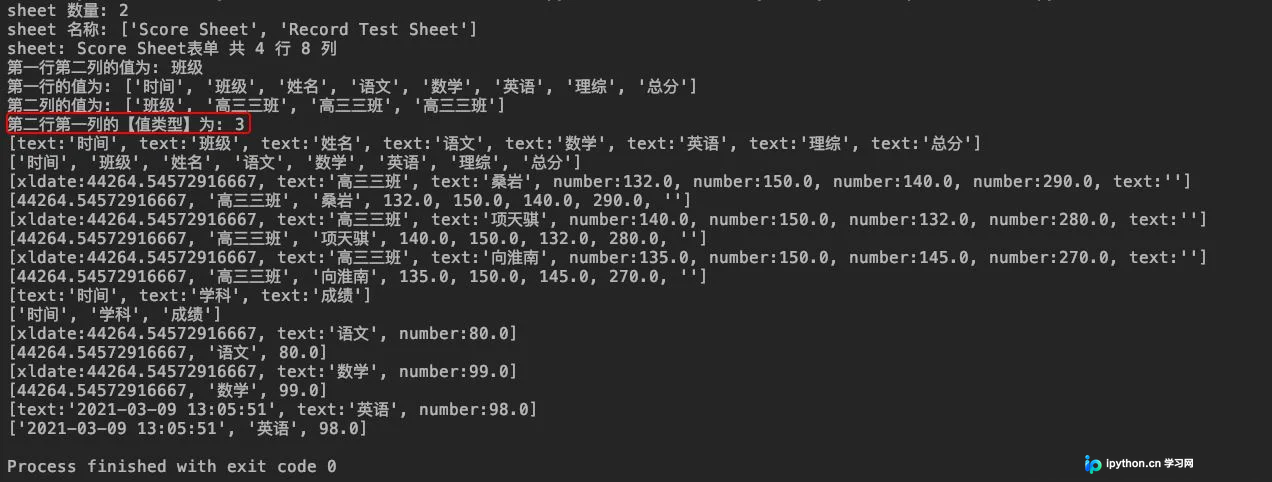
| 数值 | 类型 | 说明 |
|---|---|---|
| 0 | empty | 空 |
| 1 | string | 字符串 |
| 2 | number | 数字 |
| 3 | date | 日期 |
| 4 | boole | 布尔值 |
| 5 | error | 错误 |
对应的读取代码示例如下。
import xlrd

# 打开 xls文件
wb = xlrd.open_workbook("example-2021-03-09.xls")

# 获取并打印 sheet 数量
print("sheet 数量:", wb.nsheets)     # sheet 数量: 2

# 获取并打印 sheet 名称
print("sheet 名称:", wb.sheet_names())  # sheet 名称: ['Score Sheet', 'Record Test Sheet']

# 根据 sheet 索引获取内容
sh1 = wb.sheet_by_index(0)
# 或者
# 也可根据 sheet 名称获取内容
# sh = wb.sheet_by_name('Score Sheet')

# 获取并打印该 sheet 行数和列数
print(u"sheet: %s表单 共 %d 行 %d 列" % (sh1.name, sh1.nrows, sh1.ncols))   # sheet: Score Sheet表单 共 4 行 8 列

# 获取并打印某个单元格的值
print("第一行第二列的值为:", sh1.cell_value(0, 1))    # 第一行第二列的值为: 班级

# 获取整行或整列的值
row_info = sh1.row_values(0)  # 获取第一行内容
col_info = sh1.col_values(1)  # 获取第二列内容

# 打印获取的行列值
print("第一行的值为:", row_info)   # 第一行的值为: ['时间', '班级', '姓名', '语文', '数学', '英语', '理综', '总分']
print("第二列的值为:", col_info)   # 第二列的值为: ['班级', '高三三班', '高三三班', '高三三班']

# 获取单元格内容的数据类型,注意这里的值 另有含义
print("第二行第一列的【值类型】为:", sh1.cell(1, 0).ctype)   # 第二行第一列的【值类型】为: 3

# 遍历所有表单内容
for sh in wb.sheets():
  for r in range(sh.nrows):

    # 输出指定行内容,这里包含原有类型指定,不能直接获取到指定列的值
    row_val_list = sh.row(r)
    print(row_val_list)
    # [text:'时间', text:'班级', text:'姓名', text:'语文', text:'数学', text:'英语', text:'理综', text:'总分']

    # 遍历行内,输出当前行内的所有列值
    col_val_list = [col_val.value for col_val in row_val_list]
    print(col_val_list)
最后讲解如何修改现有的Excel文件。
修改Excel的核心思路是利用xlutils库的copy方法,将原始Excel文件完整复制一份,然后在副本上进行修改操作,最后保存为新文件或覆盖原文件。
这是修改前的Excel文件状态。
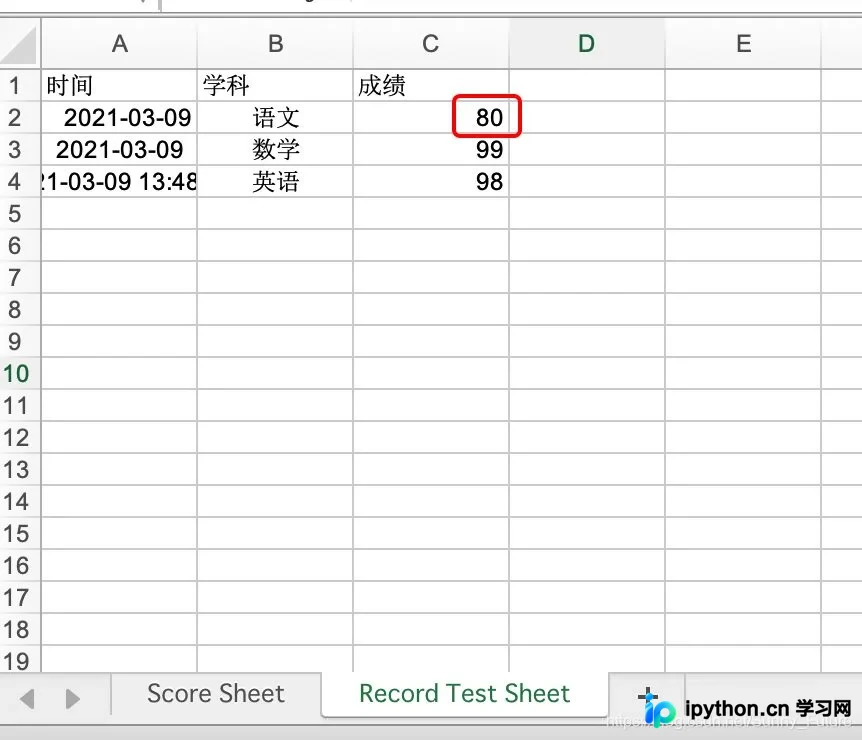
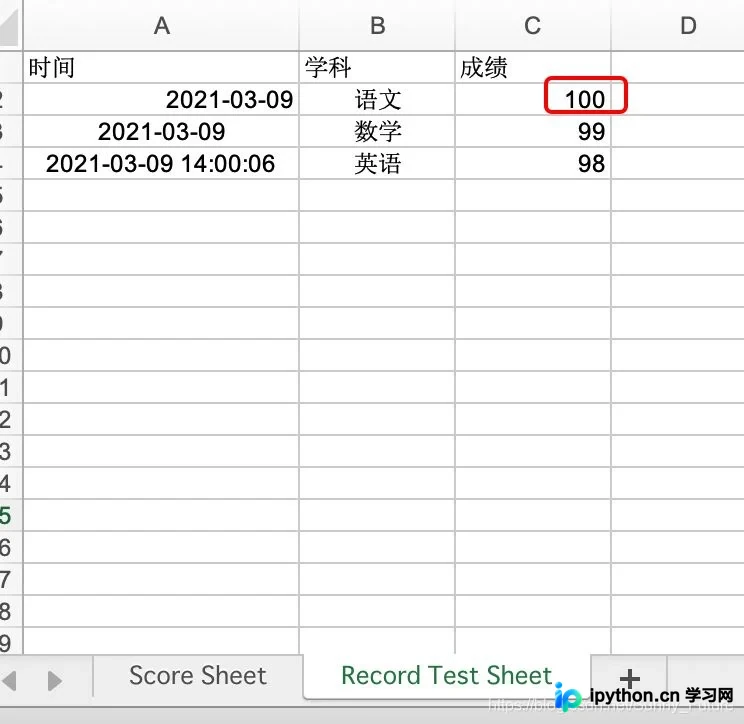
这是修改后的Excel文件状态。
修改操作的代码示例如下。
import xlrd
from xlutils.copy import copy


# 打开 excel 文件, 带格式复制
read_book = xlrd.open_workbook("example-2021-03-09.xls", formatting_info=True)

# 复制一份
wb = copy(read_book)

# 选取第一个表单
sh1 = wb.get_sheet(0)

# 在第五行新增写入数据
sh1.write(4, 0, '2020-12-16')
sh1.write(4, 1, '高三三班')
sh1.write(4, 2, '小鱼仙倌儿')
sh1.write(4, 3, 150)
sh1.write(4, 4, 150)
sh1.write(4, 5, 150)
sh1.write(4, 6, 300)

# 选取第二个表单
sh2 = wb.get_sheet(1)

# 替换总成绩数据
sh2.write(1, 2, 100)

# 保存
wb.save('example-2021-03-09.xls')
需要注意的是,在复制xls文件时可能会遇到格式问题。
目前似乎没有简单的方法能完美保留单元格的原始格式,复制后格式通常会丢失并变为空白。
更多讨论可参考:https://www.coder.work/article/80896
其他相关资源:https://zhuanlan.zhihu.com/p/128674458
附录部分包含参考资料。
参考文章:http://www.ityouknow.com/python/2019/12/29/python-excel-103.html
官方文档地址:http://www.python-excel.org/
以上就是关于Python使用xlrd、xlwt和xlutils库读写及修改Excel文件的详细介绍,更多相关内容建议搜索本站历史文章或浏览后续文章,感谢支持。
免责声明:本文内容仅供参考,不代表本站观点。转载或引用请注明出处。









