

Django多数据库配置与路由修复方案

发布时间:2026-10-14| 2人浏览过
本文介绍Django配置多个数据库的方法,重点解决因使用inspectdb生成模型导致的迁移报错1146(Table doesn't exist)。通过修改DatabaseAppsRouter,确保未映射的App回退至默认数据库,从而正常创建系统所需表结构。
Django多数据库配置与常见报错分析
参考官方文档https://docs.djangoproject.com/zh-hans/3.1/topics/db/multi-db/与csdn文章https://blog.csdn.net/songfreeman/article/details/70229839,可以完成Django多数据库的基础设置。但在实际使用中,若通过inspectdb方法生成模型,执行migrate时可能会遇到错误:1146, “Table xxx doesn't exist”。经排查,问题根源在于数据库路由配置。虽然已配置DATABASE_APPS_MAPPING进行映射,但Django默认表写入时可能因找不到对应数据库而失败。此外,源码中的映射关系往往未包含新加入的app(如grappelli等),导致路由失效。
数据库映射配置示例
DATABASE_APPS_MAPPING = {
# example:
# 'app_name':'database_name',
# 'admin': 'default',
# 'users': 'default', #django
'basic_estate': 'basic_estate',
'footstone': 'footstone',
'mall': 'hsmall',
'iot_biz': 'iot_biz',
'mall': 'mall',
'hsuser': 'hsuser',
}
修复路由以解决迁移错误
为解决该问题,需修改router代码逻辑:当在映射关系中找不到对应数据库时,应返回默认数据库连接。具体实现代码如下:
自定义DatabaseAppsRouter实现
# -*- coding: utf-8 -*-
"""
@author: obaby
@license: (C) Copyright 2013-2020, obaby@mars.
@contact: root@obaby.org.cn
@link: http://www.obaby.org.cn
  http://www.h4ck.org.cn
  http://www.findu.co
@file: atabase_router.py.py
@time: 2021/2/26 9:07
@desc:
"""
from django.conf import settings

DATABASE_MAPPING = settings.DATABASE_APPS_MAPPING


class DatabaseAppsRouter(object):
 """
 A router to control all database operations on models for different
 databases.

 In case an app is not set in settings.DATABASE_APPS_MAPPING, the router
 will fallback to the `default` database.

 Settings example:

 DATABASE_APPS_MAPPING = {'app1': 'db1', 'app2': 'db2'}
 """

 def db_for_read(self, model, **hints):
  """"Point all read operations to the specific database."""
  if model._meta.app_label in DATABASE_MAPPING:
   return DATABASE_MAPPING[model._meta.app_label]
  return 'default'

 def db_for_write(self, model, **hints):
  """Point all write operations to the specific database."""
  if model._meta.app_label in DATABASE_MAPPING:
   return DATABASE_MAPPING[model._meta.app_label]
  return 'default'

 def allow_relation(self, obj1, obj2, **hints):
  """Allow any relation between apps that use the same database."""
  db_obj1 = DATABASE_MAPPING.get(obj1._meta.app_label)
  db_obj2 = DATABASE_MAPPING.get(obj2._meta.app_label)
  if db_obj1 and db_obj2:
   if db_obj1 == db_obj2:
    return True
   else:
    return False
  return None

 def allow_syncdb(self, db, model):
  """Make sure that apps only appear in the related database."""

  if db in DATABASE_MAPPING.values():
   return DATABASE_MAPPING.get(model._meta.app_label) == db
  elif model._meta.app_label in DATABASE_MAPPING:
   return False
  return None

 def allow_migrate(self, db, app_label, model=None, **hints):
  """
  Make sure the auth app only appears in the 'auth_db'
  database.
  """
  if db in DATABASE_MAPPING.values():
   return DATABASE_MAPPING.get(app_label) == db
  elif app_label in DATABASE_MAPPING:
   return False
  return None
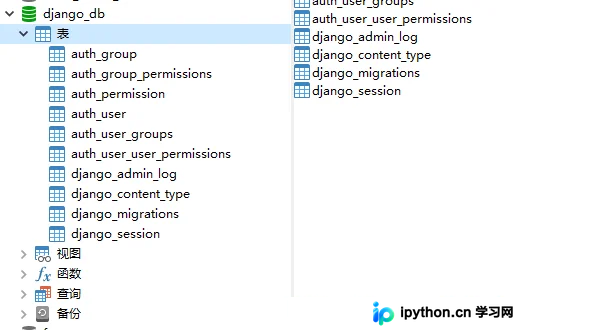
经过上述修改,Django系统所需的数据库即可正常创建。
总结
至此,关于Django使用多个数据库的配置与问题修复介绍完毕。如需了解更多Django多数据库相关内容,建议搜索本站历史文章或继续浏览后续教程,感谢支持。
免责声明:本文内容仅供参考,不代表本站观点。转载或引用请注明出处。









