

Python3实现QQ邮箱发送邮件及附件功能详解

发布时间:2026-10-13| 4人浏览过
本文详细介绍如何使用Python3通过QQ邮箱的SMTP服务发送电子邮件及附件。内容涵盖开启QQ邮箱SMTP权限、配置发件人信息与授权码,以及利用smtplib和email模块构建包含HTML内容与Excel附件的完整邮件发送脚本,提供可直接运行的代码示例供参考。
Python3 QQ邮箱邮件发送指南
本文分享了一个使用Python3通过QQ邮箱发送电子邮件及其附件的具体实现方案,供读者参考学习。
开启SMTP服务
首先需要开启QQ邮箱的SMTP服务,以便获取发送权限。
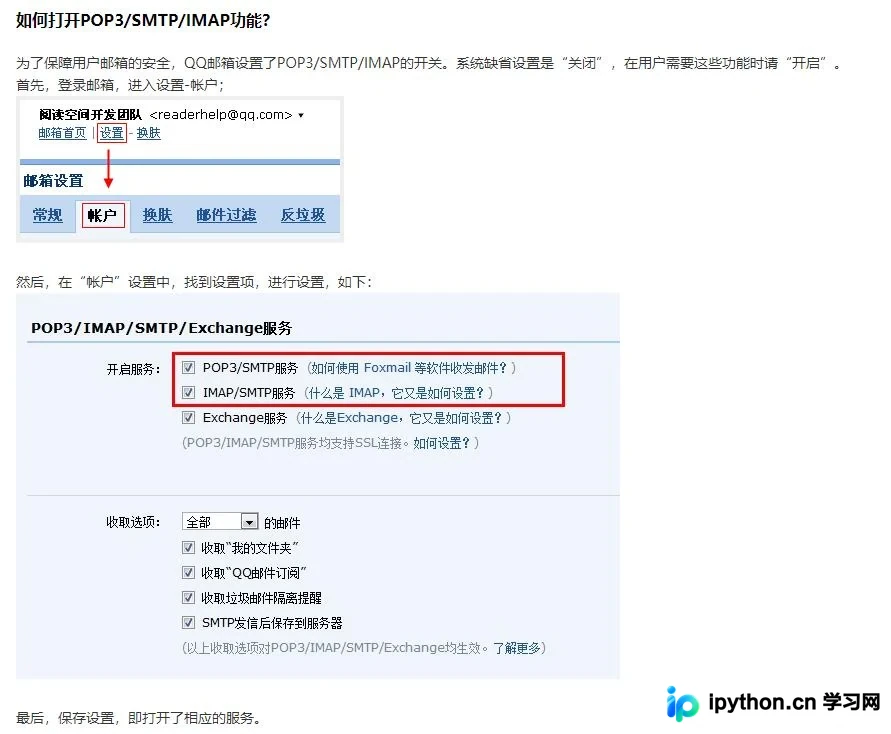
代码实现
具体的实现代码如下所示。
import smtplib
from email.mime.text import MIMEText
from email.mime.multipart import MIMEMultipart


def Mailer(to_list,th1=None,Subject=None,unipath=None):

 mail_host = 'smtp.qq.com'  # 邮箱服务器
 mail_user = 'dalu@qq.com' # 发件人邮箱密码(当时申请smtp给的口令)
 mail_pwd = '***********' # SMTP密码
 s = smtplib.SMTP_SSL(mail_host, 465,timeout=5)
 s.login(mail_user, mail_pwd)
 #邮件内容
 mail = str(th1)
 msg = MIMEMultipart()
 msgtext = MIMEText(mail.encode('utf8'), _subtype='html', _charset='utf8')
 msg['From'] = mail_user
 msg['Subject'] = Subject
 msg['To'] = ",".join(to_list)

 if unipath is not None:
  att1 = MIMEText(open(unipath, 'rb').read(), 'base64', 'gb2312')
  att1["Content-Type"] = 'application/octet-stream'
  att1.add_header('Content-Disposition', 'attachment',filename=(Subject+ '.xlsx'))
  msg.attach(att1)
 msg.attach(msgtext)
 try:
  s.sendmail(mail_user, to_list, msg.as_string())
  s.close()
  print('发送成功')
 except Exception as e:
  print(e)

to_list = [
 #多用户使用的list
 'dalu@qq.com',
]

Mailer(to_list,th1="这是要发的邮件内容",Subject='邮件标题',unipath=r'F:\test.xlsx')
以上即为本文的全部内容,希望能为读者的学习带来帮助,同时也欢迎大家继续支持本站。
免责声明:本文内容仅供参考,不代表本站观点。转载或引用请注明出处。









