

Pytest框架之fixture的详细使用教程

本文深入解析Pytest框架中fixture的核心用法,涵盖scope作用域(function至session)、autouse自动调用、params参数化及ids标识。详细演示通过函数传参、usefixtures装饰器及autouse三种调用方式,并对比session与function的实例化顺序。重点讲解利用yield关键字和addfinalizer实现Teardown后置清理的逻辑与异常处理差异,提供完整代码示例与注意事项。
前言
在前一篇文章中,我们介绍了setup和teardown方法,它们可以在执行用例之前或之后加入一些操作,但这些操作仅对整个脚本全局生效。在实际测试场景中,如果用例1需要先登录,用例2不需要登录,而用例3又需要先登录,此时setup和teardown便无法灵活应对。Fixture功能允许我们自定义测试用例的前置条件,从而解决此类问题。
fixture优势
- 命名方式灵活,不再局限于setup和teardown等固定命名。
- 在conftest.py配置文件中定义的fixture可以实现数据共享,无需显式import即可自动被其他测试文件找到。
- 通过设置scope="module",可以实现多个.py文件之间共享前置条件。
- 通过设置scope="session",可以实现多个.py文件在同一个会话中共享前置条件,从而完成多个用例的执行。
fixture参数列表
fixture的定义语法如下: @pytest.fixture(scope="function", params=None, autouse=False, ids=None, name=None) def test(): print("fixture初始化的参数列表")
参数列表详解
- scope:定义fixture的作用域,默认值为function,此外还支持class、module、package和session四种常用作用域。
- autouse:默认值为False,表示需要测试用例手动调用该fixture;如果设置为True,则作用域内的所有测试用例都会自动调用该fixture。
- name:默认值为装饰器的名称。建议在同一个模块中相互调用的fixture使用不同的name,以避免冲突。
注意
session作用域覆盖整个测试会话,即从开始执行pytest到测试结束的全过程。
测试用例如何调用fixture
- 将fixture的名称作为测试用例函数的输入参数。
- 在测试用例上添加装饰器:@pytest.mark.usefixtures(fixture_name)。
- 在fixture中设置autouse=True。
#!/usr/bin/env python
# -*- coding: utf-8 -*-
"""
__title__ =
__Time__ = 2020-04-06 15:50
__Author__ = 小菠萝测试笔记
__Blog__ = https://www.cnblogs.com/poloyy/
"""
import pytest
# 调用方式一
@pytest.fixture
def login():
 print("输入账号,密码先登录")

def test_s1(login):
 print("用例 1:登录之后其它动作 111")

def test_s2(): # 不传 login
 print("用例 2:不需要登录,操作 222")

# 调用方式二
@pytest.fixture
def login2():
 print("please输入账号,密码先登录")

@pytest.mark.usefixtures("login2", "login")
def test_s11():
 print("用例 11:登录之后其它动作 111")

# 调用方式三
@pytest.fixture(autouse=True)
def login3():
 print("====auto===")

# 不是test开头,加了装饰器也不会执行fixture
@pytest.mark.usefixtures("login2")
def loginss():
 print(123)
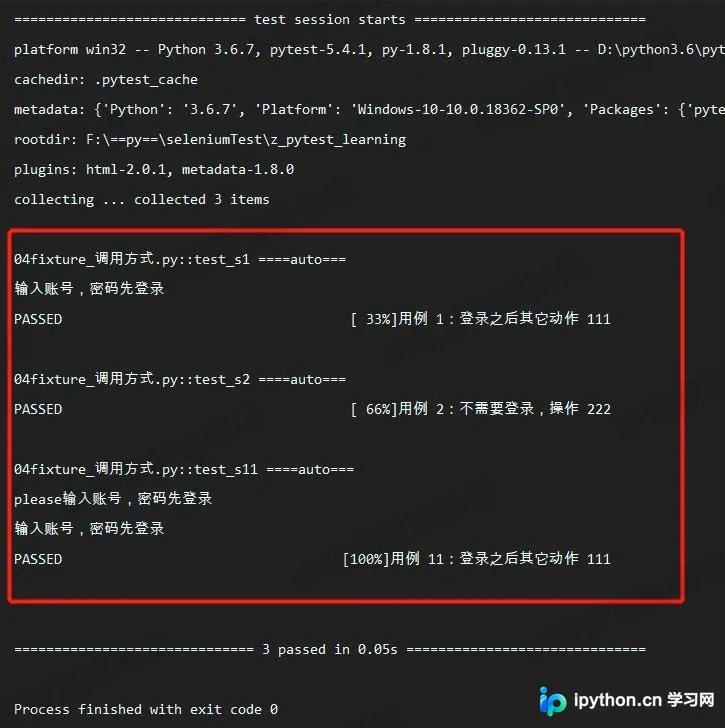
执行结果
fixture的实例化顺序
- 较高scope范围的fixture(如session)会在较低scope范围的fixture(如function、class)之前实例化,顺序为:session > package > module > class > function。
- 具有相同作用域的fixture遵循测试函数中声明的顺序,并遵循fixture之间的依赖关系。例如,在fixture_A内部依赖的fixture_B会优先实例化,随后才是fixture_A本身。
- 自动使用(autouse=True)的fixture将在显式使用(通过传参或装饰器)的fixture之前实例化。
#!/usr/bin/env python
# -*- coding: utf-8 -*-
"""
__title__ =
__Time__ = 2020-04-06 16:14
__Author__ = 小菠萝测试笔记
__Blog__ = https://www.cnblogs.com/poloyy/
"""
import pytest
order = []
@pytest.fixture(scope="session")
def s1():
 order.append("s1")
@pytest.fixture(scope="module")
def m1():
 order.append("m1")
@pytest.fixture
def f1(f3, a1):
 # 先实例化f3, 再实例化a1, 最后实例化f1
 order.append("f1")
 assert f3 == 123
@pytest.fixture
def f3():
 order.append("f3")
 a = 123
 yield a
@pytest.fixture
def a1():
 order.append("a1")
@pytest.fixture
def f2():
 order.append("f2")
def test_order(f1, m1, f2, s1):
 # m1、s1在f1后,但因为scope范围大,所以会优先实例化
 assert order == ["s1", "m1", "f3", "a1", "f1", "f2"]
执行结果
断言成功
关于fixture的注意点
添加了 @pytest.fixture ,如果fixture还想依赖其他fixture,需要用函数传参的方式,不能用 @pytest.mark.usefixtures() 的方式,否则会不生效。
@pytest.fixture(scope="session")
def open():
 print("===打开浏览器===")

@pytest.fixture
# @pytest.mark.usefixtures("open") 不可取!!!不生效!!!
def login(open):
 # 方法级别前置操作setup
 print(f"输入账号,密码先登录{open}")
前面讲解的内容主要涉及setup操作,接下来介绍如何实现teardown。
使用fixture实现teardown并非通过独立函数,而是利用yield关键字来开启teardown操作。
#!/usr/bin/env python
# -*- coding: utf-8 -*-

"""
__title__ =
__Time__ = 2020-04-06 15:50
__Author__ = 小菠萝测试笔记
__Blog__ = https://www.cnblogs.com/poloyy/
"""

import pytest

@pytest.fixture(scope="session")
def open():
 # 会话前置操作setup
 print("===打开浏览器===")
 test = "测试变量是否返回"
 yield test
 # 会话后置操作teardown
 print("==关闭浏览器==")

@pytest.fixture
def login(open):
 # 方法级别前置操作setup
 print(f"输入账号,密码先登录{open}")
 name = "==我是账号=="
 pwd = "==我是密码=="
 age = "==我是年龄=="
 # 返回变量
 yield name, pwd, age
 # 方法级别后置操作teardown
 print("登录成功")

def test_s1(login):
 print("==用例1==")
 # 返回的是一个元组
 print(login)
 # 分别赋值给不同变量
 name, pwd, age = login
 print(name, pwd, age)
 assert "账号" in name
 assert "密码" in pwd
 assert "年龄" in age

def test_s2(login):
 print("==用例2==")
 print(login)
yield注意事项
- 如果yield前面的代码(即setup部分)抛出异常,则不会执行yield后面的teardown内容。
- 如果测试用例抛出异常,yield后面的teardown内容仍会正常执行。
yield+with的结合
# 官方例子
@pytest.fixture(scope="module")
def smtp_connection():
 with smtplib.SMTP("smtp.gmail.com", 587, timeout=5) as smtp_connection:
 yield smtp_connection # provide the fixture value
该 smtp_connection 连接将测试完成执行后已经关闭,因为 smtp_connection 对象自动关闭时, with 语句结束。
addfinalizer 终结函数
@pytest.fixture(scope="module")
def test_addfinalizer(request):
 # 前置操作setup
 print("==再次打开浏览器==")
 test = "test_addfinalizer"

 def fin():
 # 后置操作teardown
 print("==再次关闭浏览器==")

 request.addfinalizer(fin)
 # 返回前置操作的变量
 return test
def test_anthor(test_addfinalizer):
 print("==最新用例==", test_addfinalizer)
注意事项
如果 request.addfinalizer() 前面的代码(即setup部分)已经抛出异常,则不会执行 request.addfinalizer() 的teardown内容(与yield行为相似,可能是最近新版本改为一致)。可以声明多个终结函数并调用。
总结
到此这篇关于Pytest框架之fixture的详细使用教程的文章就介绍到这了,更多相关Pytest fixture使用内容请搜索本站以前的文章或继续浏览下面的相关文章,希望大家以后多多支持本站!
免责声明:本文内容仅供参考,不代表本站观点。转载或引用请注明出处。









