

Django执行原始SQL并返回字典类型数据的两种方案

本文介绍在Django中执行原始SQL并返回字典类型数据的两种方法。第一种通过手动遍历游标结果构建字典,适用于简单场景;第二种通过继承重写mysql驱动中的create_cursor和is_sql_auto_is_null_enabled方法,实现全局自动返回字典,解决元组嵌套带来的处理麻烦,提升查询效率与代码可读性。
Django执行原始SQL并返回字典的两种方案
在许多场景下,直接执行SQL语句比使用Django的Model对象更高效。有时我们并不关心具体的字段映射,例如执行`select * from product`这类查询时,我们希望直接获得与数据库列名对应的键值对。
返回的数据结构示例如下:`result = [{“id”:1,”name”:”product1”},{“id”:2,”name”:”product2”}]`
此外,你也可以将结果转换为JSON格式以便传输或存储。
import json json.dumps(result )
这样就能得到一串标准的JSON字符串,处理起来非常方便。
手动构建字典的方法
# coding:utf-8
from django.db import connection, transaction

'''执行django原始sql语句 并返回一个数组对象'''
def executeQuery(sql):
 cursor = connection.cursor() # 获得一个游标(cursor)对象
 cursor.execute(sql)
 rawData = cursor.fetchall()
 print rawData
 col_names = [desc[0] for desc in cursor.description]
 print col_names

 result = []
 for row in rawData:
  objDict = {}
  # 把每一行的数据遍历出来放到Dict中
  for index, value in enumerate(row):
  print index, col_names[index], value
  objDict[col_names[index]] = value

  result.append(objDict)

 return result
重写MySQL驱动实现自动返回字典
补充知识:重写Django的MySQL驱动以原生SQL查询返回字典类型数据
在使用Django时,某些高性能需求场景需要直接使用原生SQL语句进行查询。然而,默认情况下,查询结果通常是一个元组嵌套元组的形式,处理起来较为繁琐。为了简化数据获取过程,我们需要实现从数据库查询后直接返回字典类型的数据。
实现这一目标的方法是通过继承Django的MySQL数据库驱动模块。
具体操作是在Django项目目录下创建一个名为`mysql`的文件夹,并在该文件夹内创建`base.py`文件。
以下是`base.py`文件的内容示例。
驱动重写与配置
from django.db.backends.mysql import base
from django.db.backends.mysql import features
from django.utils.functional import cached_property

class DatabaseFeatures(features.DatabaseFeatures):
 @cached_property
 def is_sql_auto_is_null_enabled(self):
  with self.connection.cursor() as cursor:
   cursor.execute('SELECT @@SQL_AUTO_IS_NULL')
   result = cursor.fetchone()
   return result and result['@@SQL_AUTO_IS_NULL'] == 1


class DatabaseWrapper(base.DatabaseWrapper):
 features_class = DatabaseFeatures

 def create_cursor(self, name=None):
  cursor = self.connection.cursor(self.Database.cursors.DictCursor)
  return base.CursorWrapper(cursor)

 @cached_property
 def mysql_server_info(self):
  with self.temporary_connection() as cursor:
   cursor.execute('SELECT VERSION()')
   return cursor.fetchone()['VERSION()']
最后,需要在Django项目的`settings.py`文件中修改数据库配置,指定使用的数据库引擎为我们刚刚创建的自定义模块。
DATABASES = {
 'default': {
  'ENGINE': 'Test.mysql', # 指定数据库驱动为刚刚创建的mysql文件夹
  'NAME': 'test', # 指定的数据库名
  'USER': 'root', # 数据库登录的用户名
  'PASSWORD': '123456', # 登录数据库的密码
  'HOST': '127.0.0.1',
  'PORT': '3306', # 数据库服务器端口,mysql默认为3306
  'DATABASE_OPTIONS': {
   'connect_timeout': 60,
   'init_command': "SET sql_mode='STRICT_TRANS_TABLES'",
   'charset': 'utf8mb4',
  },
 }
}
接下来进行功能测试。
from django.db import connections

def f():
 search_sql = "SELECT propertyphotoid,propertyid,alykey FROM lansi_architecture_data.propertyphoto limit 0,5"
 cursor = connections['default'].cursor()
 try:
  cursor.execute(search_sql)
  rows = cursor.fetchall()
 except Exception as e:
  print(e)
  rows = 1

 print(rows)
预期的输出结果如下所示。
[{'propertyphotoid': 27, 'propertyid': 0, 'alykey': '123456'}, {'propertyphotoid': 28, 'propertyid': 10837, 'alykey': 'Property/6113/207504A1-AC65-4E3B-BE86-538B3807D364'}, {'propertyphotoid': 29, 'propertyid': 6113, 'alykey': 'Property/6113/357A4EAE-750A-4F59-AF01-271B4225CFBD'}, {'propertyphotoid': 31, 'propertyid': 6113, 'alykey': 'Property/6113/6DF1A2C1-F54C-4462-8363-619806A2F085'}, {'propertyphotoid': 36, 'propertyid': 6113, 'alykey': 'Property/6113/572CB245-ABC0-4FD6-8353-729EBD5E5D46'}]
源码解析与问题修复
源码解析:
Django中`django.db.utils.ConnectionHandler`的`__getitem__`方法负责管理数据库连接。
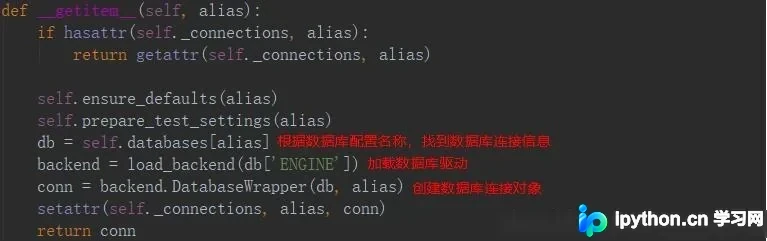
获取连接对象的游标是由`DatabaseWrapper`类的`create_cursor`方法返回的。因此,只需重写`create_cursor`方法,即可更改游标返回的数据类型,使其直接返回字典而非元组。
在`django.db.backends.mysql.base.DatabaseWrapper`类中,原始的`create_cursor`方法实现如下。
 def create_cursor(self, name=None):
  cursor = self.connection.cursor()
  return CursorWrapper(cursor)
理论上完成上述重写后目标已达成,但在测试过程中遇到了错误。具体表现为在`django.db.backends.mysql.features.DatabaseFeatures`里的`is_sql_auto_is_null_enabled`方法中报出`KeyError`错误。
 @cached_property
 def is_sql_auto_is_null_enabled(self):
  with self.connection.cursor() as cursor:
   cursor.execute('SELECT @@SQL_AUTO_IS_NULL')
   result = cursor.fetchone()
   return result and result[0] == 1
出现该错误的原因是`is_sql_auto_is_null_enabled`方法使用了重写后的游标,执行`cursor.execute('SELECT @@SQL_AUTO_IS_NULL')`后返回的结果不再是元组,而是一个字典。因此,原代码中的`result[0]`会因键不存在而抛出`KeyError`。解决方法是重写`is_sql_auto_is_null_enabled`方法,将`result[0]`改为`result['@@SQL_AUTO_IS_NULL']`。
最后,还需要将`DatabaseWrapper`类中的`features_class`属性赋值为重写后的`DatabaseFeatures`类,以确保功能生效。
以上这篇Django执行原始SQL并返回Dict字典的例子就是小编分享给大家的全部内容了,希望能给大家一个参考,也希望大家多多支持本站。
免责声明:本文内容仅供参考,不代表本站观点。转载或引用请注明出处。









