

使用PyInstaller将Python脚本打包为独立EXE可执行文件

发布时间:2026-10-13| 6人浏览过
本文详细介绍如何利用PyInstaller库将Python脚本打包为独立的Windows EXE可执行文件。内容涵盖环境安装、命令行操作、常用参数(如-F生成单文件、-w隐藏窗口)以及编译过程解析,帮助开发者快速实现Python应用的跨机器分发。
在开始打包之前,必须确保环境中已安装PyInstaller库。
pip install pyinstallerEXE程序打包具体步骤
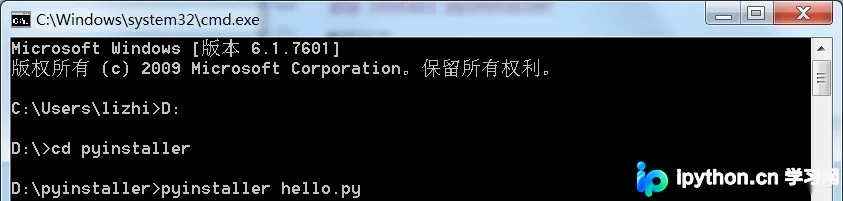
打开命令行工具(CMD),导航至包含待编译Python源文件的目录。
执行打包命令。
pyinstaller -F hello.py示例中,hello.py为需要被打包的目标源文件。
PyInstaller支持多种常用参数以定制打包行为。
-F:指定生成单个EXE文件,便于分发。
-w:在Windows系统中隐藏控制台运行窗口,适用于GUI程序。
-h:显示帮助信息,可通过此命令查看其他可用指令。
初始状态下,D:\pyinstaller 目录仅包含hello.py文件,其余文件均为打包过程中自动生成。

最终生成的EXE文件位于dist子目录中,该文件可独立复制至任意位置并直接运行。

编译过程的关键日志输出。
当日志显示“completed successfully”时,表明打包操作已成功完成。
96 INFO: PyInstaller: 3.4
96 INFO: Python: 3.6.8
97 INFO: Platform: Windows-7-6.1.7601-SP1
98 INFO: wrote D:\pyinstaller\hello.spec
105 INFO: UPX is not available.
107 INFO: Extending PYTHONPATH with paths
['D:\\pyinstaller', 'D:\\pyinstaller']
107 INFO: checking Analysis
108 INFO: Building Analysis because Analysis-00.toc is non existent
108 INFO: Initializing module dependency graph...
110 INFO: Initializing module graph hooks...
112 INFO: Analyzing base_library.zip ...
4577 INFO: running Analysis Analysis-00.toc
4582 INFO: Adding Microsoft.Windows.Common-Controls to dependent assemblies of f
inal executable
 required by d:\python3.6.8\python.exe
5582 INFO: Caching module hooks...
5590 INFO: Analyzing D:\pyinstaller\hello.py
5596 INFO: Loading module hooks...
5597 INFO: Loading module hook "hook-encodings.py"...
5845 INFO: Loading module hook "hook-pydoc.py"...
5847 INFO: Loading module hook "hook-xml.py"...
6152 INFO: Looking for ctypes DLLs
6152 INFO: Analyzing run-time hooks ...
6164 INFO: Looking for dynamic libraries
6287 INFO: Looking for eggs
6287 INFO: Using Python library d:\python3.6.8\python36.dll
6288 INFO: Found binding redirects:
[]
6294 INFO: Warnings written to D:\pyinstaller\build\hello\warn-hello.txt
6349 INFO: Graph cross-reference written to D:\pyinstaller\build\hello\xref-hell
o.html
6357 INFO: checking PYZ
6358 INFO: Building PYZ because PYZ-00.toc is non existent
6359 INFO: Building PYZ (ZlibArchive) D:\pyinstaller\build\hello\PYZ-00.pyz
7000 INFO: Building PYZ (ZlibArchive) D:\pyinstaller\build\hello\PYZ-00.pyz comp
leted successfully.
7006 INFO: checking PKG
7007 INFO: Building PKG because PKG-00.toc is non existent
7007 INFO: Building PKG (CArchive) PKG-00.pkg
8818 INFO: Building PKG (CArchive) PKG-00.pkg completed successfully.
8822 INFO: Bootloader d:\python3.6.8\lib\site-packages\PyInstaller\bootloader\Wi
ndows-32bit\run.exe
8822 INFO: checking EXE
8823 INFO: Building EXE because EXE-00.toc is non existent
8824 INFO: Building EXE from EXE-00.toc
8826 INFO: Appending archive to EXE D:\pyinstaller\dist\hello.exe
如需了解更多关于将Python文件打包为EXE独立运行程序的方法,请参考下方相关链接。
免责声明:本文内容仅供参考,不代表本站观点。转载或引用请注明出处。









