

Django框架模板使用与数据库增删改查实战

发布时间:2026-10-13| 5人浏览过
本文通过两个完整的Django实例,详细演示了模板继承机制及基于models.py、urls.py和views.py的完整开发流程。重点讲解了如何利用Django ORM处理一对多和多对多关系建表,并实现了书籍信息的添加、查看、修改与删除功能,涵盖从模型定义到前端页面渲染的全链路代码示例。
Django模板基础与单表操作实例
本文通过两个具体的Django框架应用实例,详细解析模板的使用方法及数据库操作逻辑,旨在为读者提供可参考的实践方案。
首先展示模型定义文件 models.py 的内容。
from django.db import models
# Create your models here.
class Book(models.Model):
  title=models.CharField(max_length=32,unique=True)
  price=models.DecimalField(max_digits=8,decimal_places=2,null=True)
  pub_date=models.DateField()
  publish=models.CharField(max_length=32)
  is_pub=models.BooleanField(default=True)
  authors=models.ManyToManyField(to="Author")
class AuthorDetail(models.Model):
  gf=models.CharField(max_length=32)
  tel=models.CharField(max_length=32)
class Author(models.Model):
  name=models.CharField(max_length=32)
  age=models.IntegerField()
  # 与AuthorDetail建立一对一的关系
  # ad=models.ForeignKey(to="AuthorDetail",to_field="id",on_delete=models.CASCADE,unique=True)
  #OneToOneField 表示创建一对一关系。on_delete=models.CASCADE 表示级联删除。假设a表删除了一条记录,b表也还会删除对应的记录
  ad=models.OneToOneField(to="AuthorDetail",to_field="id",on_delete=models.CASCADE,)
接着是路由配置文件 urls.py 的代码。
from django.conf.urls import url
from django.contrib import admin
from app01 import views
urlpatterns = [
  url(r'^admin/', admin.site.urls),
  # url(r'',views.index),#这一条不能放上面,会造成死循环
  url(r'index/$',views.index),
  url(r'books/add/$',views.add),
  url(r'books/manage/',views.manage),
  url(r'books/delete/(?P<id>\d+)',views.delete),
  url(r'books/modify/(?P<id>\d+)',views.modify),
]
随后是视图处理逻辑 views.py 的实现代码。
from django.shortcuts import render,HttpResponse
from app01 import models
# Create your views here.
def index(request):
  ret=models.Book.objects.all().exists()#True 和 False
  if ret:
    book_list=models.Book.objects.all()
    return render(request,'index.html',{'book_list':book_list})
  else:
    # hint='<script>alert("没有书籍,请添加书籍");window.location.href="/books/add" rel="external nofollow" rel="external nofollow" </script>'
    hint='<script>alert("没有书籍,请添加书籍");window.location.href="/books/add/" rel="external nofollow" </script>'
    return HttpResponse(hint)
def add(request):
  if request.method=="POST":
    title=request.POST.get("title")
    price=request.POST.get("price")
    pub_date=request.POST.get("pub_date")
    publish=request.POST.get("publish")
    is_pub=request.POST.get("is_pub")
    #插入一条记录
    obj=models.Book.objects.create(title=title,price=price,publish=publish,pub_date=pub_date,is_pub=is_pub)
    print(obj.title)
    hint = '<script>alert("添加成功");window.location.href="/index/" rel="external nofollow" rel="external nofollow" rel="external nofollow" rel="external nofollow" rel="external nofollow" </script>'
    return HttpResponse(hint)
  return render(request,"add.html")
def manage(request):
  ret=models.Book.objects.all().exists()
  print(ret)
  if ret:
    book_list=models.Book.objects.all()
    return render(request,"manage.html",{"book_list":book_list})
  else:
    hint='<script>alert("没有书籍,请添加书籍");window.location.href="/books/add" rel="external nofollow" rel="external nofollow" </script>'
    return HttpResponse(hint)
def delete(request,id):
  ret=models.Book.objects.filter(id=id).delete()
  print('删除记录%s'%ret)
  if ret[0]:
    hint='<script>alert("删除成功");window.location.href="/index/" rel="external nofollow" rel="external nofollow" rel="external nofollow" rel="external nofollow" rel="external nofollow" </script>'
    return HttpResponse(hint)
  else:
    hint='<script>alert("删除失败");window.location.href="/index/" rel="external nofollow" rel="external nofollow" rel="external nofollow" rel="external nofollow" rel="external nofollow" </script>'
    return HttpResponse(hint)
def modify(request,id):
  if request.method=="POST":
    title=request.POST.get('title')
    price = request.POST.get("price")
    pub_date = request.POST.get("pub_date")
    publish = request.POST.get("publish")
    is_pub = request.POST.get("is_pub")
    # 更新一条记录
    ret = models.Book.objects.filter(id=id).update(title=title, price=price, publish=publish, pub_date=pub_date,
                            is_pub=is_pub)
    print('更新记录%s'%ret)
    if ret: # 判断返回值为1
      hint = '<script>alert("修改成功");window.location.href="/index/" rel="external nofollow" rel="external nofollow" rel="external nofollow" rel="external nofollow" rel="external nofollow" </script>'
      return HttpResponse(hint) # js跳转
    else: # 返回为0
      hint = '<script>alert("修改失败");window.location.href="/index/" rel="external nofollow" rel="external nofollow" rel="external nofollow" rel="external nofollow" rel="external nofollow" </script>'
      return HttpResponse(hint) # js跳转
  book=models.Book.objects.get(id=id)
  return render(request,"modify.html",{"book":book})
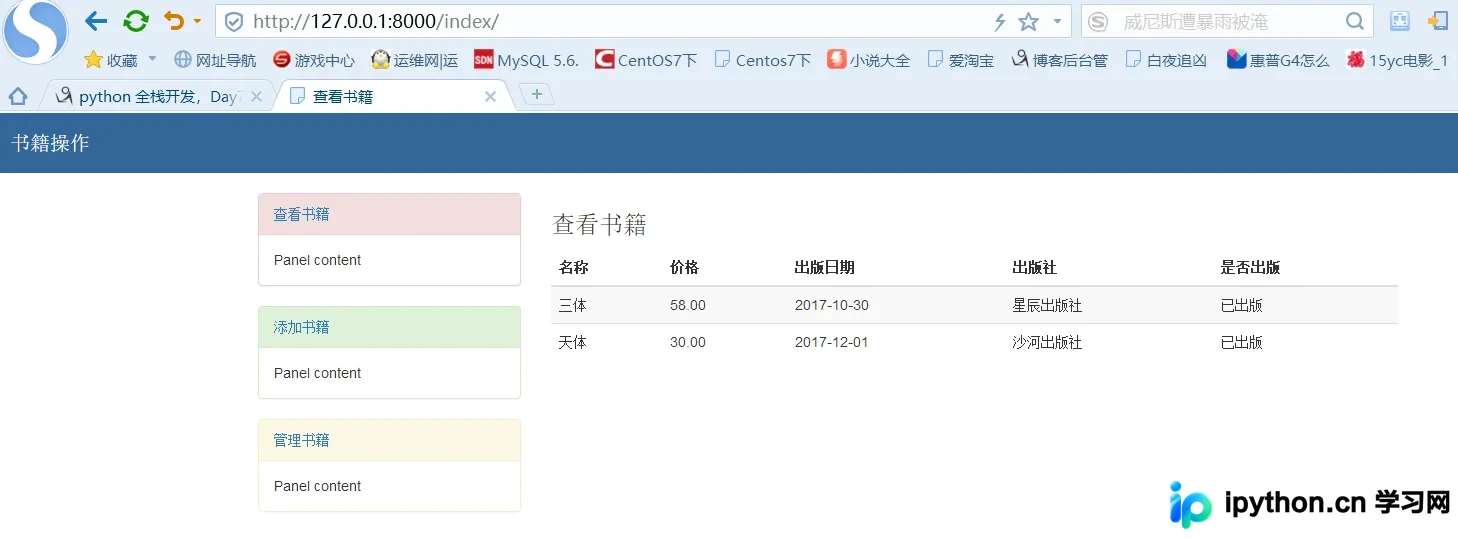
前端页面 index.html 的模板代码如下。
{% extends 'base.html' %}
{% block title %}
  <title>查看书籍</title>
{% endblock title %}
{% block content %}
  <h3>查看书籍</h3>
  <table class="table table-hover table-striped ">
        <thead>
           <tr>
             <th>名称</th>
             <th>价格</th>
             <th>出版日期</th>
             <th>出版社</th>
             <th>是否出版</th>
           </tr>
        </thead>
        <tbody>
           {% for book in book_list %}
           <tr>
             <td>{{ book.title }}</td>
             <td>{{ book.price }}</td>
             <td>{{ book.pub_date|date:"Y-m-d" }}</td>
             <td>{{ book.publish }}</td>
             <td>
               {% if book.is_pub %}
               已出版
               {% else %}
               未出版
               {% endif %}
             </td>
           </tr>
           {% endfor %}
        </tbody>
      </table>
{% endblock content %}
添加书籍页面 add.html 的模板代码展示如下。
{% extends 'base.html' %}
{% block title %}
<title>添加书籍</title>
{% endblock title %}
{% block content %}
<h3>添加书籍</h3>
<form action="" method="post">
   {% csrf_token %}
   <div class="form-group">
    <label for="">书籍名称</label>
    <input type="text" name="title" class="form-control">
  </div>
  <div class="form-group">
    <label for="">价格</label>
    <input type="text" name="price" class="form-control">
  </div>
  <div class="form-group">
     <label for="">出版日期</label>
    <input type="date" name="pub_date" class="form-control">
  </div>
  <div class="form-group">
     <label for="">出版社</label>
     <input type="text" name="publish" class="form-control">
  </div>
  <div class="form-group">
     <label for="">是否出版</label>
    <select name="is_pub" id="" class="form-control">
      <option value="1">已出版</option>
      <option value="0" selected="selected">未出版</option>
    </select>
  </div>
  <input type="submit" class="btn btn-success pull-right" value="添加">
</form>
{% endblock content %}
基础模板文件 base.html 的代码结构如下。
<!DOCTYPE html>
<html lang="en">
<head>
  <meta charset="UTF-8">
  {% block title %}
  <title>Title</title>
  {% endblock title %}
  <link rel="stylesheet" href="https://cdn.bootcss.com/bootstrap/3.3.7/css/bootstrap.min.css" rel="external nofollow" >
  <style>
    * {
      margin: 0;
      padding: 0;
    }
    .header {
      width: 100%;
      height: 60px;
      background-color: #369;
    }
    .title {
      line-height: 60px;
      color: white;
      font-weight: 100;
      margin-left: 20px;
      font-size: 20px;
    }
    .container{
      margin-top: 20px;
    }
  </style>
</head>
<body>
<div class="header">
  <p class="title">
    书籍操作
  </p>
</div>
<div class="container">
  <div class="row">
    <div class="col-md-3">
      <div class="panel panel-danger">
        <div class="panel-heading"><a href="http://127.0.0.1:8000/index/" rel="external nofollow" >查看书籍</a></div>
        <div class="panel-body">
          Panel content
        </div>
      </div>
      <div class="panel panel-success">
        <div class="panel-heading"><a href="http://127.0.0.1:8000/books/add/" rel="external nofollow" >添加书籍</a></div>
        <div class="panel-body">
          Panel content
        </div>
      </div>
      <div class="panel panel-warning">
        <div class="panel-heading"><a href="http://127.0.0.1:8000/books/manage/" rel="external nofollow" >管理书籍</a></div>
        <div class="panel-body">
          Panel content
        </div>
      </div>
    </div>
    <div class="col-md-9">
      {% block content %}
      {% endblock content %}
    </div>
  </div>
</div>
</body>
</html>
项目启动与管理脚本 manage.py 的相关配置。
{% extends 'base.html' %}
{% block title %}
  <title>管理书籍</title>
{% endblock title %}
{% block content %}
  <h3>管理书籍</h3>
<table class="table table-hover table-striped ">
        <thead>
           <tr>
             <th>名称</th>
             <th>价格</th>
             <th>出版日期</th>
             <th>出版社</th>
             <th>是否出版</th>
             <th>删除</th>
             <th>编辑</th>
           </tr>
        </thead>
        <tbody>
           {% for book in book_list %}
           <tr>
             <td>{{ book.title }}</td>
             <td>{{ book.price }}</td>
             <td>{{ book.pub_date|date:"Y-m-d" }}</td>
             <td>{{ book.publish }}</td>
             <td>
               {% if book.is_pub %}
               已出版
               {% else %}
               未出版
               {% endif %}
             </td>
             <td>
               <a href="/books/delete/{{ book.id }}" rel="external nofollow" >
                 <button type="button" class="btn btn-danger" data-toggle="modal" id="modelBtn">删除</button>
               </a>
             </td>
             <td>
                <a href="/books/modify/{{ book.id }}" rel="external nofollow" >
                  <button type="button" class="btn btn-success" data-toggle="modal">编辑</button>
                </a>
             </td>
           </tr>
           {% endfor %}
        </tbody>
      </table>
{% endblock content %}
修改书籍功能涉及的 modify.py 视图逻辑代码。
{% extends 'base.html' %}
{% block title %}
<title>修改书籍</title>
{% endblock title %}
{% block content %}
<h3>修改书籍</h3>
<form action="" method="post">
   {% csrf_token %}
   <div class="form-group">
    <label for="">书籍名称</label>
    <input type="text" name="title" class="form-control" value="{{ book.title }}">
  </div>
  <div class="form-group">
    <label for="">价格</label>
    <input type="text" name="price" class="form-control" value="{{ book.price }}">
  </div>
  <div class="form-group">
     <label for="">出版日期</label>
    <input type="date" name="pub_date" class="form-control" value="{{ book.pub_date|date:"Y-m-d" }}">
  </div>
  <div class="form-group">
     <label for="">出版社</label>
     <input type="text" name="publish" class="form-control" value="{{ book.publish }}">
  </div>
  <div class="form-group">
     <label for="">是否出版</label>
    <select name="is_pub" id="" class="form-control">
      {% if book.is_pub %}
        <option value="1" selected="selected">已出版</option>
        <option value="0">未出版</option>
      {% else %}
        <option value="1">已出版</option>
        <option value="0" selected="selected">未出版</option>
      {% endif %}
    </select>
  </div>
  <input type="submit" class="btn btn-default pull-right" value="修改">
</form>
{% endblock content %}
Django一对多与多对多关系CRUD实战
接下来演示Django中一对多和多对多关系建表后的增删改查完整流程。
对应数据库模型 models.py 的具体定义如下。
from django.db import models
# Create your models here.
class Book(models.Model):
  title=models.CharField(max_length=32)
  price=models.DecimalField(max_digits=6,decimal_places=2)
  create_time=models.DateField()
  memo=models.CharField(max_length=32,default="")
  publish=models.ForeignKey(to="Publish",default=1)
  author=models.ManyToManyField("Author")#on_delete=models.CASCADE()默认级联删除
  def __str__(self):
    return self.title
class Publish(models.Model):
  name=models.CharField(max_length=32)
  email=models.CharField(max_length=32)
class Author(models.Model):
  name=models.CharField(max_length=32)
  def __str__(self): return self.name
路由映射 urls.py 的配置代码展示如下。
from django.conf.urls import url,include
from django.contrib import admin
from app01 import views
urlpatterns = [
  url(r'^admin/', admin.site.urls),
  url(r'^books/$',views.books), #查看
  url(r'^addbook/$',views.addbook), #增加
  url(r'^delbook/(\d+)/$',views.delbook), #删除
  url(r'editbook/(\d+)/$',views.editbook), #修改
]
视图逻辑 views.py 在 app01 应用下的具体实现。
from django.shortcuts import render,HttpResponse,redirect
from .models import *
def books(request):
  book_list=Book.objects.all()
  return render(request,"books.html",locals())
def addbook(request):
  if request.method=="POST":
    title=request.POST.get("title") #get方法取的是html页面中的name属性
    price= request.POST.get("price")
    date = request.POST.get("date")
    publish_id=request.POST.get("publish_id")
    # author_id_list = request.POST.get("author_id_list") #此方法只能取到最后一个值
    author_id_list = request.POST.getlist("author_id_list") #有多个值的注意要用getlist
    #绑定书籍与出版社一对多的关系
    obj=Book.objects.create(title=title,price=price,create_time=date,publish_id=publish_id)
    #绑定书籍与作者多对多的关系
    obj.author.add(*author_id_list)
    # obj.author.remove(1,2) #解除关系
    # obj.author.clear() #清空所有关系
    return redirect("/books/")
  else:
    publish_list=Publish.objects.all()
    author_list=Author.objects.all()
  return render(request,"addbook.html",locals())
def delbook(request,id):
  Book.objects.filter(id=id).delete()
  return redirect("/books/")
def editbook(request,id):
  if request.method=="POST":
    title=request.POST.get("title") #get方法取的是html页面中的name属性
    price=request.POST.get("price")
    date=request.POST.get("date")
    publish_id=request.POST.get("publish_id")
    author_id_list=request.POST.getlist("author_id_list")
    Book.objects.filter(id=id).update(title=title,price=price,create_time=date,publish_id=publish_id)
    book=Book.objects.filter(id=id).first()
    # book.author.clear()
    # book.author.add(*author_id_list)
    book.author.set(author_id_list) #相当于上面两条
    return redirect ("/books/")
  edit_obj=Book.objects.filter(id=id).first() #加first从queryset得到 models对象
  publish_list = Publish.objects.all()
  author_list = Author.objects.all()
  return render(request,"editbook.html",locals())
书籍列表页面 books.html 的模板代码。
<!DOCTYPE html>
<html lang="en">
<head>
  <meta charset="UTF-8">
  <title>Title</title>
  <link rel="stylesheet" href="/static/bs/css/bootstrap.css" rel="external nofollow" rel="external nofollow" rel="external nofollow" >
</head>
<body>
<div class="container" style="margin-top:100px">
  <div class="row">
    <div class="col-md-6 col-md-offset-3">
      <a href="/addbook/" rel="external nofollow" ><button class="btn btn-primary">添加数据</button></a>
      <table class="table table-bordered table-striped">
      <thead>
      <tr>
      <th>序号</th>
      <th>书名</th>
      <th>价格</th>
      <th>出版时间</th>
        <th>出版社</th>
        <th>作者</th>
        <th>操作</th>
      </tr>
      </thead>
      <tbody>
      {% for book in book_list %}
        <tr>
          <td>{{ forloop.counter }}</td>
          <td>{{ book.title }}</td>
          <td>{{ book.price }}</td>
          <td>{{ book.create_time|date:"Y-m-d" }}</td>
        <td>{{ book.publish.name }}</td>
        <td> {% for author in book.author.all %}
          {{ author.name }}
          {% if not forloop.last %}
            ,
          {% endif %}
          {% endfor %}
        </td>
        <td>
          <a href="/delbook/{{ book.pk }}/" rel="external nofollow" >删除</a>
          <a href="/editbook/{{ book.pk }}/" rel="external nofollow" >编辑</a>
        </td>
        </tr>
      {% endfor %}
      </tbody>
      </table>
    </div>
  </div>
</div>
</body>
</html>
添加书籍页面 addbook.html 的模板代码。
<!DOCTYPE html>
<html lang="en">
<head>
  <meta charset="UTF-8">
  <title>Title</title>
  <link rel="stylesheet" href="/static/bs/css/bootstrap.css" rel="external nofollow" rel="external nofollow" rel="external nofollow" >
</head>
<body>
<div class="container" style="margin-top:100px">
  <div class="row">
    <div class="col-md-6 col-md-offset-3">
      <form action="/addbook/" method="post">
        {% csrf_token %}
        <p>书籍名称<input type="text" name="title"></p>
        <p>书籍价格<input type="text" name="price"></p>
        <p>出版日期<input type="text" name="date"></p>
        <p><select name="publish_id" id="">
          {% for publish in publish_list %}
          <option value="{{ publish.pk }}">{{ publish.name }}</option>
          {% endfor %}
        </select>
        </p>
        <p><select name="author_id_list" id="" multiple>
          {% for author in author_list %}
          <option value="{{ author.pk }}">{{ author.name }}</option>
          {% endfor %}
        </select>
        </p>
        <input type="submit" class="btn btn-default">
      </form>
    </div>
  </div>
</div>
</body>
</html>
编辑书籍页面 editbook.html 的模板代码。
<!DOCTYPE html>
<html lang="en">
<head>
  <meta charset="UTF-8">
  <title>Title</title>
  <link rel="stylesheet" href="/static/bs/css/bootstrap.css" rel="external nofollow" rel="external nofollow" rel="external nofollow" >
</head>
<body>
<div class="container" style="margin-top:100px">
  <div class="row">
    <div class="col-md-6 col-md-offset-3">
      <form action="/editbook/{{ edit_obj.id }}/" method="post">
        {% csrf_token %}
        <p>书籍名称<input type="text" name="title" value="{{ edit_obj.title }}"></p>
        <p>书籍价格<input type="text" name="price" value="{{ edit_obj.price }}"></p>
        <p>出版日期<input type="text" name="date" value="{{ edit_obj.create_time|date:"Y-m-d" }}"></p>
        <p><select name="publish_id" id="">
          {% for publish in publish_list %}
            {% if edit_obj.publish == publish %}
            <option selected value="{{ publish.pk }}">{{ publish.name }}</option>
            {% else %}
            <option value="{{ publish.pk }}">{{ publish.name }}</option>
            {% endif %}
          {% endfor %}
        </select>
        </p>
        <p><select name="author_id_list" id="" multiple>
          {% for author in author_list %}
            {% if author in edit_obj.author.all %}
            <option selected value="{{ author.pk }}">{{ author.name }}</option>
            {% else %}
            <option value="{{ author.pk }}">{{ author.name }}</option>
            {% endif %}
          {% endfor %}
        </select>
        </p>
        <input type="submit" class="btn btn-default">
      </form>
    </div>
  </div>
</div>
</body>
</html>
希望上述关于Django框架及Python程序设计的示例内容能对读者有所帮助。
免责声明:本文内容仅供参考,不代表本站观点。转载或引用请注明出处。









