

Python实战:2019中国好声音腾讯视频评论爬取与可视化分析

本文解析如何使用Python抓取2019年《中国好声音》第六期在腾讯视频的公开评论数据。通过逆向分析接口参数,实现分页评论、用户昵称及地区信息的自动化采集。随后利用jieba库进行中文分词,结合WordCloud生成主题词云,并通过Matplotlib绘制国内各地区参与用户分布直方图,完整展示从数据抓取到可视化分析的技术流程。
引言与背景
2019年《中国好声音》热播期间,作为观众追更了每一期节目,特别是刚播出的第六期开启了正式的PK环节。在观看视频之余,作者对网友们的评论内容产生了兴趣,决定通过技术手段获取这些公开评论数据进行分析。
网页分析与接口定位
网页结构分析与接口定位
本次爬取的目标是腾讯视频平台上的评论数据,具体针对第六期节目的评论页面,其基础地址为:http://coral.qq.com/4093121984。
页面默认每页展示10条评论,点击“查看更多评论”可动态加载更多内容。通过浏览器开发者工具监控网络请求,发现加载出的评论数据隐藏在以“v2”开头的JavaScript类型响应中。
实际的数据请求采用GET方法,目标URL为http://coral.qq.com/article/4093121984/comment/v2。通过构造不同的请求参数,可以获取对应的评论内容。
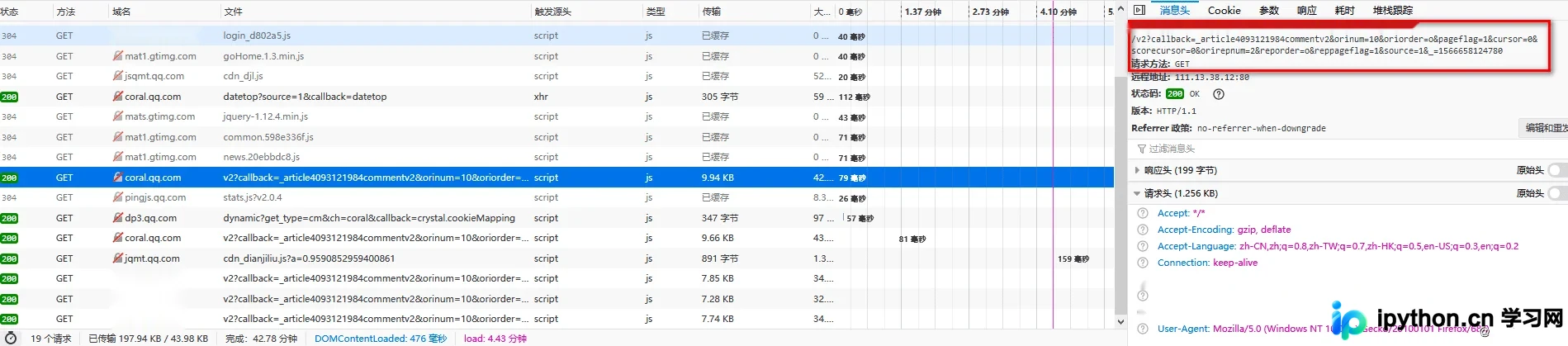
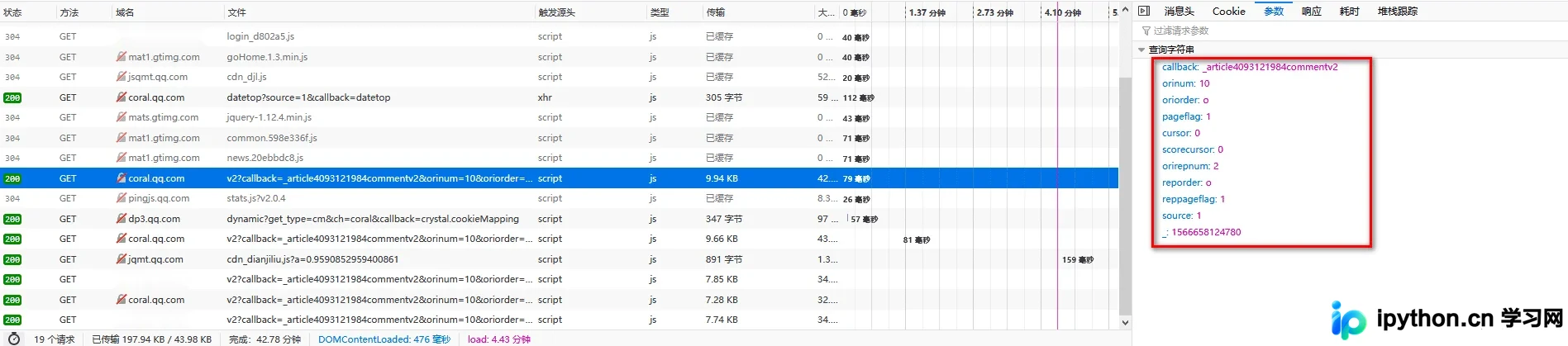
对比不同页码的请求参数,发现主要差异仅体现在“cursor”和另一个标识符上。
关于“cursor”参数:第一页请求时该值为0,后续每一页的请求中,该值需设置为前一页响应数据中“last”字段返回的值,以此实现分页滚动。
关于另一个标识符:第一页请求时该值看似随机生成,而在后续页面中,该值是在前一页响应基础上加1得到的。
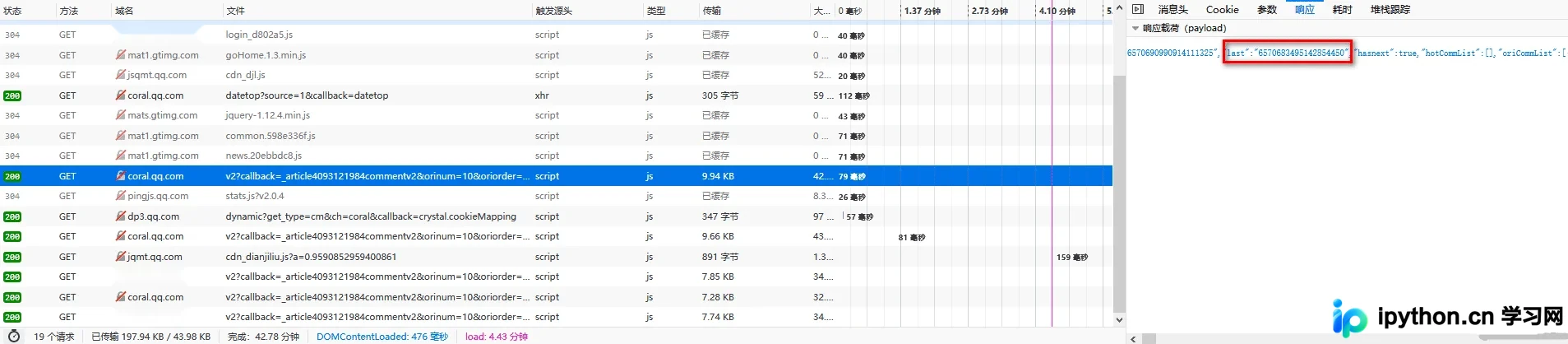
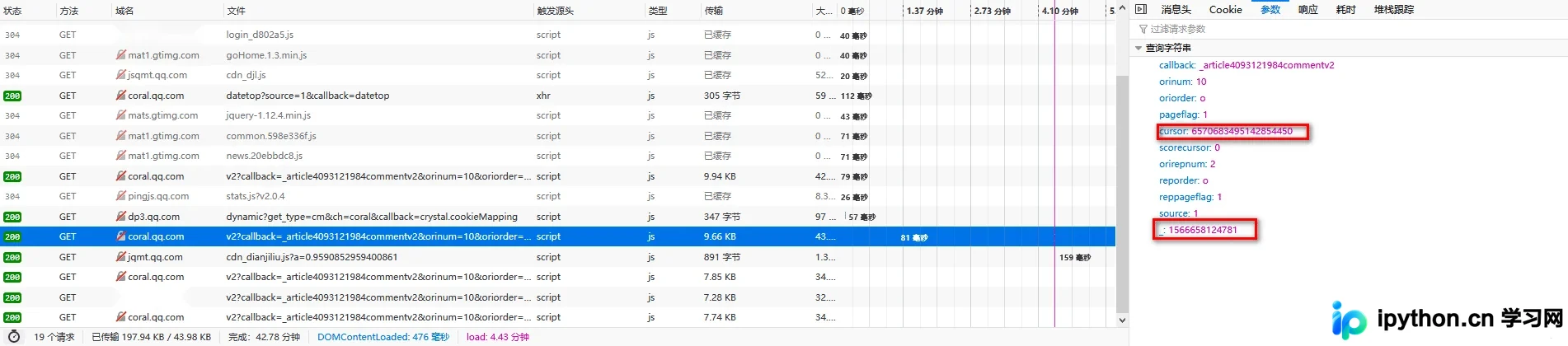
明确上述参数规律后,即可编写脚本自动化获取每一页的评论数据。
Python爬虫实现
爬虫实现细节
(1)环境依赖与库导入
import requests
import re
import random
import time
import json
import jieba
import numpy as np
from PIL import Image
import matplotlib.pyplot as plt
import matplotlib.font_manager as fmgr
from wordcloud import WordCloud
from common import user_agent #自定义
from common import my_fanction #自定义
项目中引入了common文件夹下的自定义模块,其中封装了以下方法:
user_agent:用于生成随机User-Agent以模拟不同浏览器请求。
#!/usr/bin/env python
# -*- coding: utf-8 -*-
'''
@File : user_agent.py
@Author: Fengjicheng
@Date : 2019/8/11
@Desc :
'''
user_agent_list = [
    # Opera
    "Mozilla/5.0 (Windows NT 6.1; WOW64) AppleWebKit/537.36 (KHTML, like Gecko) Chrome/39.0.2171.95 Safari/537.36 OPR/26.0.1656.60",
    "Opera/8.0 (Windows NT 5.1; U; en)",
    "Mozilla/5.0 (Windows NT 5.1; U; en; rv:1.8.1) Gecko/20061208 Firefox/2.0.0 Opera 9.50",
    "Mozilla/4.0 (compatible; MSIE 6.0; Windows NT 5.1; en) Opera 9.50",
    # Firefox
    "Mozilla/5.0 (Windows NT 6.1; WOW64; rv:34.0) Gecko/20100101 Firefox/34.0",
    "Mozilla/5.0 (X11; U; Linux x86_64; zh-CN; rv:1.9.2.10) Gecko/20100922 Ubuntu/10.10 (maverick) Firefox/3.6.10",
    # Safari
    "Mozilla/5.0 (Windows NT 6.1; WOW64) AppleWebKit/534.57.2 (KHTML, like Gecko) Version/5.1.7 Safari/534.57.2",
    # chrome
    "Mozilla/5.0 (Windows NT 6.1; WOW64) AppleWebKit/537.36 (KHTML, like Gecko) Chrome/39.0.2171.71 Safari/537.36",
    "Mozilla/5.0 (X11; Linux x86_64) AppleWebKit/537.11 (KHTML, like Gecko) Chrome/23.0.1271.64 Safari/537.11",
    "Mozilla/5.0 (Windows; U; Windows NT 6.1; en-US) AppleWebKit/534.16 (KHTML, like Gecko) Chrome/10.0.648.133 Safari/534.16",
    # 360
    "Mozilla/5.0 (Windows NT 6.1; WOW64) AppleWebKit/537.36 (KHTML, like Gecko) Chrome/30.0.1599.101 Safari/537.36",
    "Mozilla/5.0 (Windows NT 6.1; WOW64; Trident/7.0; rv:11.0) like Gecko",
    # 淘宝浏览器
    "Mozilla/5.0 (Windows NT 6.1; WOW64) AppleWebKit/536.11 (KHTML, like Gecko) Chrome/20.0.1132.11 TaoBrowser/2.0 Safari/536.11",
    # 猎豹浏览器
    "Mozilla/5.0 (Windows NT 6.1; WOW64) AppleWebKit/537.1 (KHTML, like Gecko) Chrome/21.0.1180.71 Safari/537.1 LBBROWSER",
    "Mozilla/5.0 (compatible; MSIE 9.0; Windows NT 6.1; WOW64; Trident/5.0; SLCC2; .NET CLR 2.0.50727; .NET CLR 3.5.30729; .NET CLR 3.0.30729; Media Center PC 6.0; .NET4.0C; .NET4.0E; LBBROWSER)",
    "Mozilla/4.0 (compatible; MSIE 6.0; Windows NT 5.1; SV1; QQDownload 732; .NET4.0C; .NET4.0E; LBBROWSER)",
    # QQ浏览器
    "Mozilla/5.0 (compatible; MSIE 9.0; Windows NT 6.1; WOW64; Trident/5.0; SLCC2; .NET CLR 2.0.50727; .NET CLR 3.5.30729; .NET CLR 3.0.30729; Media Center PC 6.0; .NET4.0C; .NET4.0E; QQBrowser/7.0.3698.400)",
    "Mozilla/4.0 (compatible; MSIE 6.0; Windows NT 5.1; SV1; QQDownload 732; .NET4.0C; .NET4.0E)",
    # sogou浏览器
    "Mozilla/5.0 (Windows NT 5.1) AppleWebKit/535.11 (KHTML, like Gecko) Chrome/17.0.963.84 Safari/535.11 SE 2.X MetaSr 1.0",
    "Mozilla/4.0 (compatible; MSIE 7.0; Windows NT 5.1; Trident/4.0; SV1; QQDownload 732; .NET4.0C; .NET4.0E; SE 2.X MetaSr 1.0)",
    # maxthon浏览器
    "Mozilla/5.0 (Windows NT 6.1; WOW64) AppleWebKit/537.36 (KHTML, like Gecko) Maxthon/4.4.3.4000 Chrome/30.0.1599.101 Safari/537.36",
    # UC浏览器
    "Mozilla/5.0 (Windows NT 6.1; WOW64) AppleWebKit/537.36 (KHTML, like Gecko) Chrome/38.0.2125.122 UBrowser/4.0.3214.0 Safari/537.36",
  ]
my_function:包含文件写入等辅助功能。
#!/usr/bin/env python
# -*- coding: utf-8 -*-
'''
@File : file_writte.py
@Author: Fengjicheng
@Date : 2019/8/24
@Desc :
'''
def file_write(file_name,content):
  if content:
    if type(content) == list:
      for i in content:
        with open(file_name,'a',encoding='utf-8') as f:
          f.write(i + '\n')
    if type(content) == str:
      with open(file_name, 'a', encoding='utf-8') as f:
        f.write(content)
  else:
    print(content,"内容为空,跳过")
    pass
(2)核心爬取逻辑
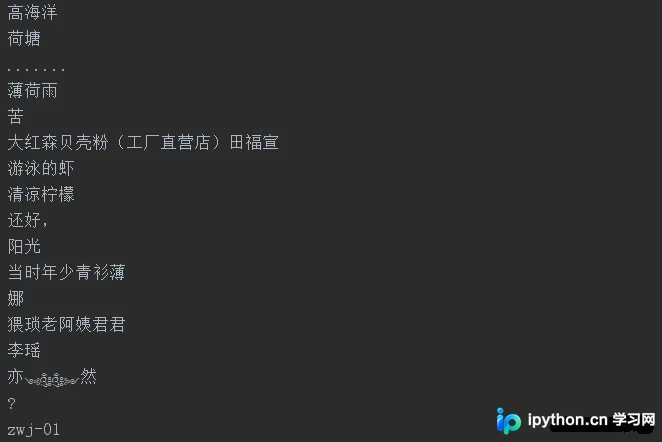
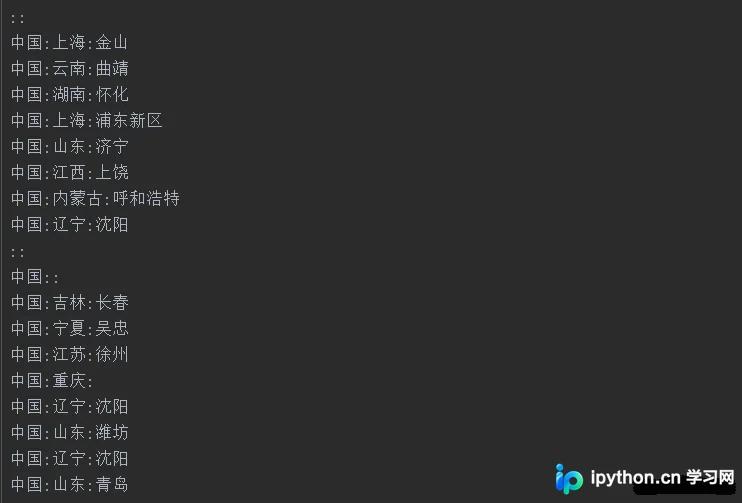
爬虫程序主要提取三类数据:用户的具体评论内容、用户昵称以及用户所在的地区信息。
#评论请求地址
url = 'http://coral.qq.com/article/4093121984/comment/v2'
agent = random.choice(user_agent.user_agent_list)
header = {
'Host': 'video.coral.qq.com',
'User-Agent': agent,
'Accept': '*/*',
'Accept-Language': 'zh-CN,zh;q=0.8,zh-TW;q=0.7,zh-HK;q=0.5,en-US;q=0.3,en;q=0.2',
'Accept-Encoding': 'gzip, deflate, br',
'Connection': 'keep-alive',
'Referer': 'https://page.coral.qq.com/coralpage/comment/video.html',
'TE': 'Trailers'
}
# 第一页
cursor = '0'
vid = 1566724116229

def get_comment(a,b):
  parameter = {
  'callback': '_varticle4093121984commentv2',
  'orinum': '10',
  'oriorder': 'o',
  'pageflag': '1',
  'cursor': a,
  'scorecursor': '0',
  'orirepnum': '2',
  'reporder': 'o',
  'reppageflag': '1',
  'source': '1',
  '_': str(b)
  }
  try:
    html = requests.get(url,params=parameter,headers=header)
  except Exception as e:
    print(time.strftime("%Y-%m-%d %H:%M:%S", time.localtime()),"请求失败。",e)
  else:
    print(time.strftime("%Y-%m-%d %H:%M:%S", time.localtime()),"请求成功。")
  content = html.content.decode('utf-8')
  sep1 = '"last":"(.*?)"' # 下一个 cursor
  sep2 = '"content":"(.*?)"' # 评论
  sep3 = '"nick":"(.*?)"' # 昵称
  sep4 = '"region":"(.*?)"' # 地区
  global cursor
  cursor = re.compile(sep1).findall(content)[0]
  comment = re.compile(sep2).findall(content)
  nick = re.compile(sep3).findall(content)
  region = re.compile(sep4).findall(content)
  my_fanction.file_write('txt/comment.txt',comment)
  my_fanction.file_write('txt/nick.txt',nick)
  my_fanction.file_write('txt/region.txt',region)
运行效果如图所示,成功提取了相关文本数据。

数据可视化分析
(3)中文分词处理
def cut_word(file_path):
  with open(file_path,'r',encoding='utf-8') as f:
    comment_txt = f.read()
    wordlist = jieba.cut(comment_txt, cut_all=True)
    wl = " ".join(wordlist)
    print(wl)
    return wl #返回分词后的数据
(4)词云可视化生成
#词云形状图片
img1 = 'lib/fangxing.png'
img2 = 'lib/xin.png'
#词云字体
font = 'lib/simsun.ttc'
def create_word_cloud(file_path,img):
  # 设置词云形状图片
  wc_mask = np.array(Image.open(img))
  # 设置词云的一些配置,如:字体,背景色,词云形状,大小
  wc = WordCloud(background_color="white", max_words=200, mask=wc_mask, scale=4,
          max_font_size=50, random_state=42, font_path=font)
  # 生成词云
  wc.generate(cut_word(file_path))
  # 在只设置mask的情况下,你将会得到一个拥有图片形状的词云
  plt.imshow(wc, interpolation="bilinear")
  plt.axis("off")
  #plt.figure()
  plt.show()
生成的词云效果如图所示,直观展示了评论中的高频词汇。


(5)地区数据统计与分析
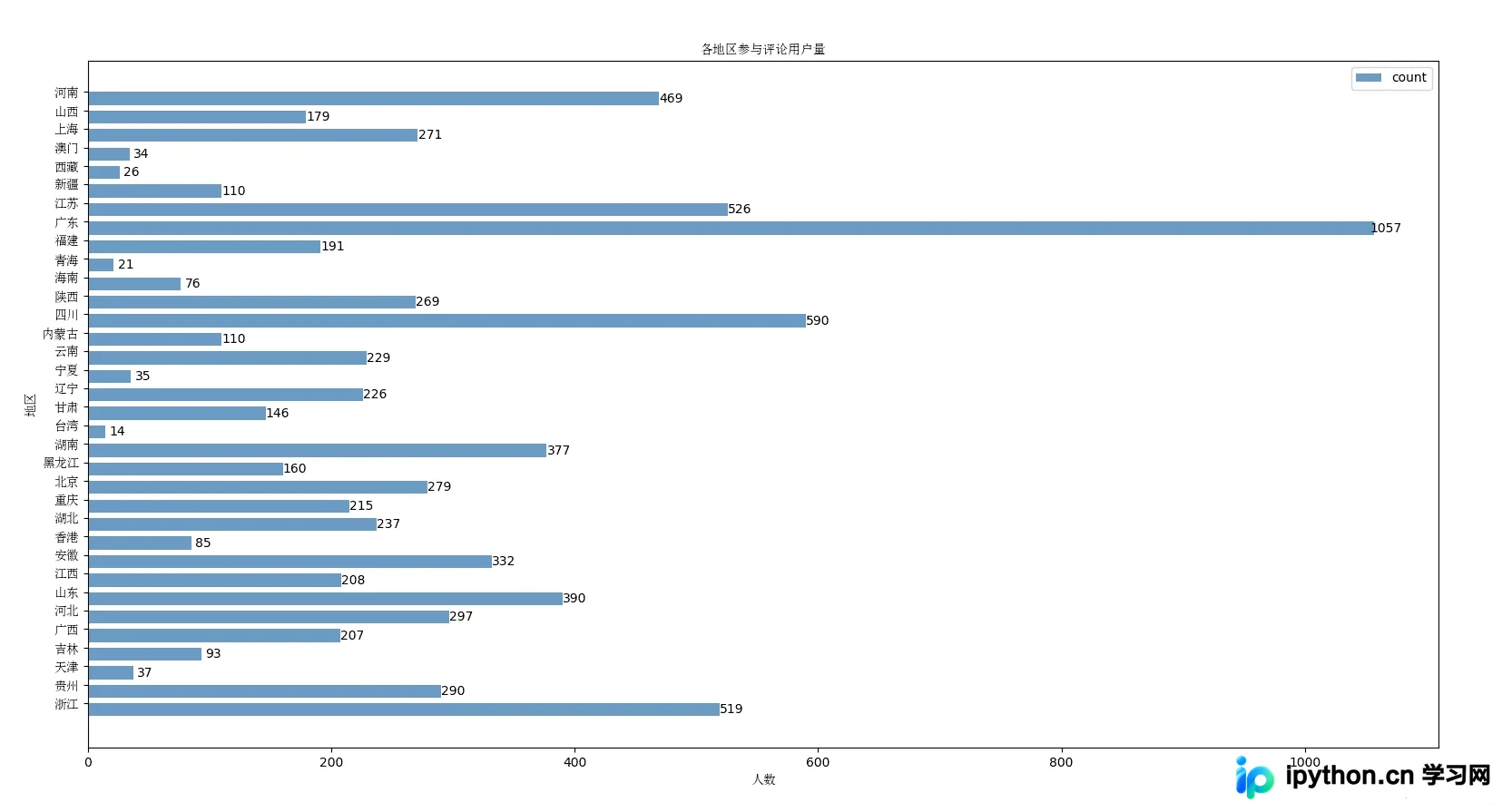
在统计过程中,忽略了国外地区的评论,仅针对国内各省市地区的数据进行了统计分析。
def create_region_histogram():
  with open('txt/region.txt','r',encoding='utf-8') as f:
    country_list = f.readlines()
    country_list = [x.strip() for x in country_list if x.strip() != '::']
  sep1 = ':'
  pattern1 = re.compile(sep1)
  province_lit = []
  province_count = []
  other_list = []
  other_count = []
  for country in country_list:
    country_detail = re.split(pattern1,country)
    if '中国' in country_detail:
      if country_detail[1] != '':
        province_lit.append(country_detail[1])
    else:
      other_list.append(country_detail[0])
  province_uniq = list(set(province_lit))
  other_uniq = list(set(other_list))
  for i in province_uniq:
    province_count.append(province_lit.count(i))
  for i in other_uniq:
    other_count.append(other_list.count(i))
  # 构建数据
  x_data = province_uniq
  y_data = province_count
  # 自定义字体属性
  fp = fmgr.FontProperties(fname='lib/simsun.ttc')
  bar_width = 0.7
  # Y轴数据使用range(len(x_data)
  plt.barh(y=range(len(x_data)), width=y_data, label='count',
       color='steelblue', alpha=0.8, height=bar_width)
  # 在柱状图上显示具体数值, ha参数控制水平对齐方式, va控制垂直对齐方式
  for y, x in enumerate(y_data):
    plt.text(x+10, y - bar_width / 2, '%s' % x, ha='center', va='bottom')
  # 为Y轴设置刻度值
  plt.yticks(np.arange(len(x_data)) + bar_width / 2, x_data,fontproperties=fp)
  # 设置标题
  plt.title("各地区参与评论用户量",fontproperties=fp)
  # 为两条坐标轴设置名称
  plt.xlabel("人数",fontproperties=fp)
  plt.ylabel("地区",fontproperties=fp)
  # 显示图例
  plt.legend()
  plt.show()
地区分布统计结果如图所示,反映了不同地区用户的参与热度。
完整代码已开源至GitHub:https://github.com/FJCAAAAA/python-spider
注:本文代码及分析仅用于技术学习与交流,请勿用于非法用途。
以上就是本文的全部内容,希望能为读者在Python爬虫及数据可视化方面提供有益参考,欢迎大家交流指正。
免责声明:本文内容仅供参考,不代表本站观点。转载或引用请注明出处。









