

Python合并TXT文件并统计高频词汇的两种实现方案

发布时间:2026-10-13| 3人浏览过
本文介绍如何使用Python合并多个TXT文件并统计出现频率最高的单词。通过读取指定目录下的文本文件,统一写入新文件后,利用正则表达式提取英文单词并排除常见无意义词汇,最终按频次排序输出前10名。此外,还展示了利用collections.Counter模块简化统计过程的更简洁方法,适用于Windows 10及Python 3.7.4环境。
需求分析与整体思路
本文的需求是对三篇英文文章进行分析,旨在计算出出现次数最多的前10个单词。
整体逻辑清晰且实现难度不高。主要步骤是使用Python读取多个TXT文件,将文件内容合并写入一个新的TXT文件中,随后对该新文件进行词频统计,从而得到最终结果。
基于正则表达式与字典的传统实现
具体实现代码如下:该代码已在Windows 10系统、Python 3.7.4环境下测试通过。
# coding=utf-8

import re
import os

# 获取源文件夹的路径下的所有文件
sourceFileDir = 'D:\\Python\\txt\\'
filenames = os.listdir(sourceFileDir)

# 打开当前目录下的 result.txt 文件,如果没有则创建
# 文件也可以是其他类型的格式,如 result.js
file = open('D:\\Python\\result.txt', 'w')

# 遍历文件
for filename in filenames:
 filepath = sourceFileDir+'\\'+filename
 # 遍历单个文件,读取行数,写入内容
 for line in open(filepath):
  file.writelines(line)
  file.write('\n')

# 关闭文件
file.close()


# 获取单词函数定义
def getTxt():
 txt = open('result.txt').read()
 txt = txt.lower()
 txt = txt.replace(''', '\'')
 # !"@#$%^&*()+,-./:;<=>?@[\\]_`~{|}
 for ch in '!"'@#$%^&*()+,-/:;<=>?@[\\]_`~{|}':
  txt.replace(ch, ' ')
  return txt

# 1.获取单词
hamletTxt = getTxt()

# 2.切割为列表格式,'' 兼容符号错误情况,只保留英文单词
txtArr = re.findall('[a-z\''A-Z]+', hamletTxt)

# 3.去除所有遍历统计
counts = {}
for word in txtArr:
 # 去掉一些常见无价值词
 forbinArr = ['a.', 'the', 'a', 'i']
 if word not in forbinArr:
  counts[word] = counts.get(word, 0) + 1

# 4.转换格式,方便打印,将字典转换为列表,次数按从大到小排序
countsList = list(counts.items())
countsList.sort(key=lambda x: x[1], reverse=True)

# 5. 输出结果
for i in range(10):
 word, count = countsList[i]
 print('{0:<10}{1:>5}'.format(word, count))
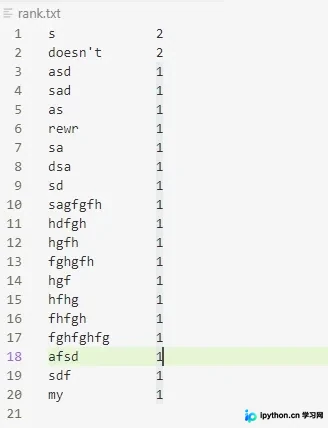
程序运行效果如下图所示:
基于Counter模块的简化实现
另一种更为简便的词频统计方法如下:
# coding=utf-8
from collections import Counter

# words 为读取到的结果 list
words = ['a', 'b' ,'a', 'c', 'v', '4', ',', 'w', 'y', 'y', 'u', 'y', 'r', 't', 'w']
wordCounter = Counter(words)
print(wordCounter.most_common(10))

# output: [('y', 3), ('a', 2), ('w', 2), ('b', 1), ('c', 1), ('v', 1), ('4', 1), (',', 1), ('u', 1), ('r', 1)]
以上即为本文的全部内容,希望能为读者的学习提供有益帮助,同时也欢迎大家多多支持本站。
免责声明:本文内容仅供参考,不代表本站观点。转载或引用请注明出处。









