

Python Socket实现单机与双人对战五子棋

本文介绍基于Python Socket网络编程实现五子棋游戏的方法。内容涵盖单机版逻辑与双人对战架构,重点讲解ServerSocket创建、多线程threading处理多客户端连接、Socket通信协议及数据编码传输。提供完整代码示例,包括棋盘类、服务器端与客户端实现,帮助开发者掌握网络对战游戏的底层通信机制。
Python Socket五子棋实现概述
本文基于Python语言,演示如何利用Socket网络编程实现从单机五子棋到双人对战模式的转换,供读者参考学习。
Socket通信基础步骤
本次实验采用Python语言,通过Socket模块实现不同机器间的通信。具体流程包含四个步骤:1. 创建ServerSocket和Socket对象;2. 打开连接到Socket的输入/输出流;3. 按照既定协议对Socket进行读写操作;4. 关闭输入输出流及Socket连接。
多线程处理多客户端连接
鉴于双人对战需要服务器同时处理多个客户端的连接请求,本实验引入了Python的threading多线程模块。通过监听实时监控网络状态,并利用socket.listen(2)设置最大连接数,实现排队等待机制。
棋盘类chess定义
定义chess类,用于封装棋盘逻辑与胜负判断。
#五子棋类
import os
class chessboard(object):
 def __init__(self):
  self.size = 16
  #初始化棋盘
  self.__board=[[' ' for n in range(self.size)] for m in range(self.size)]
  n = 0
  #添加桌面标签
  while n < self.size:
   ntr=str(n)
   self.__board[0][n] = ntr.zfill(2)
   self.__board[n][0] = ntr.zfill(2)
   n=n+1
  self.id=0
 #胜利条件
 def is_end(self):
  ch_stack=[]
  #行检查
  for i in range(self.size):
   for j in range(self.size):
    #判断是否结束
    chess=self.__board[i][j]
    if len(ch_stack)==5 and ch_stack[-1]=='* ':
     print('winner=id 1')
     return 1
    elif len(ch_stack) == 5 and ch_stack[-1] == '@ ':
     print('winner=id 2')
     return 2

    if chess==' ':
     ch_stack.clear()
    else:
     if (not ch_stack) or ch_stack[-1] == chess:
      ch_stack.append(chess)
     else:
      ch_stack.clear()
      ch_stack.append(chess)
   ch_stack.clear()
  ch_stack.clear()
  #列检查
  for j in range(self.size):
   for i in range(self.size):
    #判断是否结束
    if len(ch_stack)==5 and ch_stack[-1]=='* ':
     print('winner=id 1')
     return 1
    elif len(ch_stack) == 5 and ch_stack[-1] == '@ ':
     print('winner=id 2')
     return 2
    chess=self.__board[i][j]
    if chess==' ':
     ch_stack.clear()
    else:
     if (not ch_stack) or ch_stack[-1] == chess:
      ch_stack.append(chess)
     else:
      ch_stack.clear()
      ch_stack.append(chess)
   ch_stack.clear()
  ch_stack.clear()
  #左斜检查
  #下三角
  for i in range(self.size):
   for j in range(1,self.size):
    #判断是否结束
    if len(ch_stack)==5 and ch_stack[-1]=='* ':
     print('winner=id 1')
     return 1
    elif len(ch_stack) == 5 and ch_stack[-1] == '@ ':
     print('winner=id 2')
     return 2

    if i+j<self.size:
     chess=self.__board[i+j][j]
     if chess==' ':
      ch_stack.clear()
     else:
      if (not ch_stack) or ch_stack[-1] == chess:
       ch_stack.append(chess)
      else:
       ch_stack.clear()
       ch_stack.append(chess)
    else:
     break
   ch_stack.clear()
  ch_stack.clear()
  #上三角
  for i in range(self.size):
   for j in range(1,self.size):
    #判断是否结束
    if len(ch_stack)==5 and ch_stack[-1]=='* ':
     print('winner=id 1')
     return 1
    elif len(ch_stack) == 5 and ch_stack[-1] == '@ ':
     print('winner=id 2')
     return 2
    if i+j<self.size:
     chess=self.__board[j][j+i]
     if chess==' ':
      ch_stack.clear()
     else:
      if (not ch_stack) or ch_stack[-1] == chess:
       ch_stack.append(chess)
      else:
       ch_stack.clear()
       ch_stack.append(chess)
    else:
     break
   ch_stack.clear()
  ch_stack.clear()
  #右斜检查
  #上三角
  for i in range(self.size):
   for j in range(1,self.size):
    #判断是否结束
    if len(ch_stack)==5 and ch_stack[-1]=='* ':
     print('winner=id 1')
     return 1
    elif len(ch_stack) == 5 and ch_stack[-1] == '@ ':
     print('winner=id 2')
     return 2
    if self.size-i-j+1>0:
     chess=self.__board[self.size-i-j][j]
     if chess==' ':
      ch_stack.clear()
     elif not chess:
      break
     else:
      if (not ch_stack) or ch_stack[-1] == chess:
       ch_stack.append(chess)
      else:
       ch_stack.clear()
       ch_stack.append(chess)
    else:
     break
   ch_stack.clear()
  ch_stack.clear()
  #下三角
  for i in range(self.size):
   for j in range(1,self.size):
    # 判断是否结束
    if len(ch_stack) == 5 and ch_stack[-1] == '* ':
     print('winner=id 1')
     return 1
    elif len(ch_stack) == 5 and ch_stack[-1] == '@ ':
     print('winner=id 2')
     return 2
    if self.size-i-j> 0:
     chess = self.__board[j][self.size-i-j]
     if chess == ' ':
      ch_stack.clear()
     elif not chess:
      break
     else:
      if (not ch_stack) or ch_stack[-1] == chess:
       ch_stack.append(chess)
      else:
       ch_stack.clear()
       ch_stack.append(chess)
    else:
     break
   ch_stack.clear()
  ch_stack.clear()
  return 0
 def draw(self):
  #clear()
  for x in self.__board:
   print(x)
  return 0
 def drop_chess(self,x,y,id):
  if id==1 and self.__board[x][y]==' ':
   self.__board[x][y]='* '
   return 1
  elif id==2 and self.__board[x][y]==' ':
   self.__board[x][y]='@ '
   return 1
  else:
   return 0
单机版五子棋逻辑
随后展示使用while循环实现的单机版五子棋逻辑。
# -*- coding: utf-8 -*-
#单机版五子棋
from chess import chessboard
def changeid(id):
 if id==1:
  return 2
 elif id==2:
  return 1
 else:
  return 0
t=chessboard()
id=1#初始化id
t.draw()
while (not t.is_end()):#end函数
 print('your id is %d,input your next drop(x,y)'% id)
 x=input()
 y=input()
 x=int(x)
 y=int(y)
 if t.drop_chess(x,y,id):
  t.draw()
 else:
  print('_________Illegal Input,Please Check Again_________')
  continue
 id=changeid(id)
———————分割线———————
服务器端多线程实现
为实现双人对战功能,服务器端需利用多线程(threading)同时服务多个客户端连接。
服务器端代码实现如下。
# -*- coding: utf-8 -*-
#服务器
import os
import socket
import json
import threading
import time
import sys
from chess import chessboard
t=chessboard()
id=1#初始化id
def handle():
 while (not t.is_end()):
  for c in socks:
   global id
   json_string0 = json.dumps(t._chessboard__board)
   c.sendto(json_string0.encode('utf-8'), address)
   msg1 = 'Your id is %d,input your next drop' % id + "\r\n"
   c.send(msg1.encode('utf-8'))
   msg2x = c.recv(1024)
   msg2y = c.recv(1024)
   x = int(msg2x.decode('utf-8'))
   y = int(msg2y.decode('utf-8'))
   print('processing......\n')
   if t.drop_chess(x, y, id):
    json_string = json.dumps(t._chessboard__board)
    c.sendto(json_string.encode('utf-8'), address)
   else:
    msg3 = '_________Illegal Input,Please Check Again_________'
    c.send(msg3.encode('utf-8'))
    continue
   id = changeid(id)
def clear():
 os.system('cls')
def changeid(id):
 if id==1:
  return 2
 elif id==2:
  return 1
 else:
  return 0
# 创建 socket 对象
s = socket.socket(socket.AF_INET, socket.SOCK_STREAM)
# 获取本地主机名
host = socket.gethostname()
port = 9999
# 绑定端口号
s.bind((host, port))
address=(host, port)
# 设置最大连接数,超过后排队
s.listen(2)
socks=[]
th = threading.Thread(target=handle)
th.start()
while 1:
 c, addr = s.accept()
 print
 'connected from:', addr
 socks.append(c)
s.close()
客户端连接与交互
客户端代码实现如下。
# -*- coding: utf-8 -*-
#客户端
import socket
import time

# 创建 socket 对象
c = socket.socket(socket.AF_INET, socket.SOCK_STREAM)
# 获取本地主机名
#host = socket.gethostname()
host='10.41.114.198'
# 设置端口号
port = 9999
# 连接服务,指定主机和端口
c.connect((host, port))
address=(host, port)
while 1:
 #s=c.accept()
 print('')
 print('__________________wait__________________')
 msg0 = c.recv(2048).decode('utf-8') # 棋盘大于1024
 for x in msg0:
  if x == '[':
   print('')
  else:
   print(x, end='')
 print('')
 msg1 = c.recv(1024)#接收输入提示
 print (msg1.decode('utf-8'))
 time.sleep(1)
 x = input('x=')
 y = input('y=')
 c.send(x.encode('utf-8'))
 c.send(y.encode('utf-8'))
 msg3 = c.recv(2048).decode('utf-8')#棋盘大于1024
 if msg3=='_________Illegal Input,Please Check Again_________':
  print(msg3)
  continue
 else:
  #print(msg3)
  for x in msg3:
   if x=='[':
    print('')
   else:
    print(x, end='')
  print('')
  print('__________________wait__________________')
 print('')
c.close()
数据编码与传输注意事项
注意:Socket传输数据时仅支持bytes类型。因此,list需先通过json转换为str,再进行encode编码处理。
运行步骤与使用说明
使用方法:首先修改客户端代码中的host为服务器地址;接着启动服务端;随后打开多个客户端(超过2个时将进入排队状态);最后输入X,Y坐标开始游戏。
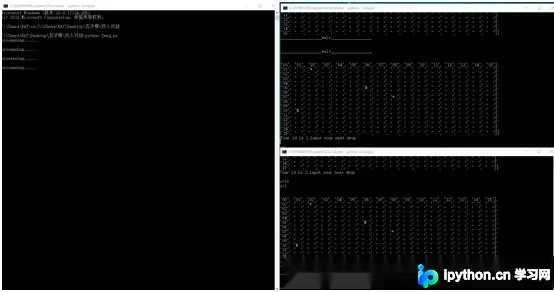
由于时间紧迫,目前尚未处理单个客户端退出后的程序初始化问题,后续可能会补充相关代码。
以上就是本文的全部内容,希望对大家的学习有所帮助,也希望大家多多支持本站。
免责声明:本文内容仅供参考,不代表本站观点。转载或引用请注明出处。









