

Django实现首页与登录页分离及用户状态保持

发布时间:2026-10-13| 2人浏览过
本文详解Django框架中首页与登录页分离的实现方案。通过配置URL路由指向特定视图函数,结合自定义UserLogin类进行身份校验,并利用HttpResponse重定向至首页及设置Cookie保存登录状态,最终在首页读取Cookie显示用户名,完成完整的登录流程。
本文详细介绍在Django框架中实现首页与登录页面分离的具体操作方法,旨在为相关开发者提供参考。
创建登录模板
首先,需要创建登录页面的模板文件login.html。
<!DOCTYPE html>
<html lang="en">
<head>
  <meta charset="UTF-8">
  <title>用户登录</title>
</head>
<body>
  <form method="post">
    <p>用户名:<input type="text" name="username"></p>
    <p>密码:<input type="password" name="pwd"></p>
    <p><input type="submit" value="提交"></p>
    <hr>
  </form>
  <p> {{ result }}</p>
</body>
</html>
配置URL路由
其次,进行URL路由配置,确保访问路径能正确映射到对应的视图处理函数。
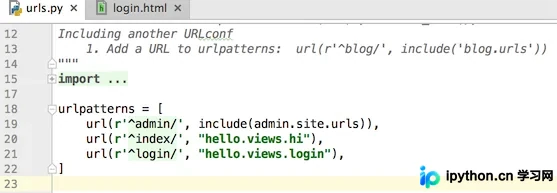
url(r'^login/', "hello.views.login")
该配置的作用是当浏览器访问login路径时,请求被转发至hello应用下的views模块中的login方法进行处理。
实现登录视图逻辑
接着,在login视图方法中,负责渲染login模板并执行具体的登录逻辑。
def login(request):
  msg = {'result': ''}
  if request.method == 'POST':
    getUserName = request.POST.get('username')
    getPwd = request.POST.get('pwd')
    # 实例化UserLogin类
    loginObj = UserLogin(getUserName,getPwd)
    if loginObj.isLogin():
      myReponse = HttpResponse("<script>self.location='/index'</script>")
      myReponse.set_cookie('userlogin_username',getUserName,3600)
      return myReponse
    else:
      msg['result'] = '用户名或密码错误'
  myReponse = render_to_response("login.html", msg)
  return myReponse
在此过程中,引入了UserLogin类,利用该类封装的方法对用户是否已登录进行验证。
UserClass.py文件中定义了UserLogin类。
# coding:utf-8
class UserLogin:
  userName = ''
  pwd = ''
  # 构造方法
  def __init__(self,username,pwd):
    self.userName = username
    self.pwd = pwd
  # 登录验证方法
  def isLogin(self):
    if self.userName == 'jack' and self.pwd == '123':
      return True
    else:
      return False
在views.py文件中使用该类之前,必须先进行导入操作。
from UserClass import UserLogin
具体语句为从UserClass模块中导入UserLogin类。
登录成功后的首页处理
最后,在login方法执行完毕后,若登录成功,则重定向至首页,并在首页展示当前登录的用户名。
<!DOCTYPE html>
<html lang="en">
<head>
  <meta charset="UTF-8">
  <title>首页</title>
</head>
<body>
  <h2>这是首页,当前登录用户是:{{ username }}</h2>
  <p><a href="##" rel="external nofollow" >安装退出</a></p>
</body>
</html>
def hi(request):
  msg = {'username':'游客'}
  if request.COOKIES.get('userlogin_username') != None :
    msg['username'] = request.COOKIES.get('userlogin_username')
  myReponse = render_to_response("index.html",msg)
  return myReponse
希望上述关于Django框架下Python程序设计的步骤说明能对大家有所帮助。
免责声明:本文内容仅供参考,不代表本站观点。转载或引用请注明出处。









