

Python 3.5 装饰器原理与实战应用详解

本文深入解析 Python 3.5 中装饰器的核心原理,涵盖函数即变量、高阶函数及嵌套函数的基础知识。通过统计运行时间、模拟网站登录认证等具体案例,详细展示装饰器的编写方法与带参装饰器的实现,帮助开发者掌握在不修改原函数源码及调用方式的前提下扩展功能的技巧。
本文详细讲解 Python 3.5 中装饰器的运作原理及其实际应用案例,旨在为读者提供清晰的参考指南。
装饰器基础概念与原则
1、装饰器基础概念:
(1)本质定义:装饰器本质上是一个函数,其定义语法遵循标准的 def 关键字规范。
(2)核心功能:用于增强其他函数的功能,即为现有函数添加额外的逻辑或特性。
(3)设计原则:必须遵循“不修改被装饰函数源代码”和“不修改被装饰函数调用方式”两大原则,确保装饰器对被修饰函数保持透明性。
(4)基础应用场景:实现一个用于统计函数执行时间的装饰器。
import time
#统计函数运行时间的砖装饰器
def timmer(func):
  def warpper(*args,**kwargs):
    strat_time = time.time()
    func()
    stop_time = time.time()
    print("the func run time is %s" %(stop_time-strat_time))
  return warpper
@timmer
def test1():
  time.sleep(3)
  print("in the test1")
test1()
代码运行输出如下:
in the test1 the func run time is 3.000171661376953
装饰器前置知识储备
(5)实现装饰器所需掌握的前置知识:
a、理解“函数即变量”的概念。
b、掌握高阶函数的定义与用法。
c、熟悉函数的嵌套调用机制。
d、将高阶函数与嵌套函数结合,即可构建装饰器。
函数即变量的内存机制
2、装饰器知识储备——深入理解“函数即变量”
在 Python 中,定义一个函数实际上是将函数体赋值给该函数名的过程。
Python 解释器通过引用计数机制来回收变量;当指向该变量的引用计数归零(即没有变量名再指向它)时,变量所占内存将被回收。
函数的定义同样遵循这一内存回收机制,与变量回收机制一致。例如,匿名函数因为没有具体的函数名引用,创建后若未被赋值给其他变量,便会立即被回收。
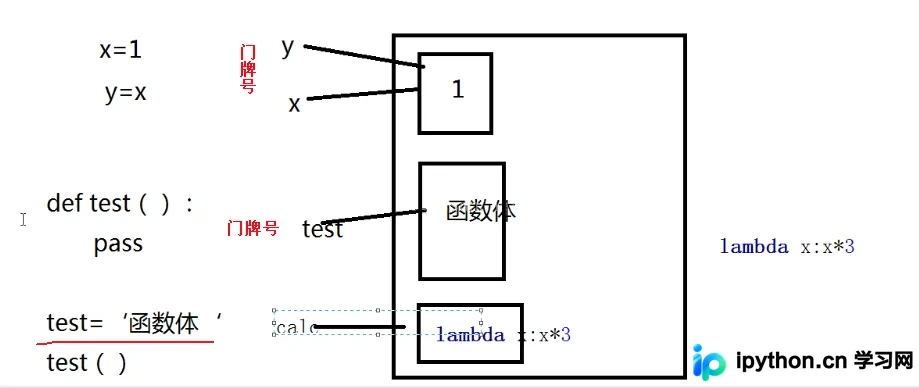
变量的使用规则是“先定义后调用”,只要调用时变量已存在即可;同理,函数作为变量,其使用方式也完全一致。
关于函数调用的顺序:与其他高级语言类似,Python 不允许在函数声明之前对其进行引用或调用。
以下两段代码的执行效果完全相同:
def bar():
  print("in the bar")
def foo():
  print("in the foo")
  bar()
foo()
#python为解释执行,函数foo在调用前已经声明了bar和foo,所以bar和foo无顺序之分
def foo():
  print("in the foo")
  bar()
def bar():
  print("in the bar")
foo()
运行结果展示:
in the foo in the bar in the foo in the bar
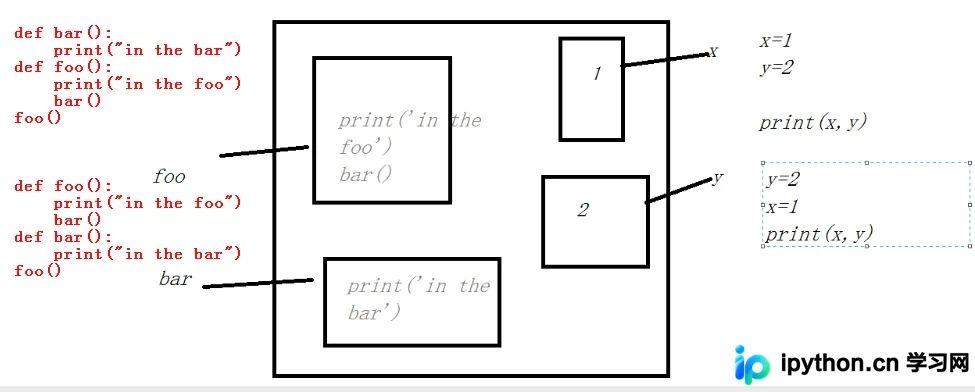
需要注意的是,Python 是解释型语言,函数 foo 在调用前,bar 和 foo 均已在内存中声明,因此这两个函数的定义顺序不影响最终结果。
其内存原理示意图如下:
高阶函数的定义与应用
3、装饰器知识储备——高阶函数解析
满足以下任一条件的函数即可称为高阶函数:
a、接收一个函数名作为实参传递给另一个函数(此特性可用于在不修改被装饰函数代码的情况下添加附加功能)。
b、返回值中包含函数名(此特性可用于在不改变原函数调用方式的前提下实现装饰)。
(1)高阶函数示例代码:
def bar():
  print("in the bar")
def test1(func):
  print(func)  #打印门牌号,即内存地址
  func()
test1(bar)   #门牌号func=bar
运行结果如下:
<function bar at 0x00BCDFA8> in the bar
(2)高阶函数的核心价值之一:将函数名作为实参传递给另一个函数,从而在不修改被装饰函数源码的情况下为其添加附加功能。
import time
def bar():
  time.sleep(3)
  print("in the bar")
#test2在不修改被修饰函数bar的代码时添加了附加的及时功能
def test2(func):
  start_time = time.time()
  func()   #run bar
  stop_time = time.time()
  print("the func run time is %s " %(stop_time-start_time))
#调用方式发生改变,不能像原来的方法去调用被修饰的函数(所以不能实现装饰器的功能)
test2(bar)
#bar()
运行结果如下:
in the bar the func run time is 3.000171661376953
(3)高阶函数的另一核心价值:返回值中包含函数名,从而保持原有的函数调用方式不变。
import time
def bar():
   time.sleep(3)
   print("in the bar")
def test3(func):
  print(func)
  return func
bar = test3(bar)
bar()  #run bar
运行结果如下:
<function bar at 0x00BADFA8> in the bar
嵌套函数与装饰器实现
4、装饰器知识储备——嵌套函数机制
#函数嵌套
def foo():
  print("in the foo")
  def bar():  #bar函数具有局部变量的特性,不能在外部调用,只能在内部调用
    print("in the bar")
  bar()
foo()
运行结果如下:
in the foo in the bar
实战:模拟网站登录认证
装饰器实际应用案例:模拟网站登录页面,实现访问需认证页面的功能。
#!/usr/bin/env python
# -*- coding:utf-8 -*-
# Author:ZhengzhengLiu
#模拟网站,访问页面和部分需要登录的页面
import timer
user,passwd = "liu","liu123"
def auth(func):
  def wrapper(*args,**kwargs):
    username = input("Username:").strip()
    password = input("Password:").strip()
    if username == user and password == passwd:
      print("\033[32;1mUser has passed authentication!\033[0m")
      res = func(*args,**kwargs)
      print("-----after authentication---")
      return res
    else:
      exit("\033[31;1mInvalid username or password!\033[0m")
  return wrapper
def index():
  print("welcome to index page!")
@auth
def home():
  print("welcome to index home!")
  return "from home"
@auth
def bbs():
  print("welcome to index bbs!")
#函数调用
index()
print(home())
bbs()
运行结果如下:
welcome to index page! Username:liu Password:liu123 User has passed authentication! welcome to home page! -----after authentication--- from home Username:liu Password:liu123 User has passed authentication! welcome to bbs page! -----after authentication---
带参数的装饰器应用
进阶:带参数的装饰器实现。
#!/usr/bin/env python
# -*- coding:utf-8 -*-
# Author:ZhengzhengLiu
#模拟网站,访问页面和部分需要登录的页面,多种认证方式
import timer
user,passwd = "liu","liu123"
def auth(auth_type):
  print("auth func:",auth_type)
  def outer_wrapper(func):
    def wrapper(*args, **kwargs):
      print("wrapper func args:",*args, **kwargs)
      if auth_type == "local":
        username = input("Username:").strip()
        password = input("Password:").strip()
        if username == user and password == passwd:
          print("\033[32;1mUser has passed authentication!\033[0m")
          #被装饰的函数中有返回值,装饰器中传入的参数函数要有返回值
          res = func(*args, **kwargs)  #from home
          print("-----after authentication---")
          return res
        else:
          exit("\033[31;1mInvalid username or password!\033[0m")
      elif auth_type == "ldap":
        print("ldap....")
    return wrapper
  return outer_wrapper
def index():
  print("welcome to index page!")
@auth(auth_type="local")    #利用本地登录 home = wrapper()
def home():
  print("welcome to home page!")
  return "from home"
@auth(auth_type="ldap")    #利用远程的ldap登录
def bbs():
  print("welcome to bbs page!")
#函数调用
index()
print(home())   #wrapper()
bbs()
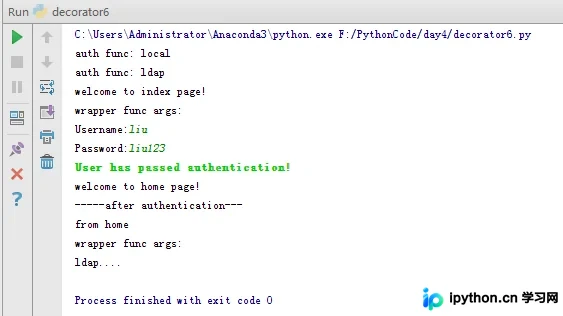
运行结果如下:
如需了解更多 Python 相关内容,建议查阅本站专题:《Python数据结构与算法教程》、《Python Socket编程技巧总结》、《Python函数使用技巧总结》、《Python字符串操作技巧汇总》及《Python入门与进阶经典教程》。
希望本文的阐述能对您的 Python 程序设计工作有所帮助。
免责声明:本文内容仅供参考,不代表本站观点。转载或引用请注明出处。









